EasyManua.ls Logo

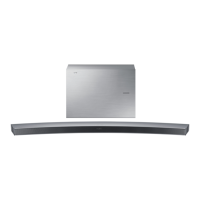
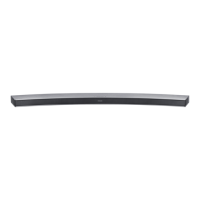
Samsung HW-J450 - User Manual

Samsung HW-J450
27 pages
Print Icon
To Next Page IconTo Next Page
Loading...
Wireless Audio - Soundbar
Imagine the possibilities
Thank you for purchasing this Samsung product.
To receive more complete service, please register your product at
www.samsung.com/register
User manual
'This Nanum Gothic Eco font is provided by NAVER'
HW-J450
HW-J450-ZA ENG.indd 1 2015/1/16 11:15:29

Questions and Answers

  • M
    Michelle ReedJul 26, 2025
    What to do if my Samsung HW-J450 Speakers have no sound?
    • D
      Deborah AustinJul 27, 2025
      If your Samsung Speakers aren't producing any sound, make sure the Mute function is not activated. If it is, press the Mute button to cancel it. Also, check the volume level and adjust it if it's set to the minimum.
  • R
    Randy WellsJul 31, 2025
    What to do if buttons don't work on Samsung Speakers?
    • J
      Jonathan FrankJul 31, 2025
      If a function on your Samsung Speakers doesn't work when you press the button, it might be due to static electricity in the air. Try disconnecting the power plug and then reconnecting it to resolve the issue.
  • A
    Anna DelgadoAug 5, 2025
    Why is my Samsung HW-J450 remote control not working?
    • M
      Matthew RangelAug 5, 2025
      If the remote control for your Samsung Speakers isn't working, first, try replacing the batteries with new ones. If that doesn't solve the issue, move closer to the main unit, as distance can sometimes interfere with the signal.
  • M
    Molly AustinAug 11, 2025
    How to fix Samsung HW-J450 TV SoundConnect pairing failure?
    • P
      Patrick RamirezAug 11, 2025
      If the TV SoundConnect (TV pairing) fails on your Samsung Speakers, first ensure that your TV supports TV SoundConnect, which is available on some Samsung TVs released from 2012 onwards. Next, update your TV to the latest firmware. If an error occurs during connection, you can also try resetting the TV SoundConnect connection by pressing and holding the +# button for 5 seconds.
  • J
    Joshua RodriguezAug 16, 2025
    How to stop Samsung HW-J450 Speakers subwoofer from droning?
    • J
      Joshua JonesAug 16, 2025
      If the subwoofer on your Samsung Speakers drones and vibrates noticeably, use the WOOFER button on your remote control to adjust the subwoofer level. You can set the value between SW-12 and SW+6 to find a comfortable setting.
  • M
    millervalerieAug 21, 2025
    Why is the red light blinking on my Samsung HW-J450 subwoofer?
    • K
      Kevin PerezAug 21, 2025
      If the red LED on the subwoofer of your Samsung Speakers is blinking and no sound is coming from it, it could mean that the subwoofer isn't properly connected to the main unit. Try to connect your subwoofer again. (See Page 13)

Summary

Features

TV SoundConnect

Connect your Soundbar to a TV wirelessly for audio playback.

HDMI Connectivity

Utilize HDMI for clear picture and ARC function for TV audio.

Surround Sound & Wireless Subwoofer

Enhance audio with surround sound and a wireless subwoofer.

Sound Modes & Remote Control

Select sound effects and use the multi-function remote control.

USB & Bluetooth Features

Support for USB playback and Bluetooth wireless audio streaming.

App & Software

Control via Samsung Audio Remote App and software updates.

Licensing Information

Details on Dolby, DTS, and HDMI licensing.

Safety Information

Safety Warnings

Essential warnings to prevent electric shock, fire, and injury.

Important Safety Instructions

Guidelines for safe installation, operation, and maintenance of the unit.

Precautions

Environmental & Usage Precautions

Avoid moisture, heat, direct sunlight, and electrical interference.

Battery Safety Warning

Critical warning about ingesting batteries and chemical burn hazards.

Getting Started

Before Reading Manual

Understand manual icons and key safety/troubleshooting references.

Whats Included

List of accessories supplied with the Soundbar.

Descriptions

Top;Front Panel Overview

Description of buttons and display on the front of the Soundbar.

Rear Panel Connections

Details of ports and connectors on the back of the Soundbar.

Remote Control

Buttons and Functions

Explanation of remote control buttons and their operations.

Installing Remote Battery

Step-by-step guide for inserting the battery into the remote.

Connections

Installing the Wall Mount

Instructions for mounting the Soundbar on a wall.

Detaching the Wall Mount

Procedure for removing the Soundbar from its wall mount.

Installing Bracket Without Guide

Guidance for bracket installation without using the guide.

Connecting Wireless Subwoofer

Steps to wirelessly link the subwoofer to the main unit.

Connecting External Devices (HDMI)

How to connect external devices using an HDMI cable.

Connecting External Devices (Audio;Optical)

Connect devices using analog audio or optical digital cables.

Functions

Input Mode Selection

How to select different audio input sources for the Soundbar.

ARC (HDMI OUT)

Utilizing ARC for audio output from TV via HDMI.

Bluetooth Connectivity

Connect and stream audio wirelessly from Bluetooth devices.

Bluetooth Operations and Information

Manage Bluetooth power, disconnections, and learn about Bluetooth.

Samsung Audio Remote App

Download and use the app to control the Soundbar with a smartphone.

TV SoundConnect

Connect your Soundbar to a Samsung TV for wireless audio.

USB Playback

Play music files from USB storage devices.

Software Update

Instructions for updating the Soundbar's firmware.

Troubleshooting

Unit Not Turning On

Troubleshooting steps if the unit fails to power on.

Function or Sound Issues

Resolving problems with buttons, sound production, or muting.

Remote Control Problems

Steps to fix issues with the remote control not working.

TV SoundConnect Pairing Failure

Troubleshooting connection issues with TV SoundConnect.

Subwoofer Connection Issues

Resolving problems with the subwoofer not producing sound or connecting.

Subwoofer Vibration

Adjusting subwoofer vibration for optimal listening.

Appendix

Specifications

Technical details and performance characteristics of the Soundbar.

Warranty

Limited Warranty Details

Information about the product's warranty period and coverage.

Samsung HW-J450 Specifications

General IconGeneral
Audio decodersDolby Digital, Dolby Digital Plus
RMS rated power300 W
Audio output channels2.1 channels
Subwoofer typeActive subwoofer
Subwoofer includedYes
Subwoofer connectivityWireless
Receiver included-
Product colorBlack
HDMI in1
USB 2.0 ports quantityUSB 2.0 ports have a data transmission speed of 480 Mbps, and are backwards compatible with USB 1.1 ports. You can connect all kinds of peripheral devices to them.

Related product manuals