EasyManua.ls Logo

Samsung HW-J470 - User Manual

Samsung HW-J470
32 pages
Print Icon
To Next Page IconTo Next Page
Loading...
Wireless Audio - Soundbar
Imagine the possibilities
Thank you for purchasing this Samsung product.
To receive more complete service, please register your product at
www.samsung.com/register
User manual
'This Nanum Gothic Eco font is provided by NAVER'
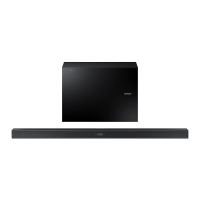
HW-J470
HW-JM47
Wireless Subwoofer (PS-WJ470)
Wireless Receiver Module (SWA-7000S)

Questions and Answers

  • J
    James SmithJul 26, 2025
    Why is there no sound coming from my Samsung Speakers?
    • C
      christina01Jul 27, 2025
      If your Samsung Speakers aren't producing sound, first check if the Mute function is activated. If it is, press the (Mute) button to deactivate it. Also, make sure the volume isn't set to the minimum. If it is, adjust the volume accordingly.
  • J
    Judy BeasleyJul 31, 2025
    What to do if the red LED on my Samsung HW-J470 subwoofer blinks?
    • S
      savannahhillJul 31, 2025
      If the red LED on your Samsung Speakers subwoofer is blinking and no sound is coming out, it might not be connected to the main unit. Try reconnecting the subwoofer.
  • B
    Brittany ManningAug 5, 2025
    Why is my Samsung HW-J470 Speakers remote control not working?
    • J
      Jacob FloresAug 5, 2025
      If the remote control for your Samsung Speakers isn't working, the batteries may be drained. Try replacing them with new ones. Also, ensure you're not too far from the main unit; try moving closer.
  • J
    Jordan LeeAug 10, 2025
    How to fix Samsung HW-J470 Speakers TV SoundConnect (TV pairing) failed?
    • S
      Scott HarrisonAug 10, 2025
      If you are experiencing issues with TV SoundConnect (TV pairing) on your Samsung Speakers, ensure that your TV supports TV SoundConnect, which is available on some Samsung TVs released from 2012 onwards. Update your TV to the latest firmware. You can also reset the TV SoundConnect connection by pressing and holding the p button for 5 seconds.
  • S
    Stephanie StoneAug 15, 2025
    What to do if a function does not work when the button is pressed on Samsung Speakers?
    • D
      Donna WhiteAug 15, 2025
      If a function isn't working when you press the button on your Samsung Speakers, it could be due to static electricity. Disconnect the power plug and then reconnect it.
  • M
    Mark RobertsAug 20, 2025
    How to stop my Samsung HW-J470 Speakers subwoofer from droning?
    • C
      Christina BenderAug 21, 2025
      If your Samsung Speakers subwoofer drones and vibrates noticeably, adjust the subwoofer's volume level using the WOOFER button on your remote control. You can set it between SW-12 and SW+6.

Summary

Getting Started

Safety Information

Safety Warnings

Covers risks of electric shock, fire, and other hazards with warnings and cautions.

Important Safety Instructions

Provides a numbered list of crucial safety guidelines for operating the unit.

Operational Precautions

Details important precautions for installation, operation, and battery handling.

Descriptions

Installation

Wall Mount Installation Guide

Step-by-step instructions for securely mounting the soundbar to a wall using brackets.

Connections

Subwoofer and Receiver Module Connection

Details automatic and manual linking procedures for the wireless subwoofer and receiver module.

Functions

Bluetooth Connectivity and Operation

Guides on pairing, connecting, and managing Bluetooth devices for wireless audio playback.

Troubleshooting

Unit Will Not Turn On

Troubleshooting steps for when the unit fails to power on, focusing on power cord connection.

No Sound Output

Guidance for troubleshooting when no sound is produced, checking Mute and Volume.

TV SoundConnect Pairing Failure

Steps to resolve issues when TV SoundConnect fails to pair or connect.

Subwoofer Connection Issues

Addresses issues with the subwoofer LED blinking and no sound production, likely connection related.

Samsung HW-J470 Specifications

General IconGeneral
Product colorBlack
RMS rated power460 W
Recommended usageHome theatre
Remotely operatedYes
Audio output channels5.1 channels
Signal-to-Noise Ratio (SNR)65 dB
Amplification device form factorBuilt-in
Satellite speaker type-
Satellite speaker weight310 g
Number of satellite speakers2
Satellite speakers RMS power- W
Center speaker weight1600 g
Center speaker dimensions (WxDxH)957.5 x 59.5 x 66.5 mm
Center speaker woofer diameter (imperial)6.5 \
Subwoofer typeActive subwoofer
Subwoofer weight4600 g
Subwoofer dimensions (WxDxH)175 x 362 x 295 mm
Power sourceAC
Power consumption (standby)0.45 W
Power consumption (typical)30 W
Front speaker dimensions (WxDxH)95 x 116.4 x 74 mm
Package weight9900 g
Audio systemDolby Digital, DTS Digital Surround
Cables includedAC, DC, Optical, USB
Channels quantity2 channels
Audio formats supportedAAC, FLAC, MP3, OGG, WAV, WMA
Connectivity technologyWired & Wireless
Sustainability certificatesENERGY STAR

Related product manuals