Connecting to a COMMON INTERFACE slot (Your
TV viewing Card Slot)
- Turn the TV off to connect or disconnect a CI card or CI card adapter.
- For more information how to use "CI or CI+ CARD", see the e-Manual chapter, "System and Support > Connecting to a
TV Viewing Card slot".
Attaching the CI Card Adapter
A CI Card Adapter that lets the TV use two different CI Cards is available, depending on the model.
We recommend that you attach the CI Card adapter and insert the CI card (viewing card) before you mount the TV
on the wall because it may be difficult and dangerous to do this when it is on the wall.
Using the “CI or CI+ CARD”
To watch paid channels, the “CI or CI+ CARD” must be inserted.
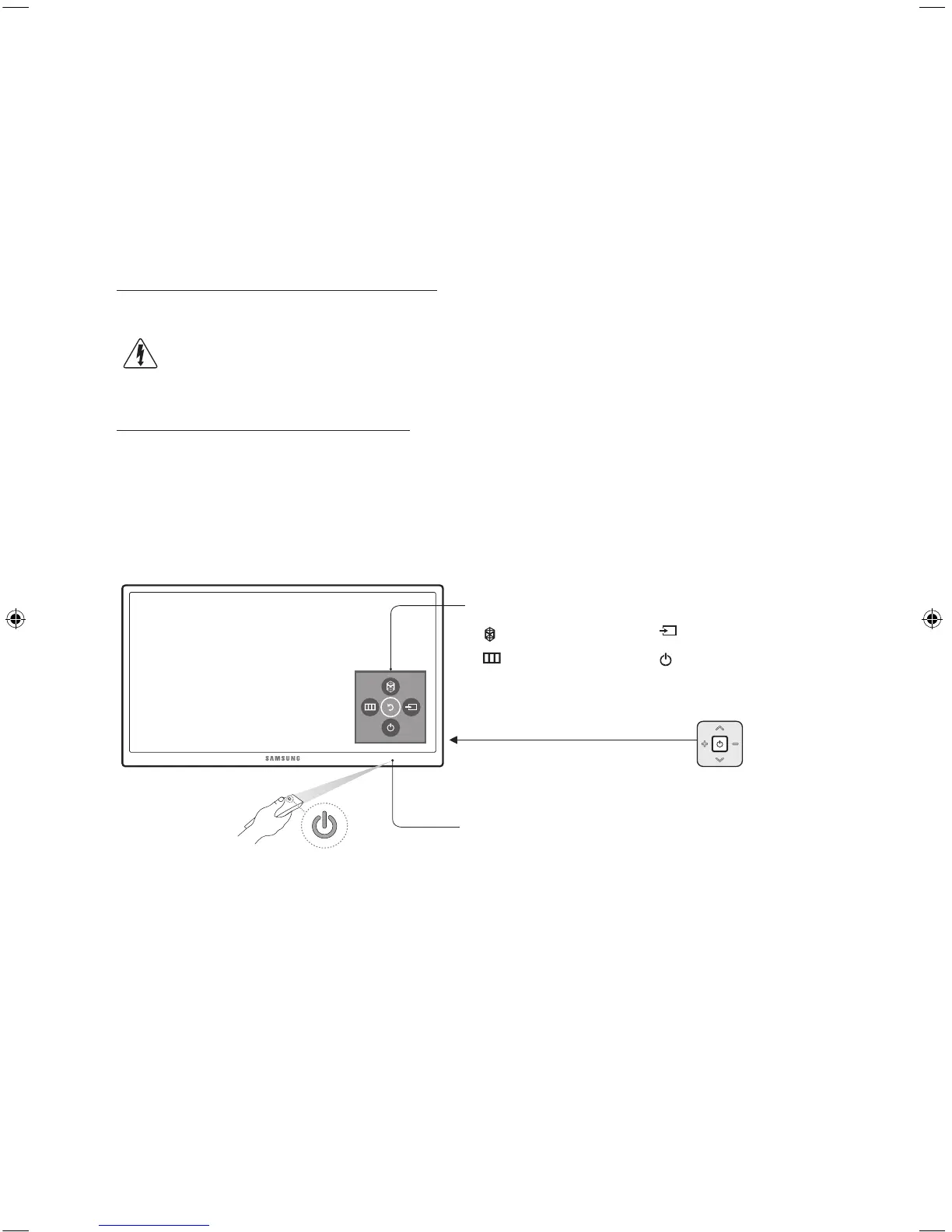
Using the TV Controller
You can use the TV Controller on the back of the TV instead of the remote control to control most of the functions of your TV.
Control Stick
The Control Stick is located on the
lower left corner of the back of the TV.
Control Menu
: Opens
Smart Hub
.
: Selects a source.
: Opens the menu.
: Turns off the TV.
Remote control sensor
English - 4
[JU7500-XN-ZF]BN68-07074C-01L04.indb 4 2015-03-18 오후 4:52:03



 To Next Page