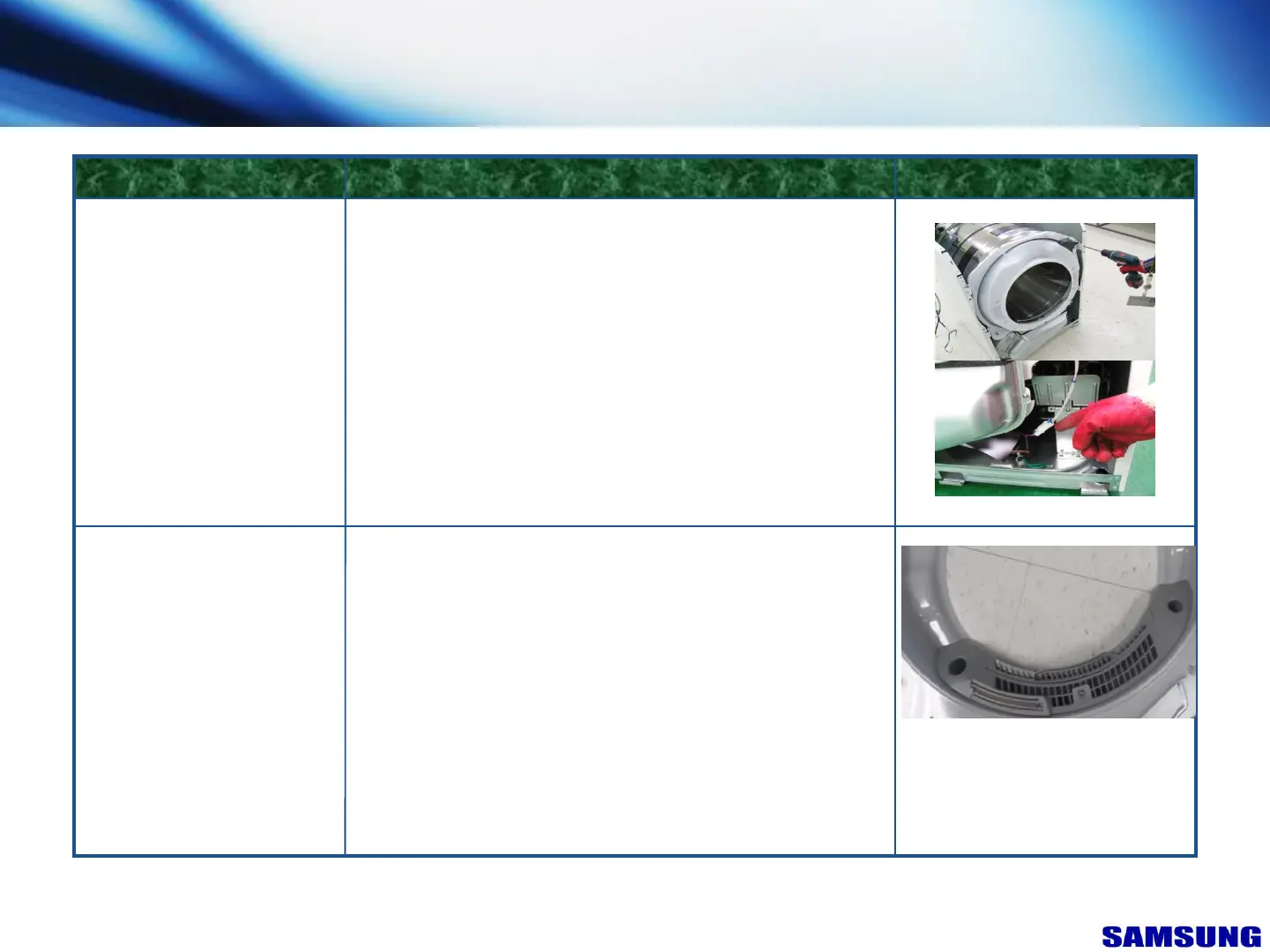
Front Bulkhead
FIGUREDESCRIPTIONPART NAME
1.Unplug the unit.
2.Remove Top Cover.
3.Remove Control Panel.
4.Remove Front Panel.
5.Remove Plate(U)
6.Remove four Bulkhead retaining 5 screws.
7.Disconnect Moisture Sensor Wiring Harness.
8.Lift Bulkhead from Cabinet and remove
Moisture Sensor &
Incandescent Lamp
1.Unplug the unit.
2.Remove Top Cover.
3.Remove Control Panel.
4.Remove Front Panel.
5.Remove 1 fixing screws from Touch Sensor
& Removal Touch Sensor.
■ After reassembly check the Touch Sensor
work properly through test mode.
7. Disassembly & Reassembly
“This document can not be used without Samsung's authorization”
64



 To Next Page