ENG
4
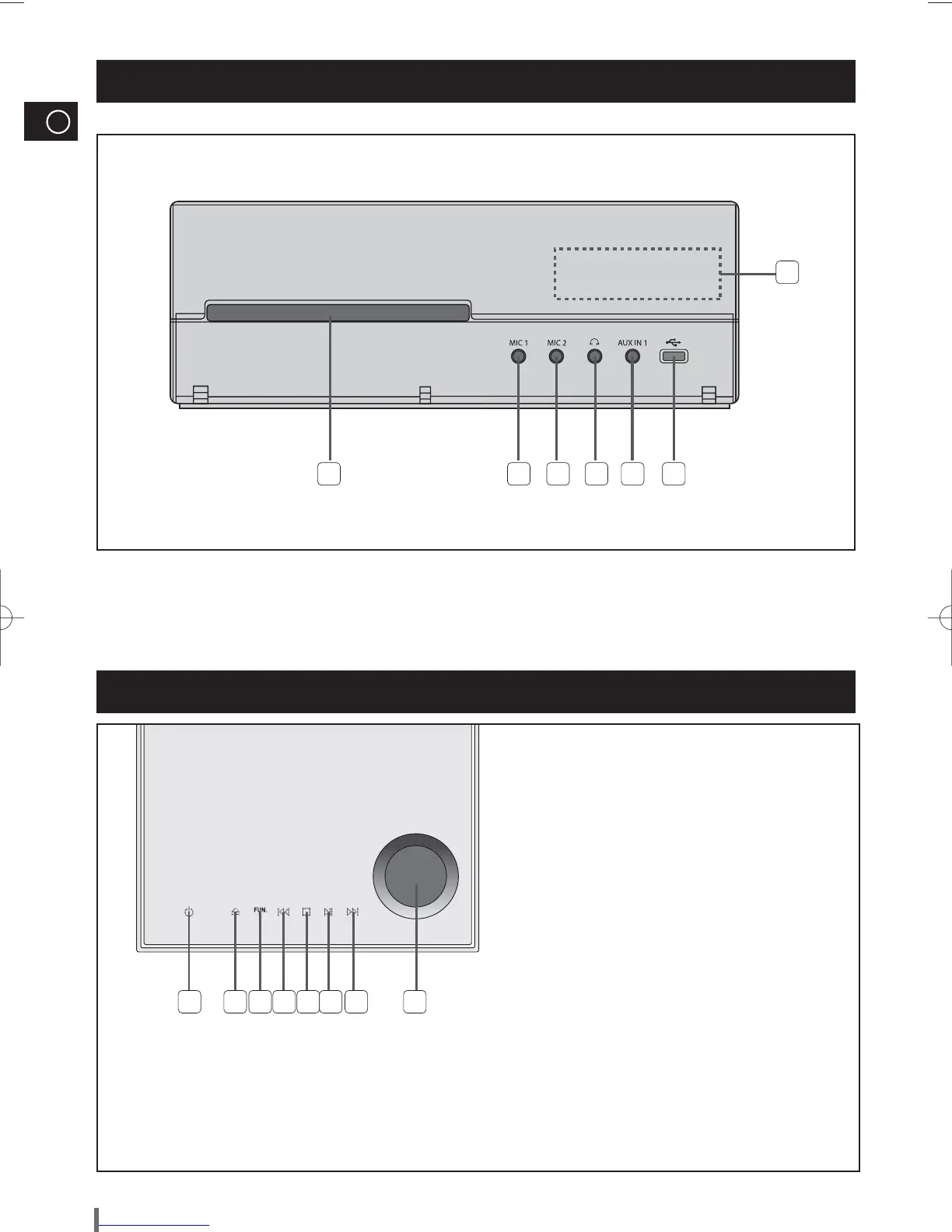
Front Panel View
Top Panel View
1. COMPACT DISC COMPARTMENT
2. MIC 1 JACK
3. MIC 2 JACK
4. HEADPHONE JACK
5. AUX IN 1 JACK
6. USB JACK
7. WINDOW DISPLAY
1 2 3 4 5 6
7
1. POWER BUTTON
2. OPEN/CLOSE BUTTON
3. FUNCTION BUTTON
4. SEARCH FUNCTION BUTTON(DOWN)
5. TUNING MODE OR STOP BUTTON
6. PLAY/PAUSE BUTTON
7. SEARCH FUNCTION BUTTON(UP)
8. VOLUME KNOB
1 2 3 4 5 6 7 8
USING THE TOUCH BUTTON
Tap on touch screen with your fi ngertip.
¡
To avoid damage to the touch screen, do not use any object other than your fi ngers to operate it.
¡
Do not tap on the touch screen if your fi ngers are not clean.
¡
Do not tap on the touch screen with gloves on.
¡
The touch screen may not function if you use a fi ngernail or other instruments such as a ballpoint pen.
¡
MAX-G85-NO EUR.indd 4MAX-G85-NO EUR.indd 4 2009-3-13 13:22:072009-3-13 13:22:07



 To Next Page