ENG
8
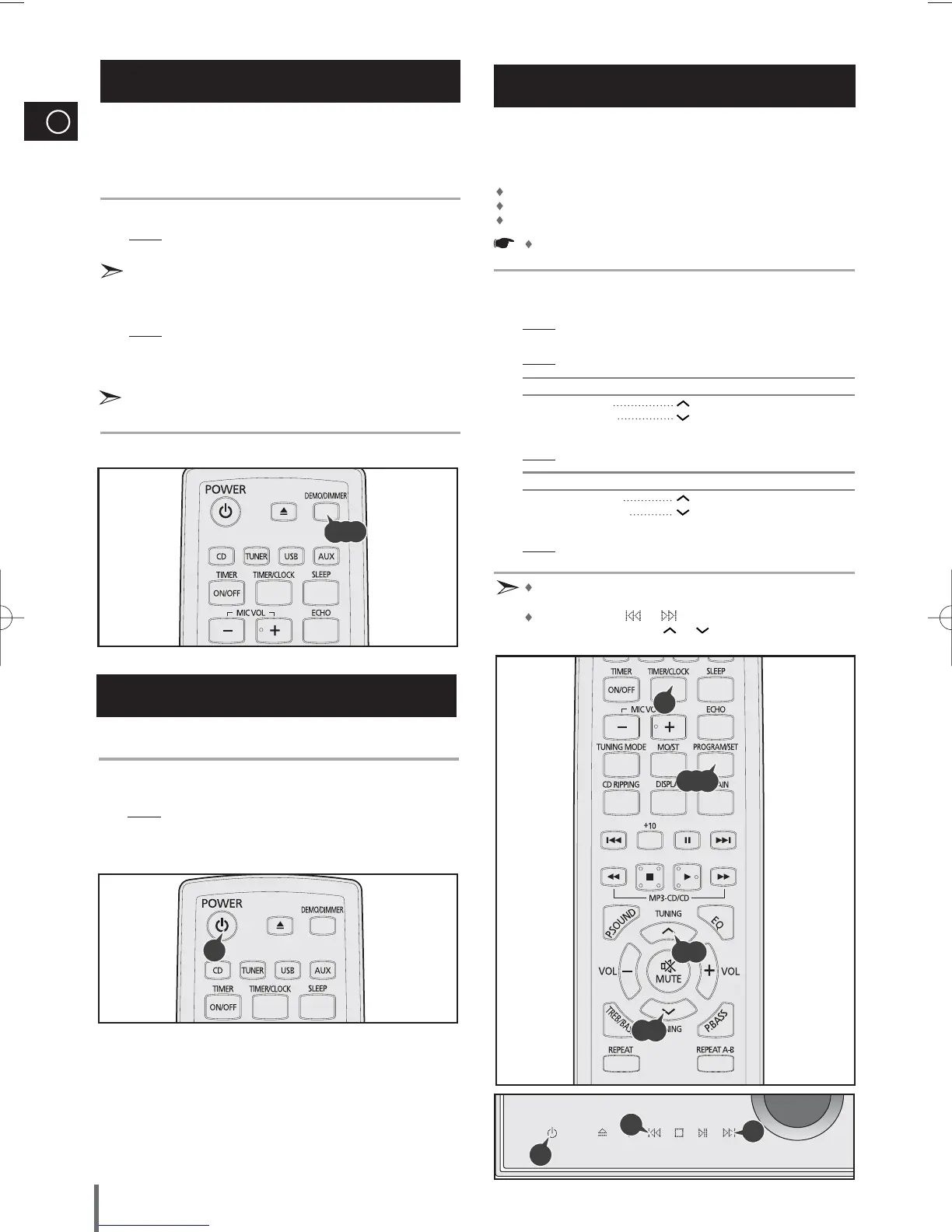
Your system is equipped with a clock which allows you to turn
your system on and off automatically.
You should set the clock:
When you first purchase the mini-compact system
After a power failure
After unplugging the unit
For each step, you have a few seconds to set the required
options. If you exceed this time, you must start again.
Switch the system on by pressing STANDBY/ON.
Press TIMER/CLOCK twice.
Result: CLOCK is displayed.
Press PROGRAM/SET.
Result: The hour flashes.
To... Press the TUNING button
Increase the hours
Decrease the hours
When the correct hour is displayed, press PROGRAM/SET.
Result: The minutes flash.
To... Press the TUNING button
Increase the minutes
Decrease the minutes
When the correct time is displayed, press PROGRAM/SET.
Result: The clock starts and is displayed, even when the system is in
standby mode.
You can display the time, even when you are using another
function, by pressing TIMER/CLOCK once.
You can also use or
buttons on the main unit to
instead of TUNING button
or in step 4, 6.
Setting the Clock
1
2
3
4
5
6
7
DEMO/DIMMER function
All functions available on the system can be viewed on the
display and the display's brightness can be switched between
"on" and "off".
Press the DEMO/DIMMER button.
Result: All functions available on the system appear on the front
panel display.
Each of these are explained in detail in this guide. Please refer to
the relevant section.
Press the DEMO/DIMMER button.
Result: The Dimmer function is selected and the display darkens.
Press the DEMO/DIMMER button once again to brighten the front
panel display.
A display brightness control can only be performed while the
system power is on.
2
1
3
3,5,7
4,6
4,6
2
1
4,6
4,6
You can save the power consumption while the unit is turned
off (on standby)
In Standby mode, press and hold the POWER button for longer than
3 seconds.
Result: ECO displays and the main set automatically switches itself
into the power saving mode.
ECO function
1
1
1,2,3
MAX-G85-NO EUR.indd 8MAX-G85-NO EUR.indd 8 2009-3-13 13:22:122009-3-13 13:22:12



 To Next Page