ENG
7
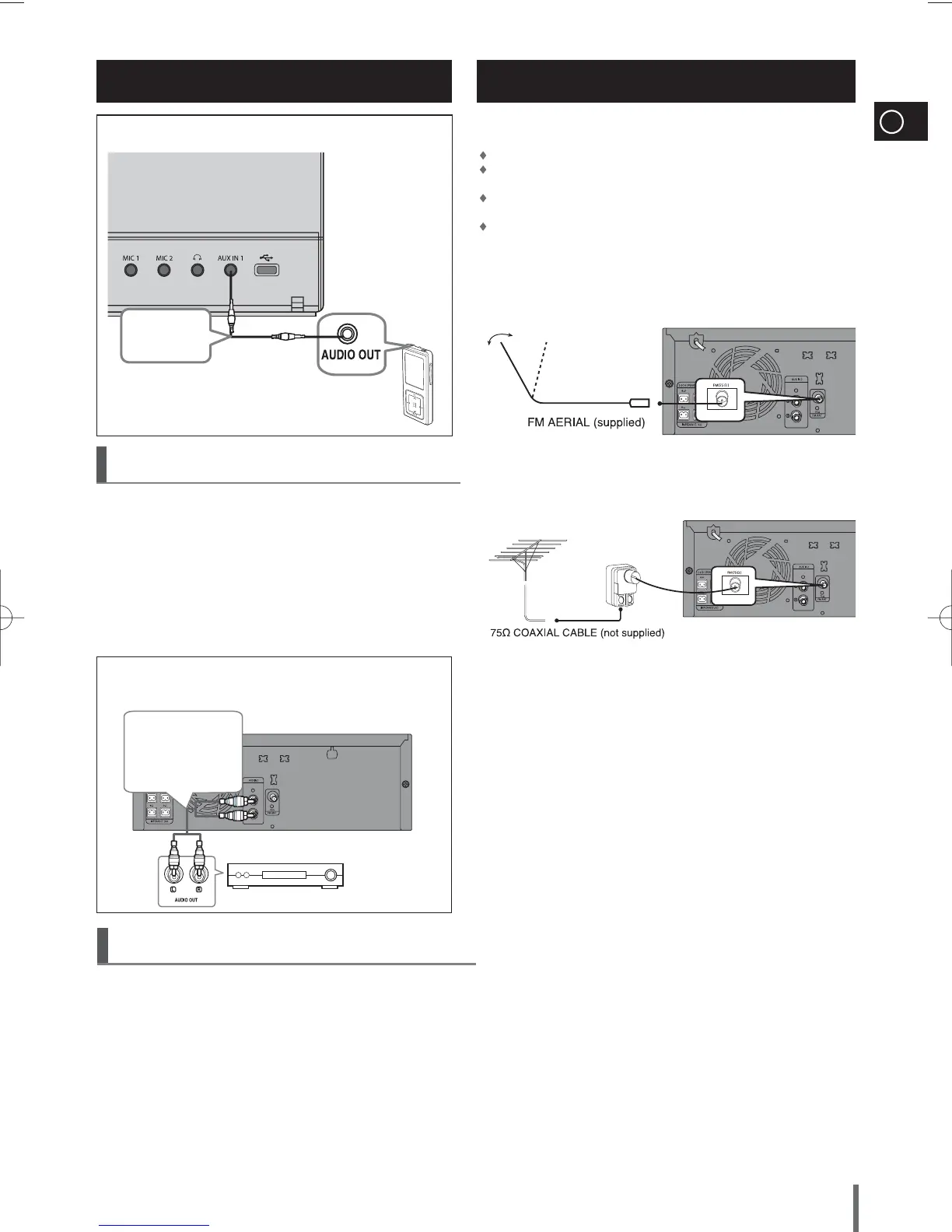
How to connect a COAXIAL TYPE aerial.
Connect a 75Ω antenna to the FM antenna terminal.
Plug the connector on the FM aerial supplied into the coaxial socket (75Ω)
marked FM on the rear of the system.
Follow the instructions given on Page 14 to tune into a radio station,
and determine the best position for the aerial.
If reception is poor, you may need to install an outdoor aerial.
To do so, connect an outdoor FM aerial to the FM socket on the rear of
the system using a 75Ω coaxial cable (not supplied).
Connecting the FM Aerial
Connecting Audio from External
Components
AUX1 : Front Panel
Audio Cable
(not supplied)
AUX1 : Connecting an External Component/MP3 player
Components such as an MP3 Player
1
Connect AUX IN 1(Audio) on the MINI COMPACT front panel to the
Audio Out of the external component/MP3 player.
2
Press the AUX button to select <AUX1> input.
The mode switches as follows : AUX 1
➝
AUX 2.
AUX2 : Rear Panel
Audio Cable
(not supplied)
If the external analog
component has only
one Audio Out, connect
either left or right.
AUX2 : Connecting an External Analog Component
Analog signal components such as a VCR.
1
Connect AUX IN 2 (Audio) on the MINI COMPACT rear panel to the Audio
Out of the external analog component.
■
Be sure to match connector colors.
2
Press the AUX button to select <AUX2> input.
The mode switches as follows : AUX 1
➝
AUX 2.
MAX-G85-NO EUR.indd 7MAX-G85-NO EUR.indd 7 2009-3-13 13:22:102009-3-13 13:22:10



 To Next Page