ENG
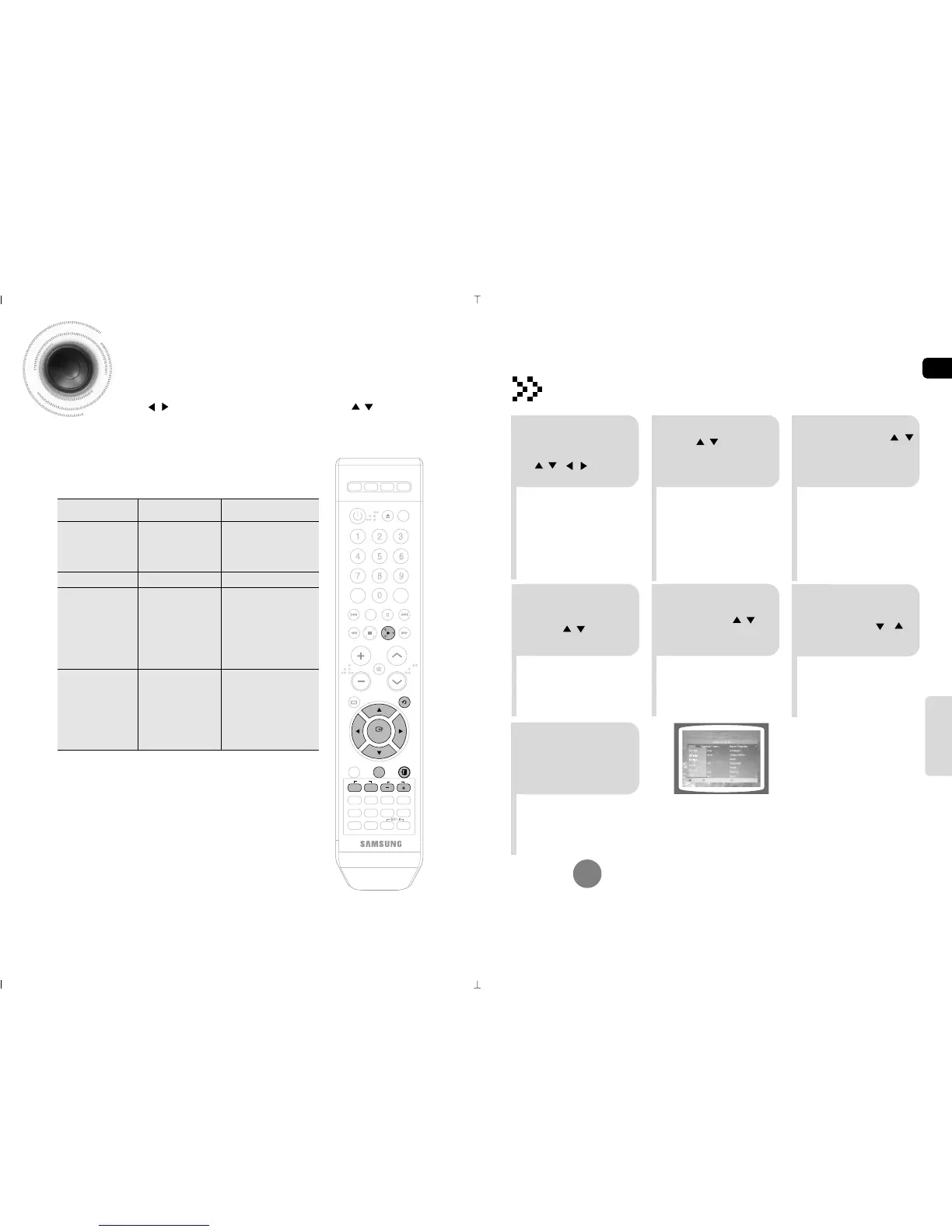
Searching Song Function
You can easily search songs on screen without viewing the song list book.
Pressing the ( , ) button in Song list mode will move one page at a time. , moves one song at a time.
Russian
Ukranian
Foreign
Duets
Genres
Hits
Items Detailed Items
Alphabet(and Number)
Title
Artist
Title
Rock
Chanson
Folk
Ballad
Romances
Modern
70-80
Kids
Patriotic
A ~ , 1~0
A ~ , 1~0
A ~ , 1~0
Structure of Song Search
R
R
R
2
•
You can select the language
among
Russian ➝ Ukranian ➝
Foreign.
•
At this time, press RETURN button
to move to the song list on the
bottom.
1
During the stop mode, press
the SEARCH SONG button. or
in MENU mode, use the
, , , button to
select the language you want.
Press the b button, use
the , button to
select the language
you want.
4
5
Press TEMPO (-) button
to move to alphabet and
press , button to
select a character.
Press the
TEMPO
(+) button and then
press the ,
button to move to
the detailed items.
To Exit Search Song Screen
Press EXIT button.
Searching by Language
3
Press # button and
then press the ,
button to select the
Title or Artist.
63 64
6
Press ENTER
button to move to
the song list and
then press ,
button to select the
song you want.
7
Press the PLAY
button to play back
the selected song.
KARAOKE



 To Next Page