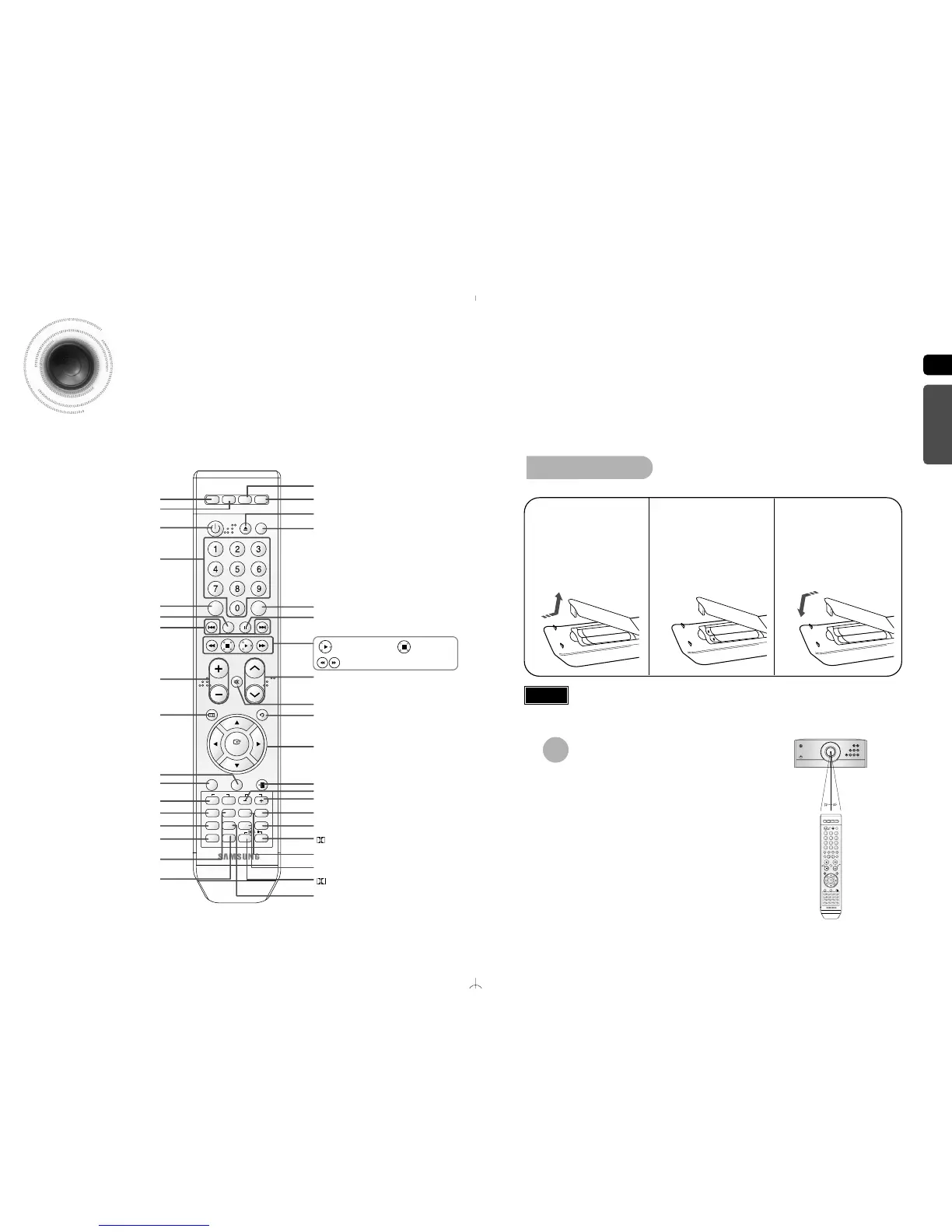
The remote control can be used up to approximately 23
feet/7 meters in a straight line. It can also be operated at
a horizontal angle of up to 30° from the remote control
sensor.
Range of Operation of the Remote Control
Caution
Remove the battery
cover in the direction
of the arrow.
1
Insert two 1.5V AAA
batteries, paying
attention to the correct
polarities (+ and –).
2
Replace the battery
cover.
3
Follow these precautions to avoid leaking or cracking cells:
•
Place batteries in the remote control so they match the polarity:(+) to (+)and (–)to (–).
•
Use the correct type of batteries.Batteries that look similar may differ in voltage.
•
Always replace both batteries at the same time.
•
Do not expose batteries to heat or flame.
Insert Remote Batteries
PL II EFFECT button
PL II MODE button
VOLUME button
MENU button
POWER button
DVD button
TUNER button
PAUSE button
CANCEL button
Number(0~9) buttons
DEMO/DIMMER button
OPEN/CLOSE button
USB button
AUX button
Cursor/Enter button
TEMPO - button
TIMER ON/OFF button
TIMER/CLOCK button
SLOW button, MO/ST Button
RETURN button
LYRIC VIEW, INFO button
TEMPO + button
SEARCH SONG,SUB TITLE button
MUTE button
POWER SOUND button
KEY CONTROL b and # button
CD RIPPING, RESERVE button
SEARCH button
EXIT button
Play button
SEARCH buttons
Stop button
TUNER MEMORY button,
SD/HD button
LOGO button
ECHO, SLEEP button
REPEAT button
FAVORITE SONG, AUDIO button
TUNING button
MALE/FEMALE, ZOOM button
DSP/EQ button



 To Next Page