Connecting Up and Purging the Circuit(Cont.)
Vacuum
Pump
COMPLETING THE INSTALLATION
MH070FXEA4A / MH080FXEA4A
1
Check the piping connections.
2
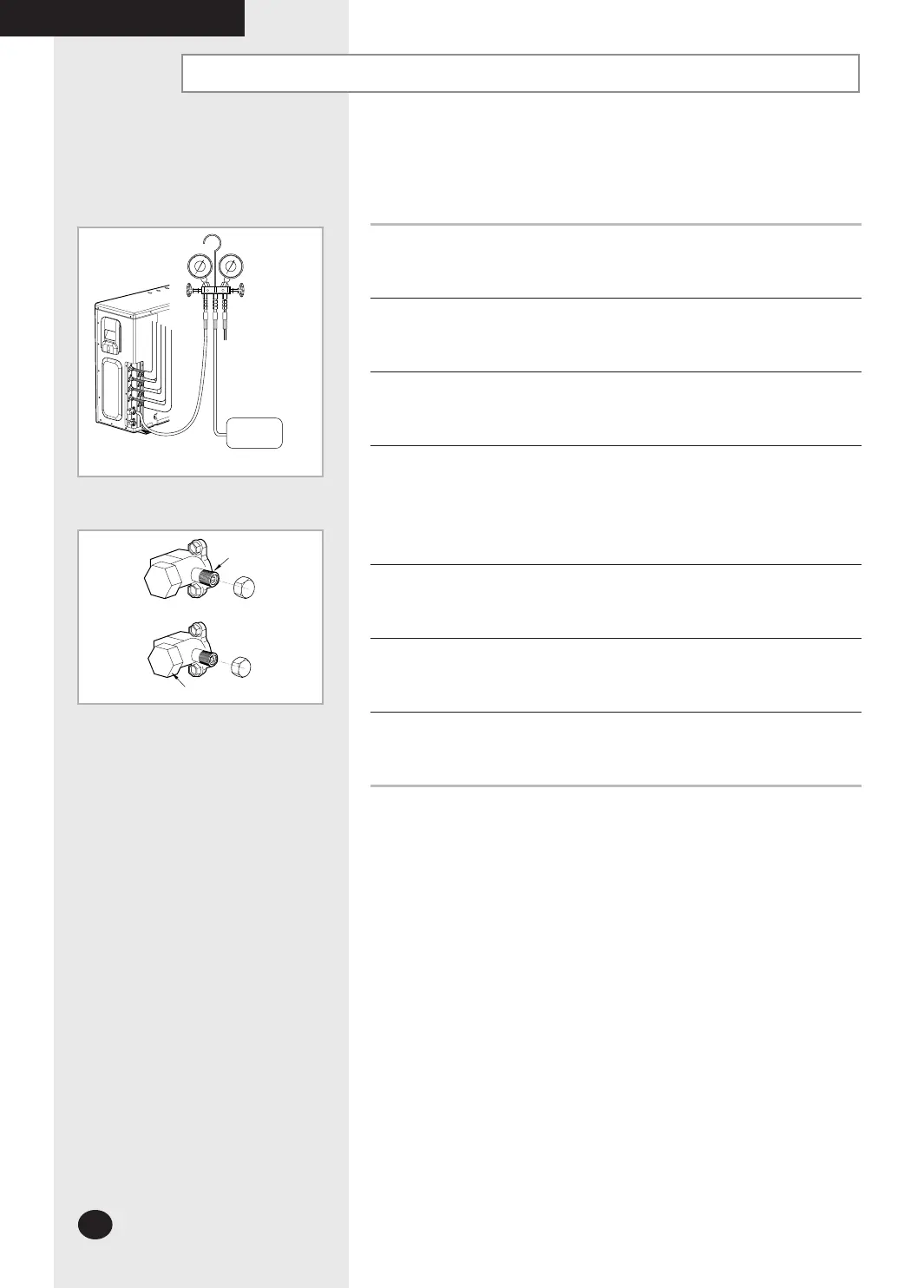
Connect the charging hose of low pressure side of manifold gauge to the
packed valve having a service port (5/8” Packed valve) as shown at the
figure (Value stem: 1/2” - 20UNF).
3
Open the valve of the low pressure side of manifold gauge
counter clockwise.
4
Purge the air from the system using vacuum pump for about 30 minutes.
- Close the valve of the low pressure side of manifold gauge clockwise.
- Make sure that pressure gauge show -0.1MPa(-76cmHg) after about
30 minutes.
This procedure is very important in order to avoid gas leak.
- Turn off the vacuum pump.
- Remove the hose of the low pressure side of manifold gauge.
5
Set valve cork of both liquid side and gas side of packed valve to the open
position.
6
Mount the valve stem nuts and the service port cap to the valve, and tighten
them at the torque of 183kgf•cm with a torque wrench.
7
Check for gas leakage.
- At this time, especially check for gas leakage from the 3-way valve’s stem
nuts, and from the service port cap.
Valve stem
Stem cap
Service port
26926A_IM_E.indd 22 2007-2-9 16:12:29



 To Next Page