Switch Setting and Testing Operation(Cont.)
Step 1 Review all the following elements in the installation:
Installation site strength
Piping connection tightness to detect any gas leakage
Connection wiring
Heat-resistant insulation of the piping
Drainage
Earthing wire connection
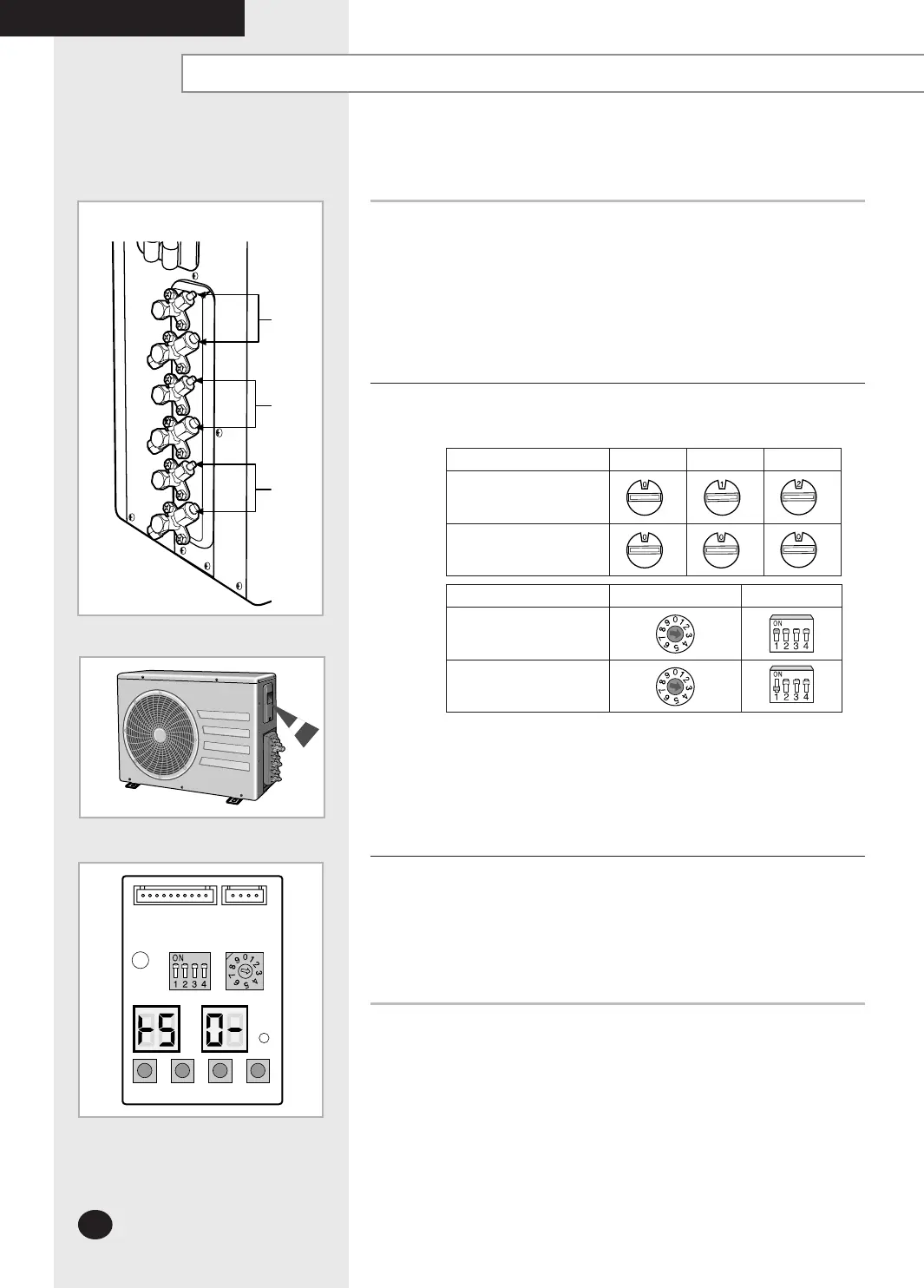
Step 2 Check the room select switch in the indoor unit and in the outdoor unit.
Set the switch properly as below. (For example: 4Rooms)
The liquid and gas refrigerant pipes should not be crossed with each
other.
The switch for the indoor unit address setting is in each indoor unit
PCB.
The manual addressing number of the indoor unit must be set as
above.
(A unit 0, B unit 1, C unit 2)
If the manual addressing,
please do cool mode try-run or heat mode try run.
Cool mode try-run : Push the [K2] button twice.
Heat mode try-run : Push the [K1] button once.
If the auto addressing, refer to page 29.
MH060FXEA3A
To complete the installation, perform the following checks and tests
to ensure that the air conditioner is operating correctly.
Indoor unit A unit B unit C unit
Manual Addressing
(For example: 3 Rooms)
Auto Addressing
(For example: 3 Rooms)
Outdoor unit SW 01 SW 02
Manual Addressing
(For example: 3 Rooms)
Auto Addressing
(For example: 3 Rooms)
K 1 K 2 K 3
(OFF)
DIS01
SW0
2 SW01
K 4
DIS02
Outdoor PCB Display
OUTDOOR UNIT
A unit
B unit
C unit
COMPLETING THE INSTALLATION
26926A_IM_E.indd 26 2007-2-9 16:12:56



 To Next Page