© 2007 Oasis Imaging Products, Inc. Page 8
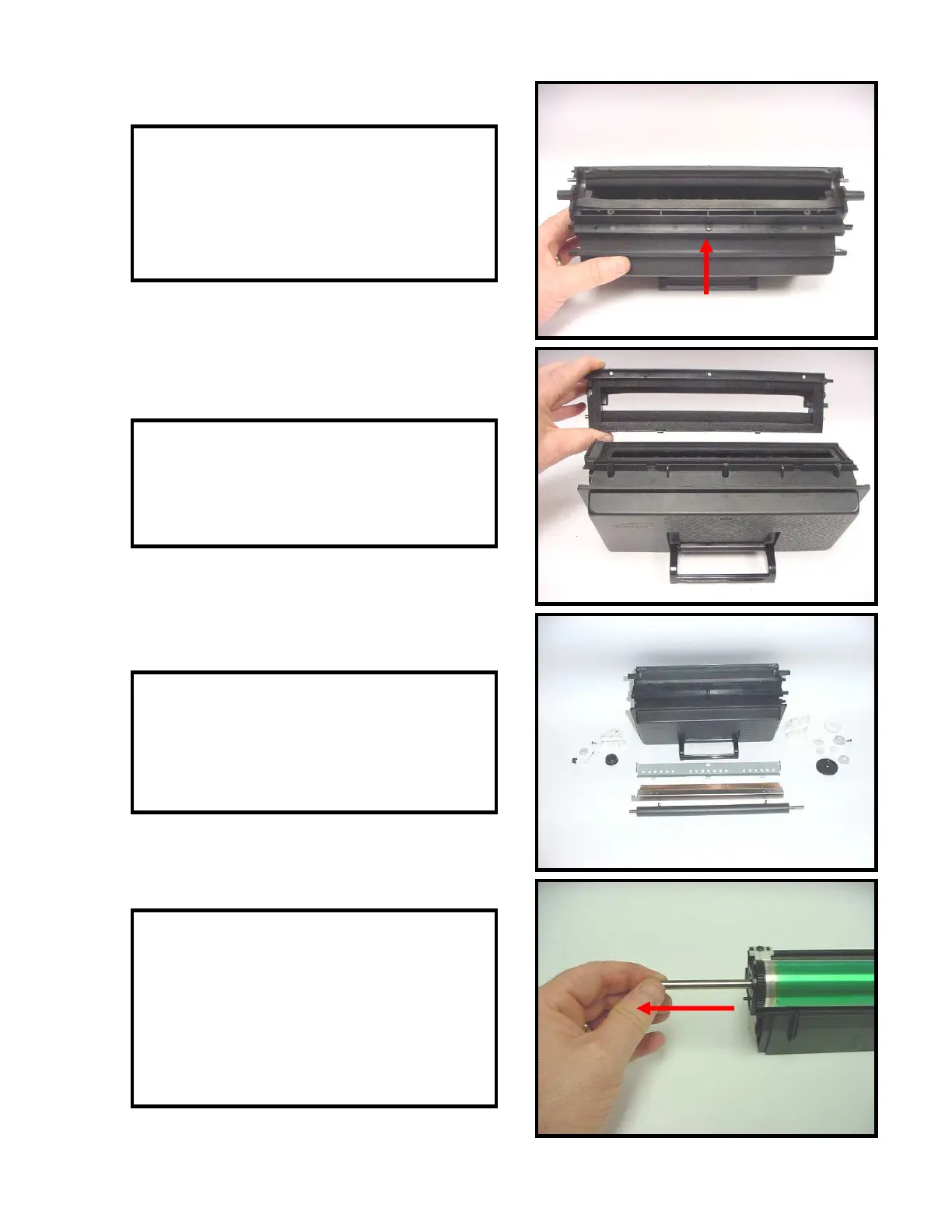
27. NOTE: The next two steps are only
needed if you are sealing the cartridge.
Remove the screw that secures the developer
roller housing (Fig. 27).
28. Remove the developer roller housing
(Fig. 28). Clean the toner hopper thoroughly.
Apply seal and secure developer roller
housing with one screw.
29. Clean all components thoroughly with
compressed air. Reassemble toner hopper in
reverse order. Fill the hopper with the
correct gram load of toner (Fig. 29).
30. Remove the drum axle from the small
gear end of the drum, remove the drum from
the waste bin (Fig. 30). During reassembly
insert the drum axle through the opposite
end of the drum (large gear). This will
prevent damaging the drum contact on the
inside of the drum.
Fig. 27
Fig. 28
Fig. 29
Fig. 30



 To Next Page