EasyManua.ls Logo

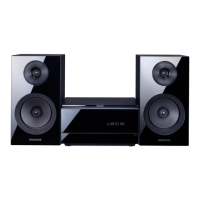
Samsung MM-E320D - User Manual

Samsung MM-E320D
36 pages
Print Icon
To Next Page IconTo Next Page
Loading...
DVD MICRO COMPONENT SYSTEM
user manual
Imagine the possibilities
Thank you for purchasing this Samsung product.
To receive more complete service,
please register your product at
www.samsung.com/register
MM-E320D
MM-E330D
MM-E320D-E330D-ENG-20120113.indd Sec1:1MM-E320D-E330D-ENG-20120113.indd Sec1:1 2012-3-29 17:32:332012-3-29 17:32:33

Questions and Answers

  • A
    Antonio MartinAug 17, 2025
    Why is there no sound coming from my Samsung MM-E320D Stereo System?
    • J
      James CraneAug 17, 2025
      There could be several reasons for this. First, ensure the speakers are properly connected and the speaker setup is correctly customized. Also, no sound is heard during fast playback, slow playback, and step motion playback. Finally, check if the disc is severely damaged.
  • M
    Mrs. Kathleen OrtizAug 19, 2025
    What to do if the remote control of my Samsung MM-E320D doesn't work?
    • L
      Lisa GarciaAug 19, 2025
      Check if you are operating the remote control within its proper angle and distance range. Also, verify if the batteries are drained.
  • J
    John HamptonAug 22, 2025
    Why won't my Samsung Stereo System play the disc and no picture is produced?
    • M
      Mia WattsAug 22, 2025
      Several factors could cause this issue. First, check if the TV is powered on. Ensure the video cables are correctly connected. Verify if the disc is dirty, damaged, or poorly manufactured.
  • D
    dkellyAug 26, 2025
    How to fix a Samsung Stereo System that won't eject the disc?
    • A
      Amy GillespieAug 26, 2025
      Make sure the power cord is securely plugged into the outlet. If it is, try turning the power off and then back on.
  • J
    Jeffrey WalshAug 27, 2025
    What to do if I forgot the rating level password on my Samsung MM-E320D?
    • E
      Edwin MathisAug 28, 2025
      While the 'NO DISC' message is displayed, press and hold the STOP button on the main unit for more than 5 seconds. 'INIT' will appear, and all settings will revert to default. Then, press the POWER button. Note that this reset function will erase all stored settings, so only use it when necessary.
  • A
    ashleefrazierAug 30, 2025
    Why won't my Samsung MM-E320D play the disc immediately?
    • A
      Alan MooreAug 30, 2025
      If you are experiencing a delay, it could be due to using a deformed disc or one with scratches. Try wiping the disc clean.
  • D
    Dale SmithSep 2, 2025
    Why won't my Samsung MM-E320D Stereo System start playback?
    • M
      Michael ShermanSep 2, 2025
      There are a few potential reasons. DVD discs purchased from abroad might not be playable, so check the region number of the DVD. Also, CD-ROMs and DVD-ROMs cannot be played on this product. Finally, ensure that the rating level is correct.
  • A
    Ashlee PetersonSep 5, 2025
    Why can't my Samsung Stereo System receive radio broadcast?
    • J
      Jodi HamptonSep 5, 2025
      First, ensure that the antenna is properly connected. If the antenna's input signal is weak, consider installing an external FM antenna in an area known for good reception.
  • K
    Kevin GonzalezSep 8, 2025
    Why don't the audio language and subtitles work on my Samsung MM-E320D Stereo System?
    • A
      Austin MooreSep 8, 2025
      Audio language and subtitles will not function if the disc itself does not contain them.
  • J
    Joseph RobinsonSep 12, 2025
    Why doesn't the menu screen appear on my Samsung MM-E320D Stereo System?
    • L
      Lisa MurphySep 12, 2025
      You may be using a disc that does not contain menus.

Samsung MM-E320D Specifications

General IconGeneral
BrandSamsung
ModelMM-E320D
CategoryStereo System
LanguageEnglish

Related product manuals