EasyManua.ls Logo

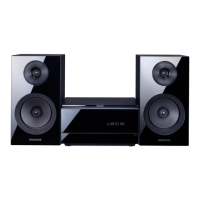
Samsung MM-E320D - User Manual

Samsung MM-E320D
36 pages
Print Icon
To Next Page IconTo Next Page
Loading...
DVD MICRO COMPONENT SYSTEM
user manual
Imagine the possibilities
Thank you for purchasing this Samsung product.
To receive more complete service,
please register your product at
www.samsung.com/register
MM-E320D
MM-E330D
MM-E320D-E330D-ENG-20120113.indd Sec1:1MM-E320D-E330D-ENG-20120113.indd Sec1:1 2012-3-29 17:32:332012-3-29 17:32:33

Questions and Answers

  • C
    Carol Long DDSSep 13, 2025
    Why can't I change the aspect ratio on my Samsung MM-E320D?
    • A
      Alicia MooreSep 13, 2025
      You can play 16:9 DVDs in 16:9 WIDE mode, 4:3 LETTER BOX mode, or 4:3 PAN SCAN mode, but 4:3 DVDs can only be viewed in 4:3 ratio. Consult the DVD disc jacket and select the appropriate function.

Samsung MM-E320D Specifications

General IconGeneral
BrandSamsung
ModelMM-E320D
CategoryStereo System
LanguageEnglish

Related product manuals