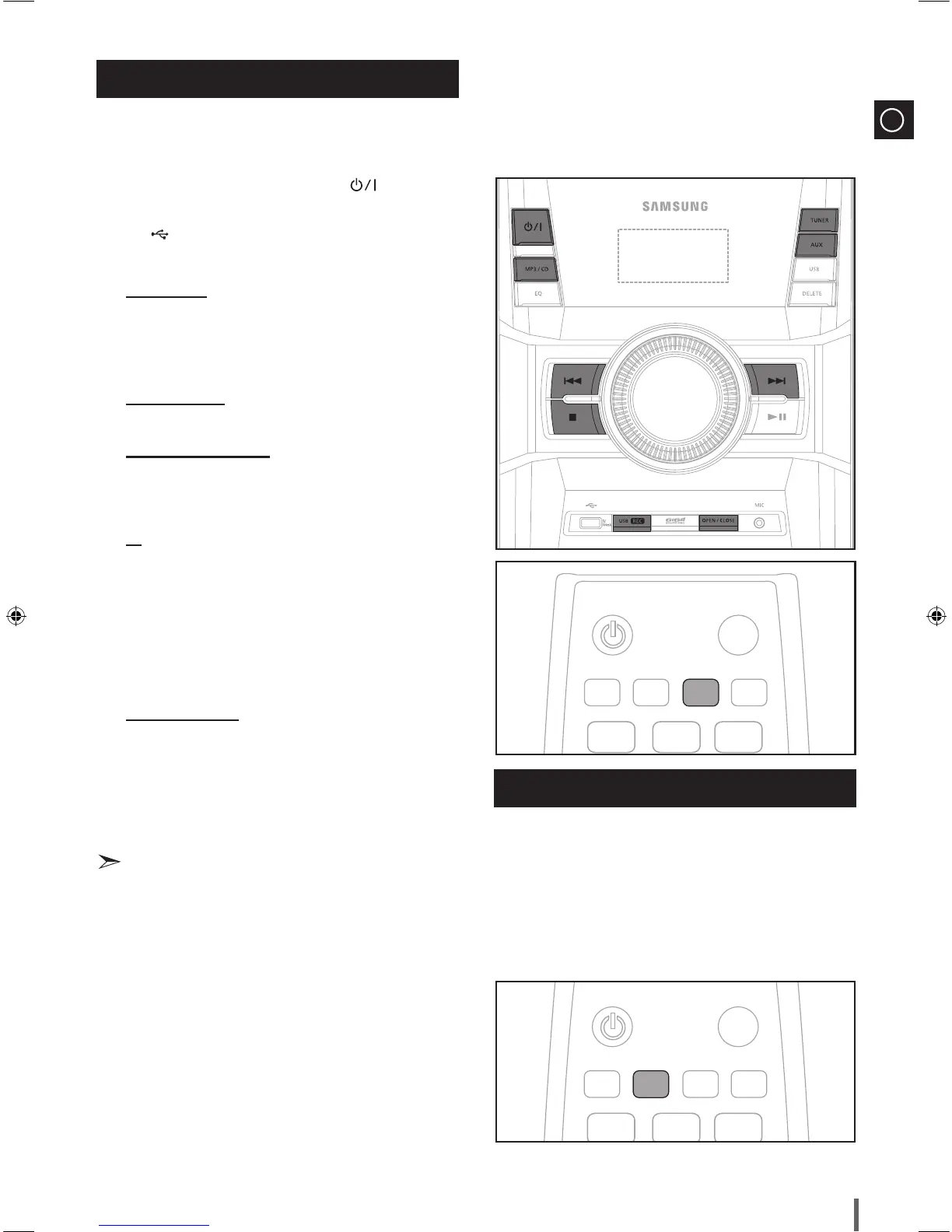
You can record sound of the CD, the Radio Broadcasting or sound from
the external source into the USB storage device.
Switch the system on by pressing the
1
POWER ( ) button.
Connect the external USB storage device you want to record to the
2
USB ( ) on your player.
Play a Disc, adjust the Radio frequency or connect the external source
3
to your player.
CD (See page 9)
Press the
◆
MP3/CD on the main unit to select the CD function.
Press the
◆
OPEN/CLOSE button to open the Compact Disc
compartment.
Insert a CD and press the
◆
OPEN/CLOSE button to close the
Compact Disc compartment.
Use the CD selection (
◆
[ or ]
) buttons to select the desired song.
Tuner (See page 14)
Select TUNER by pressing the
◆
TUNER button on the main unit.
Adjust the Radio frequency you want to record.
◆
External Source (See page 7)
Connect an External Component/MP3 player to your player.
◆
Press the
◆
AUX button to select <AUX> input.
Play a song from the external device.
◆
Press the
4
USB REC button to start recording.
CD
“TRACK RECORDING” is displayed and CD recording starts.
◆
Press and hold the
◆
USB REC button to start recording the all tracks
of Disc.
"RECORDING" is displayed.
If you record the MP3 CD, the file is copied into the USB device
◆
totally.
“COPY XX”“COPY END” is displayed. When the recording is
done, “STOP” will be displayed.
If there is the same file name, "FILE EXISTED" is displayed, and the
◆
function is canceled.
Tuner /External Source
RECORDING is displayed.
◆
To stop recording, press the
5
STOP (@) button and then automatically
create and save as the MP3 file.
6
To remove the USB device safely, press the STOP (@) button once again.
After the recording, a directory named “RECORDING”(CD), “CD
◆
COPY”(MP3 CD), “TUNER RECORDING” or “AUX RECORDING” will
be created in your device.
Recording Function
Recording Speed
Do not disconnect the USB or the AC Cord during the recording as this
◆
may cause file damage.
If you disconnected USB device during the recording, the main unit will
◆
be power off and you may not delete the recorded file, In this case,
please connect the USB device to the PC and backup the USB data on
the PC first and then format the USB device.
When the USB memory is not enough, it will be displayed “NOT
◆
ENOUGH MEMORY”.
The recording works if the USB device or the HDD is formatted in the FAT
◆
file system. (The NTFS file system is not supported.)
When you use CD high speed search function, the CD recording can’t
◆
work.
Sometimes, the recording time may be longer with some USB devices.
◆
(See page 12)
In the program mode, you can't use the CD recording function. (See
◆
page 11)
When the CD recording, the EQ and GIGA SOUND functions can not
◆
work and automatically change to OFF.
When the CD recording, the REPEAT function can not work and
◆
automatically changes to OFF.
If you use the MIC function during the CD recording, the voice from the
◆
microphone will be recorded.
You can not record the radio when searching or no available frequencies
◆
in the Tuner mode.


 To Next Page