6 English
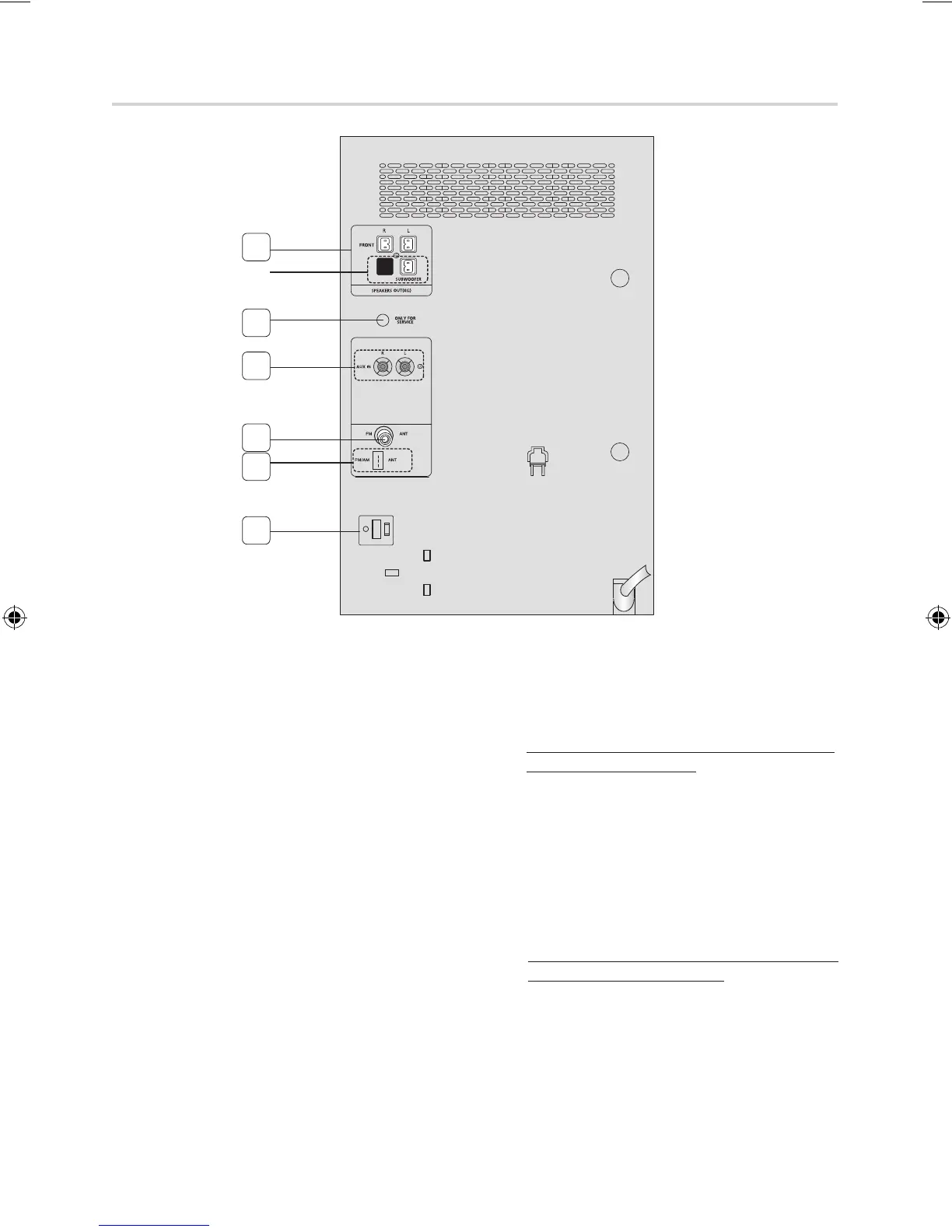
1. 2.0 CH Speaker Connector Terminals
(MX-E630/E631/E660/E661 only)
2.1 CH Speaker Connector Terminals
(MX-E650/E651 only)
The speakers connector terminals are located on the
rear of the system.
1.
To achieve the correct sound quality, insert those
speaker connector cables to the speaker connector
terminals of the system.
• Leftspeaker(markedL).
• Rightspeaker(markedR).
• TheSBUWOOFERspeakerisonlyforMX-E650/
E651.
2. ONLY FOR SERVICE
• Thisjackisjustfortesting,pleasedon'tuseit.
3. AUX IN Terminals
1.
Use the Audio Cable (not supplied) to connect AUX
IN on the product to Audio Out on the external ana-
log component.
• Besuretomatchconnectorcolors.
• IftheexternalanalogcomponenthasonlyoneAudio
Outjack,connecteitherleftorright.
• PresstheTUNER/AUXbuttontoselecttheAUX
input.
• YoucanselectAUXbypressingtheFUNCTION
buttonontheremotecontrol.
4. FM/AM(optional) Antenna Connector Terminal
The position of FM antenna connector terminal may differ
depending on your region.
This product may not support the AM function
depending on your region.
☛
If this product does not receive AM broadcasts.
Connect the FM antenna:
1.
Connect the FM antenna (optional) to the FM
Antenna jack.
2.
Slowly move the antenna wire around until you
find a location where reception is good, then fas-
ten it to a wall or other rigid surface.
3.
If reception is poor, you may need to install an out-
door antenna. To do so, connect an outdoor FM
antenna to the FM socket on the rear of the system
using a 75Ω coaxial cable (not supplied).
☛
If this product can receive AM broadcasts. (Optional)
Connect the FM/AM antenna:
1.
Plug the connector on the FM/AM antenna
(optional) into the FM/AM terminal on the rear of
the system.
5. Voltage Selector (Optional)
Check the position of the voltage selector on the rear of
the system(optional).
This product may not support the Voltage Selector
function depending on your region.
Rear Panel
1
3
2
4
4
5
MX-E650/E651
only
MX-E630-E650-E661-ENG-0417.indd 6 2012-4-24 18:02:34



 To Next Page