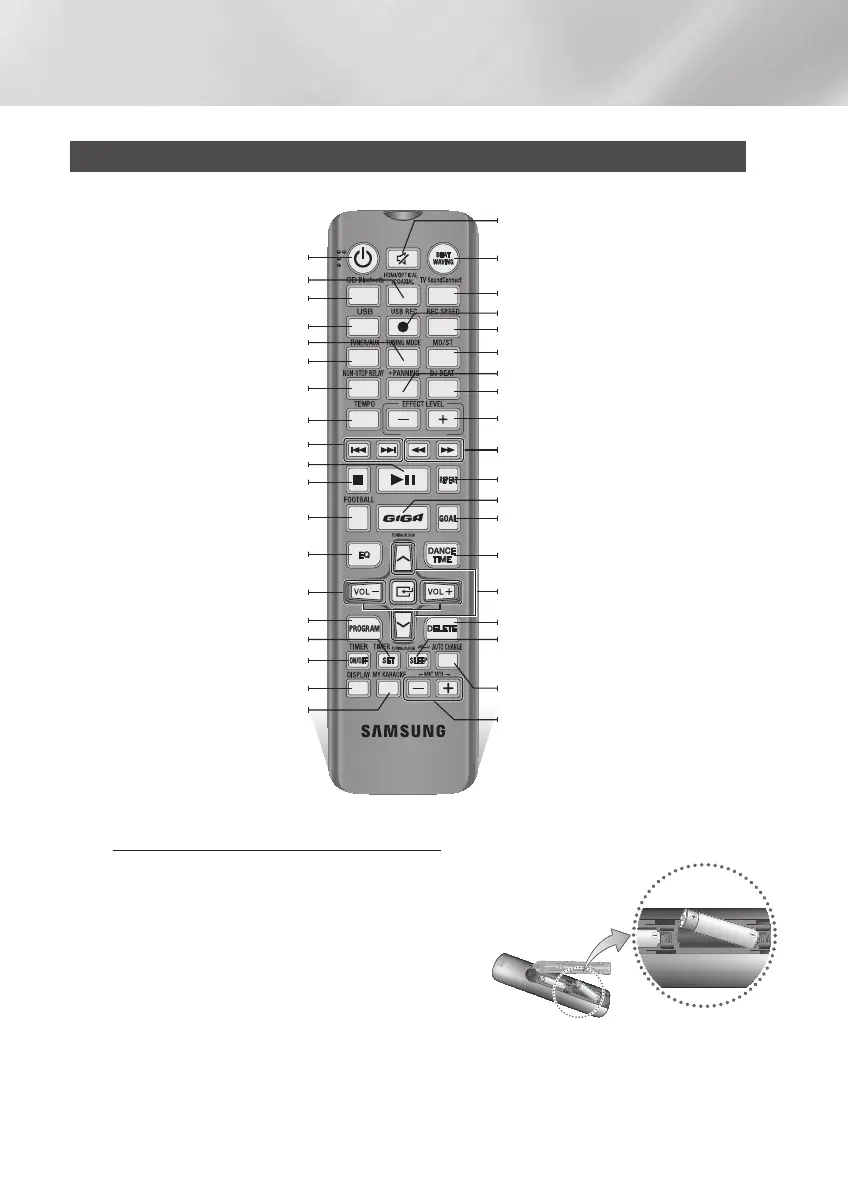
Installing Batteries In The Remote Control
• Place batteries in the remote control so they
match the of the illustrations in the battery
compartment. : (+) to (+) and (–) to (–).
• Do not dispose of batteries in a fire.
• Do not short circuit, disassemble, or overheat
the batteries.
• Danger of explosion if the battery is replaced
with the wrong battery type. Replace only with
the same or equivalent type.
• The remote control can be used up to
approximately 23 feet (7 meters) in a straight
line from the system.
Power
HDMI/OPTICAL/COAXIAL
TUNING MODE
PLAY/PAUSE
TIMER SET
MY KARAOKE
CD/Bluetooth
USB
TUNER/AUX
NON-STOP MUSIC RELAY
TEMPO
STOP
FOOTBALL
EQ
PROGRAM
TIMER ON/OFF
DISPLAY
MIC VOLUME –, +
AUTO CHANGE
BEAT WAVING
TV SoundConnect
REC SPEED
MO/ST
DJ BEAT
EFFECT LEVEL/AV SYNC
REPEAT
GOAL
DANCE TIME
DELETE
Anynet+/SLEEP (
Press and hold Anynet+button,
turn Anynet+ On and OFF./Set a sleep time to
shut off the
product.)
TUNING/ALBUM
,
,
.
SEARCH
USB REC
+PANNING
GIGA SOUND BEAT
MUTE (Turn off the sound temporarily. Press
again to turn the sound back on.)
SKIP
VOLUME (–, +)
/
AV SYNC
Remote Control
Getting Started
8 English
MX-HS6800-ZN-ENG-20140429.indd 8 2014/8/13 14:19:23


 To Next Page