ENG - 13
04 CONNECTING AN EXTERNAL DEVICE
Connect to an external device via a wired or wireless network to play the external device’s sound
through the Sound Tower.
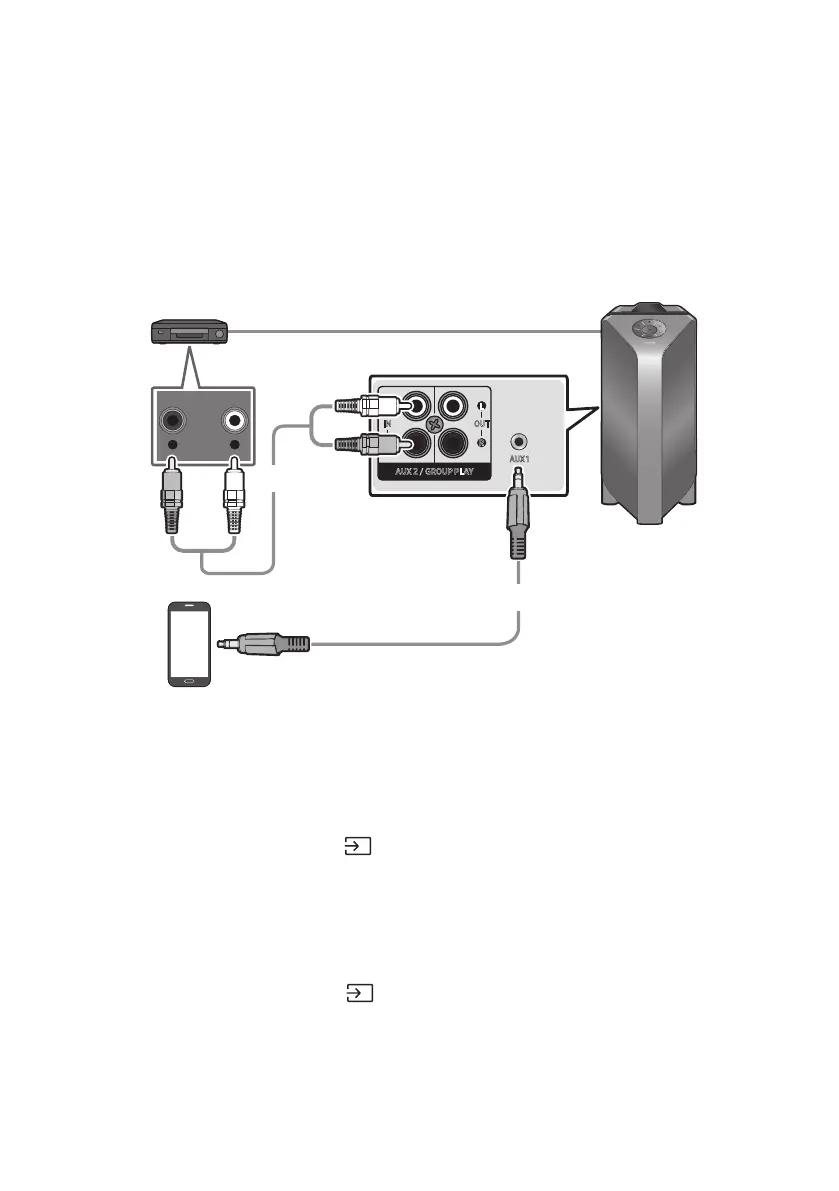
Connecting using an Analogue Audio (AUX) Cable
- AUDIO -
R L
AUX 1
L
OUT
R
L
IN
R
AUX 2 / GROUP PLAY
Mobile device / MP3 / PMP
BD / DVD player / Set-top box /
Game console
Rear of the Sound Tower
Audio (AUX) Cable
(not supplied)
3.5 mm stereo cable
(not supplied)
3.5 mm stereo Cable (AUX1)
1. Connect AUX1 jack on the main unit to the AUDIO OUT jack of the Source Device using an
3.5 mm stereo cable .
2. Select “AUX1” mode by pressing the (Source) button on the top panel or on the remote control.
You can also select a source using AUX button on the remote control.
Audio Cable (AUX2)
1. Connect AUX2 (IN) terminals on the main unit to the AUDIO OUT terminals of the Source Device
using an audio cable .
2. Select “AUX2” mode by pressing the (Source) button on the top panel or on the remote
control.
You can also select a source using AUX button on the remote control.



 To Next Page