ENG - 18
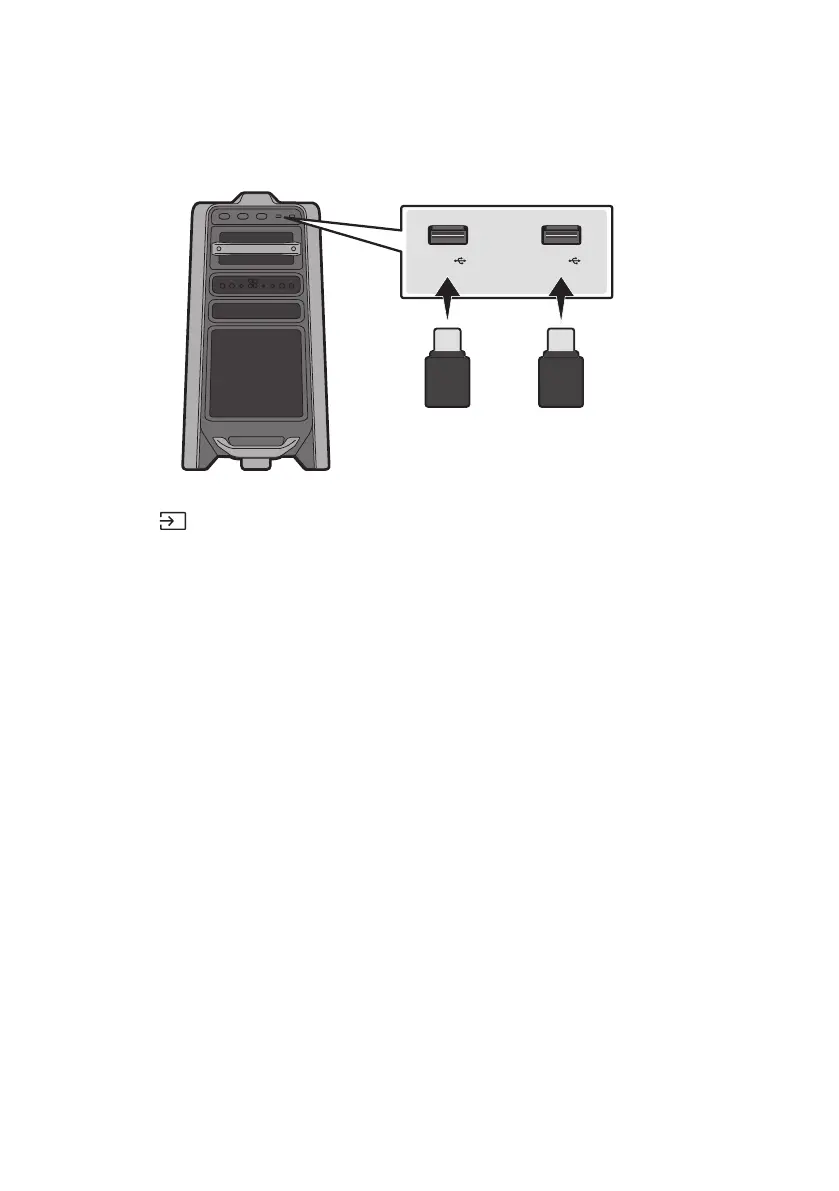
05 CONNECTING A USB STORAGE DEVICE
USB1
(5V 2.1A)
USB2
(5V 0.5A)
OR
USB storage device (not supplied)
Rear of the Sound Tower
1. Connect a USB storage device to the USB1 or USB2 jacks on your Sound Tower.
2. Press the (Source) button on the top panel or on the remote control, and then select “USB1” or
“USB2”.
You can also select a source using USB button on the remote control.
3. “USB1” or “USB2” appears in the display screen.
4.
The Sound Tower automatically turns off (Auto Power Down) if USB device is not connected,
playback stopped, or there is no input for more than 20 minutes.
NOTES
system.
This product does not support HDD storage or storage on mobile devices.
A maximum of 256 folders can be read per USB storage device.



 To Next Page