EasyManua.ls Logo

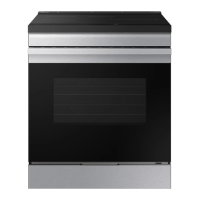
Samsung NSI6D 91 Series - User Manual

Samsung NSI6D 91 Series
62 pages
Print Icon
To Next Page IconTo Next Page
Loading...
Electric Range
User manual
NSI6D*91****

Questions and Answers

  • J
    Joe MillerAug 15, 2025
    What to do if my Samsung NSI6D 91 Ranges surface units will not turn on?
    • L
      Lisa GarciaAug 16, 2025
      If the surface units on your Samsung Ranges won't turn on, it could be due to a blown fuse or tripped circuit breaker in your home; replace the fuse or reset the breaker. Also, ensure that the cooktop controls are correctly set for the surface unit you're attempting to use.
  • T
    Tiffany MillerAug 19, 2025
    What to do if my Samsung Ranges oven will not turn on?
    • R
      ryanloweryAug 19, 2025
      If your Samsung Ranges oven won't turn on, several factors could be the cause: * Ensure the range is fully plugged into a properly grounded electrical outlet. * Check for a blown fuse or tripped circuit breaker and replace or reset it. * Allow the oven to cool if it is too hot. Incomplete service wiring requires a service call. A power outage may also be the reason; check if house lights turn on, and contact your local electric company if necessary.
  • W
    wendyrhodesAug 21, 2025
    Why is my Samsung Ranges surface unit not maintaining a rolling boil?
    • I
      Ian AndersonAug 22, 2025
      If the surface units of your Samsung Ranges aren't maintaining a rolling boil or cooking fast enough, it could be due to using inappropriate cookware. Ensure you're using flat pans that match the diameter of the surface unit. In some areas, low power (voltage) may be the issue; try covering the pan with a lid until the desired heat is reached.
  • R
    Rachael FrenchAug 25, 2025
    Why is my Samsung NSI6D 91 Ranges oven door not opening after self-cleaning?
    • J
      Jennifer AdamsAug 25, 2025
      If the oven door on your Samsung Ranges won't open after a self-cleaning cycle, it is likely because the oven is still too hot. Allow the oven to cool down completely.
  • B
    Brittany AbbottAug 27, 2025
    How to clean brown streaks or specks from my Samsung Ranges cooktop?
    • M
      Mark FrenchAug 27, 2025
      To remove brown streaks or specks from your Samsung Ranges cooktop caused by cooked-on boilovers: * Wait until the surface cools down. * Use a single-edge razor-blade scraper at approximately a 45° angle against the glass surface to remove the soil.
  • V
    Vanessa VargasAug 30, 2025
    Why does my Samsung Ranges oven smoke so much when broiling?
    • L
      leejennyAug 30, 2025
      Excessive smoking during broiling in your Samsung Ranges oven can occur due to several reasons: * The oven controls may not be set properly. * The meat may be too close to the element; reposition the rack for proper clearance and preheat the broil element. * The meat may not be properly prepared; remove excess fat and cut away fatty edges. * Grease buildup on oven surfaces; regular cleaning is necessary when broiling frequently.
  • H
    hallgeraldSep 2, 2025
    How to level a Samsung Ranges?
    • S
      Shelley OwensSep 3, 2025
      If your Samsung Ranges is not level, it may be due to improper installation, a sagging floor, or misaligned kitchen cabinets. To correct this: * Place the oven rack in the center of the oven. Place a level on the oven rack. Adjust the leveling legs at the base of the range until the oven rack is level. * Ensure the floor is level, strong, and stable enough to adequately support the range. If the floor is sagging or sloping, contact a carpenter. * Ensure the cabinets are square and provide sufficient room for installation.
  • P
    Peter KennedySep 5, 2025
    What to do if my Samsung NSI6D 91 Ranges must be accessed for servicing but cannot be moved easily?
    • L
      lorigraySep 5, 2025
      If your Samsung Ranges needs servicing but is difficult to move, it could be due to kitchen cabinets being too close or not square. Contact a builder or installer to make the appliance accessible. Alternatively, carpet interfering with movement can be resolved by providing sufficient space so the range can be lifted over the carpet.
  • S
    sherri97Sep 8, 2025
    How to stop excessive smoking during a self-cleaning cycle on Samsung NSI6D 91?
    • C
      Christian BrooksSep 8, 2025
      If your Samsung Ranges is smoking excessively during a self-cleaning cycle, tap 'Stop,' open the windows to clear the smoke, wait for the cycle to cancel, wipe up the excessive soil, and then restart the self-cleaning cycle.
  • T
    Terry HarrisSep 12, 2025
    Why does the display go blank on my Samsung NSI6D 91 Ranges?
    • E
      evanjonesSep 12, 2025
      If the display on your Samsung Ranges goes blank, it may be due to a blown fuse or tripped circuit breaker in your home. Replace the fuse or reset the circuit breaker.

Summary

Important Safety Instructions

General Safety Precautions

Essential safety rules and warnings for appliance operation.

Specific Safety Guidelines

Detailed safety advice for cooktop, electrical, child, and oven use.

Critical Warnings: Installation, Usage, and Cleaning

Key warnings for installation, usage, cleaning, and environmental factors.

Introducing Your New Range

Range Overview and Included Accessories

Identification of range components and items included in the package.

Preparation and Energy Saving Tips

Initial setup steps and tips for energy-efficient operation.

Surface Cooking Operations

Induction Cooktop Usage and Safety

Instructions for using the induction cooktop safely and effectively.

Cookware Selection and Usage

Guidelines for choosing and using appropriate cookware for induction.

Cooktop Best Practices and Maintenance

Tips for optimal results, energy saving, and cooktop protection.

Operating the Oven

Control Panel and Basic Functions

Overview of the control panel, lock feature, and display settings.

Oven Cooking Modes and Rack Usage

How to use various cooking modes and position oven racks correctly.

Advanced Oven Functions and Smart Control

Using cooking options, delay start, Sabbath mode, and smart connectivity.

Maintaining Your Appliance

Self-Cleaning and Steam-Cleaning Procedures

Steps and precautions for self-cleaning and steam-cleaning the oven.

Cleaning Oven Interior and Glass Cooktop

Guidelines for cleaning the oven, door, drawer, and glass cooktop.

Door and Drawer Maintenance

Instructions for removing, reinstalling, and cleaning the oven door and storage drawer.

Troubleshooting Common Issues

Control Display and Installation Problems

Resolving issues related to the control panel and initial installation.

Cooktop and Oven Malfunctions

Diagnosing and fixing common problems with the cooktop and oven.

Information Codes and Drawer Issues

Interpreting error codes and troubleshooting drawer-related problems.

Warranty Information

U.S.A. Limited Warranty Details

Terms, exclusions, and contact for the U.S.A. warranty.

Canada Limited Warranty Details

Warranty terms for products purchased and used in Canada.

Appendix and Support

Open Source Software Notice

Information regarding open source software included in the product.

Customer Support and Online Resources

Contact details and online resources for customer assistance.

Samsung NSI6D 91 Series Specifications

General IconGeneral
BrandSamsung
ModelNSI6D 91 Series
CategoryRanges
LanguageEnglish

Related product manuals