EasyManua.ls Logo

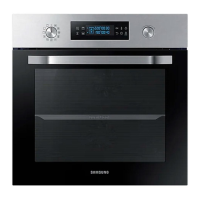
Samsung NV68A1110 Series - User Manual

Samsung NV68A1110 Series
28 pages
Print Icon
To Next Page IconTo Next Page
Loading...
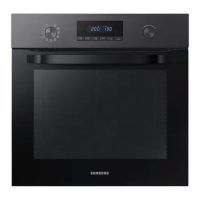
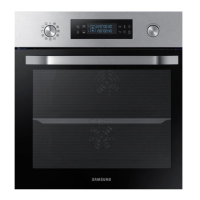
Built-in Oven
User & Installation manual
NV68A1110** / NV68A1140** / NV68A1145**
NV68A1140BK_EU_DG68-01365A-00_EN.indd 1NV68A1140BK_EU_DG68-01365A-00_EN.indd 1 2021-02-09 오후 4:34:482021-02-09 오후 4:34:48

Questions and Answers

  • J
    Joseph LoweSep 23, 2025
    Why does the brightness inside the Samsung Oven vary?
    • N
      Natasha HartmanSep 23, 2025
      The brightness changes depending on power output changes in the Samsung Oven. Power output changes during cooking are not malfunctions, so there is no need to worry.
  • A
    aaron10Aug 23, 2025
    Why does smoke come out of my Samsung NV68A1110 Oven during operation?
    • M
      michelle49Aug 23, 2025
      During initial operation, smoke may come from the heater when you first use the Samsung Oven. This is not a malfunction, and if you run the oven 2-3 times, it should stop happening. Also, if there is food on the heater, let the oven cool sufficiently and remove the food from the heater.
  • S
    stevenclarkAug 25, 2025
    How to fix a Samsung Oven that does not heat?
    • M
      Matthew SmithAug 26, 2025
      If the door of the Samsung Oven is open, close the door and restart. If oven controls are not correctly set, refer to the chapter on oven operation and reset the oven. If the household fuse has been blown or the circuit breaker has operated, replace the fuse or reset the circuit. If it happens repeatedly, call an electrician.
  • C
    Christine FreyAug 27, 2025
    What to do if the door cannot be opened properly on my Samsung Oven?
    • T
      thomasfrancoAug 27, 2025
      If there is food residue stuck between the door and product interior of the Samsung Oven, clean the oven well and then open the door again.
  • B
    Billy GardnerAug 27, 2025
    How to fix Samsung NV68A1110 Oven buttons that are not working?
    • K
      Kelly SmithAug 27, 2025
      If the buttons on your Samsung Oven cannot be pressed properly, consider the following possibilities: * If there is foreign matter caught between the buttons, remove it. * If it's a touch model and there is moisture on the exterior, remove the moisture. * Check whether the lock function is set.
  • J
    Jessica PearsonSep 18, 2025
    Why does the brightness inside my Samsung NV68A1110 vary?
    • B
      Brandon JacksonSep 18, 2025
      The brightness inside your Samsung Oven changes depending on power output changes during cooking. These power output changes are normal, so there is no need to worry.
  • L
    Laura TylerSep 14, 2025
    Why is the cooling fan still running after cooking is finished in my Samsung NV68A1110 Oven?
    • S
      Samantha DownsSep 14, 2025
      If the cooling fan continues to run after cooking is finished in your Samsung Oven, it is because the fan automatically runs for a certain amount of time to ventilate inside the oven. This is normal operation.
  • J
    Jennifer JenningsSep 15, 2025
    Why is there water dripping from my Samsung NV68A1110?
    • B
      Brent PerezSep 16, 2025
      Water or steam may appear in your Samsung Oven depending on the food being cooked. This is not a malfunction. Cool the oven and then wipe it with a dry dish towel.
  • V
    Valerie JacksonSep 6, 2025
    What should I do if my Samsung NV68A1110 Oven gives me an electric shock?
    • M
      Michelle CordovaSep 6, 2025
      If you experience an electric shock from your Samsung Oven, it is important to check whether the power supply is properly grounded. Also, check whether you are using a socket without grounding.
  • A
    Andrew BanksSep 3, 2025
    Why is the exterior of my Samsung NV68A1110 Oven so hot?
    • W
      williamsdanielSep 3, 2025
      If the exterior of your Samsung Oven is too hot during operation, it could be due to poor ventilation. Ensure that you keep the gaps specified in the product installation guide to allow for proper airflow.

Summary

Using this manual

Safety instructions

Important safety precautions

Essential safety guidance for oven use and potential hazards.

Correct Disposal of This Product (Waste Electrical & Electronic Equipment)

Guidelines for environmentally responsible disposal of the product and accessories.

Auto energy saving function

Information on how the oven conserves energy during operation and standby modes.

Installation

Whats included

List of items and accessories provided in the product package.

Oven at a glance

Diagram identifying key external parts of the oven for reference.

Accessories

Details and illustrations of oven accessories provided for cooking.

Power connection

Instructions and safety requirements for connecting the oven to the electrical mains.

Cabinet mount

Requirements for installing the oven within a built-in cabinet for proper ventilation and fit.

Required dimensions for installation

Technical drawings and measurements for cabinet and oven installation.

Built-in cabinet dimensions

Specific dimensions and ventilation requirements for built-in cabinets.

Under-sink cabinet dimensions

Specific dimensions and ventilation requirements for under-sink installations.

Mounting the oven

Guidance on securing the oven within the cabinet for safe installation.

Installing with a hob

Considerations for installing the oven below a hob, including space requirements.

Before you start

Initial settings

Steps for setting the oven's clock and initial operational parameters.

New oven smell

Procedure to eliminate residual manufacturing odors before first use.

Accessory Usage Guide

Instructions on how to correctly use various oven accessories for optimal results.

Basic accessory use

Fundamental guidelines for utilizing oven accessories for better cooking experiences.

Mechanical lock (applicable models only)

Instructions for installing, uninstalling, and using the oven's mechanical child lock feature.

Operations

Control panel overview

Explanation of the oven's control panel buttons, display, and dial functions.

Mode selector and value dial

Guidance on using the mode selector and value dial for oven functions.

Fast preheat function

How to use the fast preheat feature to reduce waiting time before cooking.

Setting cooking time

Steps to set the desired cooking duration for various recipes.

Cooking modes explained

Details of different cooking modes, suggested temperatures, and usage instructions.

Stopping the cooking process

Procedure for safely stopping an ongoing cooking cycle.

Convenience features

Overview of additional features like oven light, child lock, and timer.

Oven light operation

How to turn the oven light on and off, with or without active cooking.

Child lock activation

Instructions for activating and deactivating the child lock feature.

Timer function usage

How to set and use the oven's timer for cooking duration.

Cooking smart

Manual cooking tips

Recommendations and settings for manual cooking of various dishes.

Accessory tips for cooking

Advice on using oven accessories for optimal cooking results and food preparation.

Baking guide

Recommended settings and methods for baking various food items.

Roasting guide

Recommended settings and methods for roasting meats, poultry, and vegetables.

Grilling guide

Instructions and settings for using the grill function for various foods.

Test dishes and recipes

Standardized test dishes with recommended settings for baking and cooking.

Maintenance

General cleaning instructions

Guidelines and warnings for cleaning the oven interior, exterior, and accessories.

Catalytic enamel care

Instructions for cleaning and maintaining the catalytic enamel surfaces within the oven.

Oven door removal

Step-by-step guide for safely removing the oven door for cleaning purposes.

Oven door glass cleaning

Procedure for removing and cleaning the individual glass panes of the oven door.

Water collector and side runners

Maintenance of the water collector and detachable side runners.

Bulb replacement

Instructions for safely replacing the oven light bulb, including bulb type recommendations.

Troubleshooting

Common issues and solutions

Table of common oven problems, their causes, and recommended actions.

Information codes and error messages

Explanation of error codes displayed by the oven and troubleshooting steps.

Technical specifications

Appendix

Product data sheet

Detailed technical specifications and energy efficiency data for the oven model.

Memo

Energy saving tips

Practical advice for optimizing energy consumption during oven use.

Samsung NV68A1110 Series Specifications

General IconGeneral
Oven TypeElectric
Installation TypeBuilt-in
Energy Efficiency ClassA
Interior LightingYes
Oven Capacity68 Litres
ColourStainless steel
Control TypeKnobs
CleaningCatalytic liners
Cleaning SystemCatalytic

Related product manuals