
 To Next Page
C
Carol PattonAug 21, 2025
Why my Samsung Oven does not work?
- LLaura PhillipsAug 22, 2025
If your Samsung oven isn't working, the first thing to check is the power supply. Make sure the oven is properly connected to a power source.

Why my Samsung Oven does not work?
If your Samsung oven isn't working, the first thing to check is the power supply. Make sure the oven is properly connected to a power source.
What to do if Samsung Oven gives electric shock?
If you experience an electric shock from your Samsung oven, the power supply may not be properly grounded. Check if the power supply is correctly grounded. Also, verify that you are not using a socket without grounding.
Why is the time not displayed on my Samsung Oven?
If the time is not displayed on your Samsung oven, check whether there is power supplied to the oven.
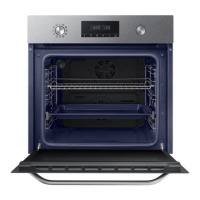
What to do if the door of my Samsung Oven cannot be opened properly?
If the door of your Samsung oven cannot be opened properly, check for food residue stuck between the door and the oven interior. Clean the oven thoroughly and try opening the door again.
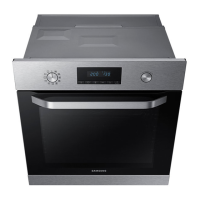
Why is the exterior of my Samsung NV70K1340BB Oven too hot during operation?
If the exterior of your Samsung oven is too hot during operation, ensure it's installed in a place with good ventilation, maintaining the gaps specified in the product installation guide.
Why does smoke come out of my Samsung Oven during operation?
If smoke comes out of your Samsung oven during operation: * During initial use, this may be normal as the heater burns off residue. Run the oven a few times to resolve this. * If there is food on the heater, let the oven cool and remove the food.
How to fix Samsung NV70K1340BB Oven buttons that are not pressed properly?
If the buttons on your Samsung oven cannot be pressed properly, consider the following: * If there's foreign matter caught between the buttons, remove it. * For touch models, remove any moisture on the exterior. * Check if the lock function is enabled.
Why does my Samsung NV70K1340BB Oven power turn off during operation?
If your Samsung oven's power turns off during operation, consider these possible causes: * If cooking for extended periods, allow the oven to cool down afterward. * Check if the cooling fan is functioning correctly by listening for its sound. * Ensure proper ventilation around the oven, maintaining the gaps specified in the installation guide. * Avoid using multiple power plugs in the same socket; use a single plug instead.
Why is my Samsung NV70K1340BB Oven not heating up?
Your Samsung oven might not be heating due to several reasons. First, make sure the oven door is completely closed, and then restart it. Also, verify that the oven controls are correctly set by referring to the operation chapter. Finally, check your household fuse or circuit breaker; replace the fuse or reset the breaker if needed. If the issue persists, consult an electrician.
How to fix a Samsung NV70K1340BB that does not heat?
If your Samsung oven isn't heating, try the following: 1. Ensure the oven door is completely closed, then restart. 2. Check the oven operation settings and reset if needed. 3. Inspect the household fuse or circuit breaker; replace the fuse or reset the breaker. If the issue continues, contact an electrician.
General safety guidelines and warnings for appliance usage, including child safety and power cord.
Instructions on how to properly connect the oven to the electrical power supply, including wiring details.
Specifies requirements for installing the oven in a built-in cabinet, including ventilation and dimensions.
Overview of the oven's control panel, explaining the function of each button and dial.
Explanation of different cooking modes available, including grill and other modes.
Guidelines for manual cooking, including warnings about acrylamide and tips for using accessories.
Recommendations and settings for various baking recipes, including food, accessory, temperature, and time.
Instructions for cleaning the oven interior, exterior, and accessories, including warnings.
Table of common oven problems, their causes, and suggested actions for troubleshooting.
List of error codes displayed on the oven, with their meanings and troubleshooting actions.

 General