EasyManua.ls Logo

Samsung PN50A460S4D - User Manual

Samsung PN50A460S4D
12 pages
Print Icon
To Next Page IconTo Next Page
Loading...
English - 1
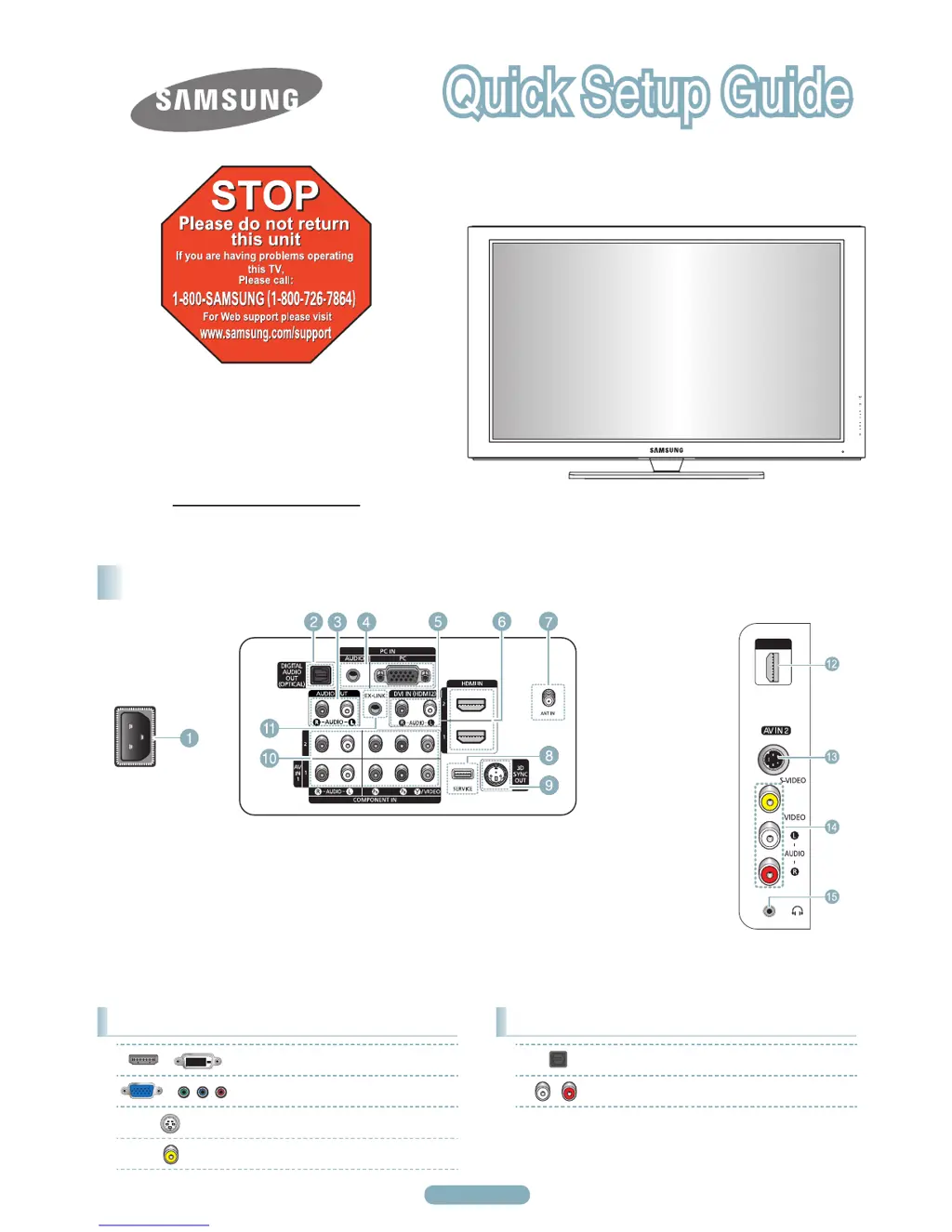
Rear & Side Panel Jacks
PN50A460S4D
1-800-SAMSUNG (7267864)
Samsung Electronics America, Inc.
105 Challenger Road Ridgefield Park, NJ 07660-0511
Samsung Electronics Canada Inc., Customer Service
55 Standish Court Mississauga, Ontario L5R 4B2
Call center hours of operation (Mon-Sun 9AM-12AM EST).
To register this product please visit
www.samsung.com/global/register.
1
POWER IN
2
DIGITAL AUDIO OUT (OPTICAL)
3
AUDIO OUT (R/L)
4
PC IN[PC]/[AUDIO]
5
DVI IN (HDMI 2) (AUDIO-R/L)
6
HDMI IN 1, 2
7
ANT IN
8
SERVICE
9
3D SYNC OUT
0
COMPONENT IN 1, 2 / AV IN 1
!
EX-LINK
@
HDMI IN 3
#
S-VIDEO (AV IN 2)
$
AV IN 2
%
HEADPHONE
($-)).
Video Input Performance Comparison
/
HDMI/DVI Best
/
PC/COMPONENT Better
S-VIDEO Good
VIDEO Normal
Audio Output Performance Comparison
OPTICAL (Digital) Best
AUDIO (Analog) Normal
BN68-01662A-00Eng_0404.indd 1 2008-05-19 오후 6:05:20

Questions and Answers

  • G
    gatesjamesAug 19, 2025
    What to do if my Samsung Flat Panel TV has no picture or sound?
    • T
      Todd QuinnAug 19, 2025
      If your Samsung Flat Panel TV isn't showing a picture or producing sound, try these steps: first, try another channel. Second, press the SOURCE button. Third, ensure the TV is plugged in. Fourth, check the antenna connections. Finally, make sure the MUTE button is off.
  • M
    Matthew RussellAug 21, 2025
    Why is the picture quality poor on my Samsung PN50A460S4D?
    • M
      Mitchell RobinsonAug 21, 2025
      If you're experiencing poor picture quality on your Samsung Flat Panel TV, try the following: try another channel, adjust the antenna, and check all wire connections.
  • J
    Jennifer SmithAug 25, 2025
    What to do if my Samsung Flat Panel TV has no sound or the sound is too low?
    • C
      Chris MurrayAug 25, 2025
      If your Samsung Flat Panel TV has no sound or the sound is too low, first, check the volume of units connected to your TV (digital broadcasting receiver, DVD, cable broadcasting receiver, VCR, etc.). Then, adjust the TV volume accordingly.
  • M
    merrittnathanAug 26, 2025
    Why is the image on my Samsung PN50A460S4D Flat Panel TV too light or too dark?
    • A
      Allen CherryAug 26, 2025
      If the image on your Samsung Flat Panel TV is too light or too dark, adjust the Brightness and Contrast. You can also adjust the Fine tuning.
  • S
    Scott SanchezAug 28, 2025
    How to fix a Samsung PN50A460S4D Flat Panel TV remote control that malfunctions?
    • O
      oriveraAug 28, 2025
      If your Samsung Flat Panel TV remote control isn't working correctly, try these solutions: Replace the remote control batteries, clean the upper edge of the remote control (transmission window), check the battery terminals, make sure the remote has batteries, and check that the “+” and “-” ends of the batteries are inserted correctly.
  • K
    Katherine ThomasAug 30, 2025
    What does it mean when the 'Resets all settings to the default values' message appears on my Samsung PN50A460S4D Flat Panel TV?
    • B
      Brenda FergusonAug 30, 2025
      The “Resets all settings to the default values” message appears when you press and hold the EXIT button for a while. The product settings are then reset to the factory defaults.
  • A
    Ashley WalshSep 1, 2025
    How to resolve a digital broadcasting screen problem on my Samsung PN50A460S4D Flat Panel TV?
    • A
      Ashley HernandezSep 1, 2025
      To resolve digital broadcasting screen problems on your Samsung Flat Panel TV, please check the digital signal strength and input antenna.
  • W
    wshawSep 3, 2025
    What to do if my Samsung Flat Panel TV operates erratically?
    • J
      jamesdanielSep 3, 2025
      If your Samsung Flat Panel TV is operating erratically, unplug the TV for 30 seconds, then try operating it again.
  • E
    elizabeth92Sep 5, 2025
    What to do if the picture rolls vertically on my Samsung Flat Panel TV?
    • Q
      qhuangSep 5, 2025
      If the picture rolls vertically on your Samsung Flat Panel TV, check all connections.
  • M
    Mr. Brandon Murphy DDSSep 8, 2025
    What to do if the image on my Samsung Flat Panel TV is too large or too small?
    • S
      Sarah CarrSep 8, 2025
      If the image on your Samsung Flat Panel TV is too large or too small, adjust the Size settings.

Samsung PN50A460S4D Specifications

General IconGeneral
Screen Size50 inches
Display TypePlasma
Resolution1366 x 768
Aspect Ratio16:9
HDMI Ports2
Component Video Inputs2
Composite Video Inputs1
S-Video Inputs1
Brightness1500 cd/m²
Response Time0.001 ms
RF Input1
PC Input1
Viewing Angle160°
Audio Output2 x 10 W

Related product manuals