Installation
English28
Installation
STEP 2 WiFi connection
You can control the refrigerator remotely using the Smart Home Adapter that is sold
separately. To purchase the Smart Home Adapter, visit www.samsung.com and follow the
product information about the adapter.
NOTE
You may not be able to purchase the Smart Home Adapter separately in some countries.
Please check with your dealer for availability.
CAUTION
• The Samsung Smart Home Adapter comes in two types: one that is dedicated to
Samsung smart TVs, and the other one that is dedicated to Samsung home appliances.
• You must purchase the Samsung Smart Home Adapter (HD39N1230GW) dedicated to
home appliances. Any other adapters may cause system failure.
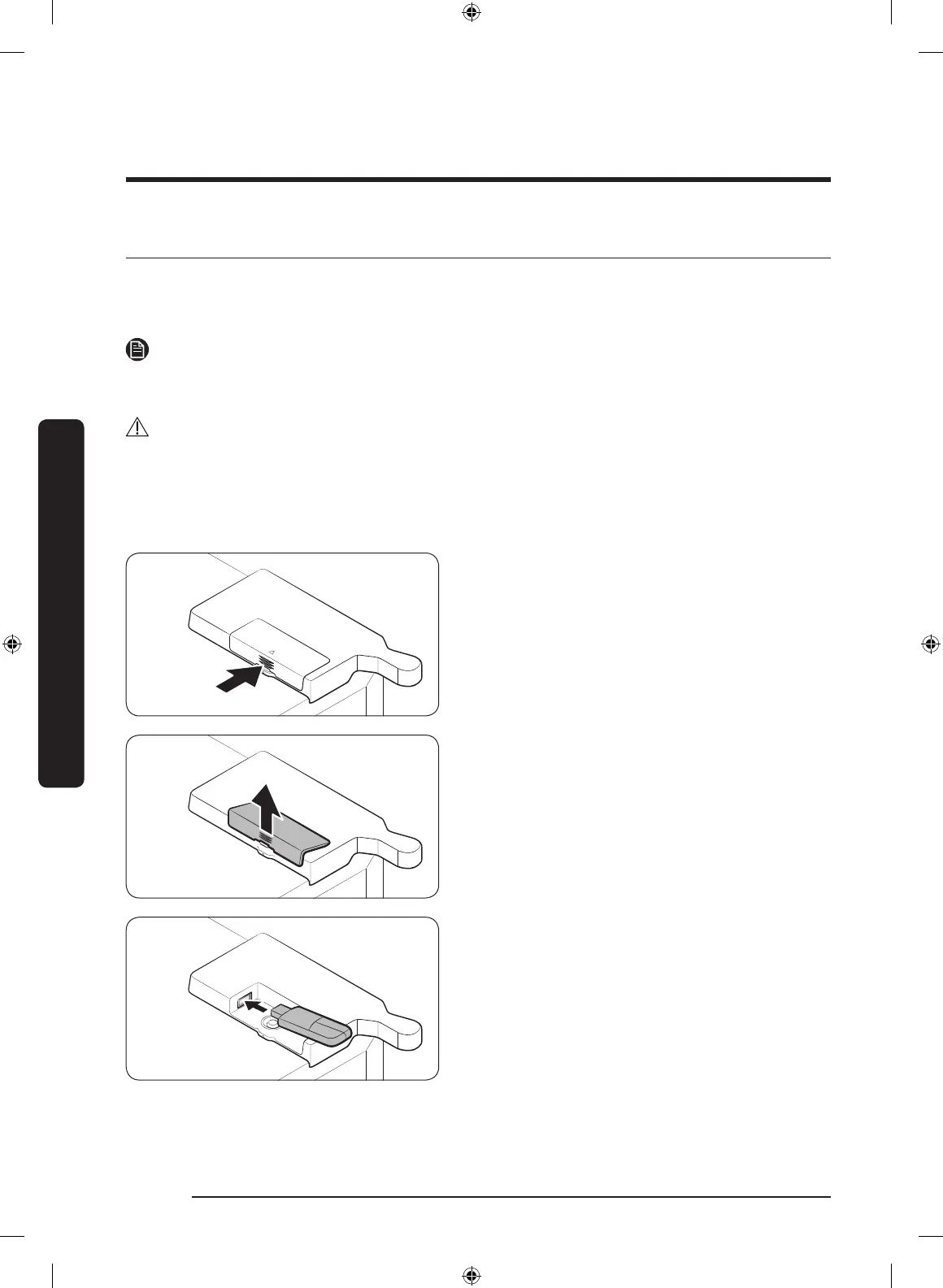
1. Press to unlock the arrow area of the
adapter cover.
2. Open up the adapter cover.
3. Insert the Smart Home Adapter into the
adapter port in the correct direction.
Untitled-23 28 2019-07-10 7:59:53



 To Next Page