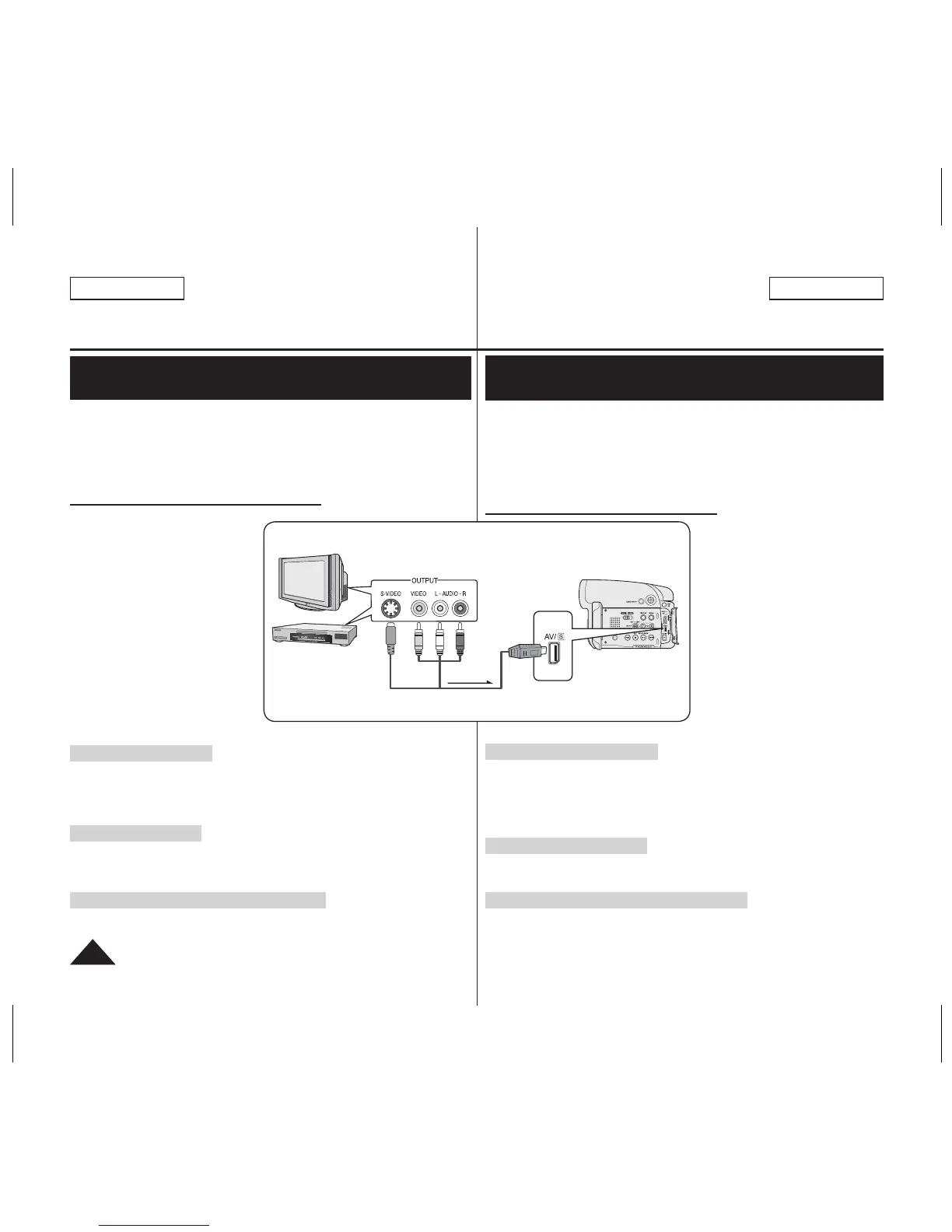
TV
Signal flow
Multi-AV Cable
DVD Camcorder
VCR
or
ENGLISH
90
ESPAÑOL
DVD Camcorder: Connection
Recording (Copying) a TV Program or Video Tape
onto a Disc (SC-DC565 only)
The Recording (Copying) function works only in Player Mode.
page 28
Connect your DVD Camcorder to a VCR or a TV using the AV/S jack to
record a TV program or copy a video tape to a disc. Set the AV In/Out
before Recording (Copying).
page 86
Recording (Copying) onto a Disc
1. Get your TV or VCR ready.
2. Connect the DVD Camcorder
to your VCR or TV with Multi-
AV cable.
Connect the Multi-AV cable
to the output jack on your
VCR or TV
The yellow jack: Video
The white jack: Audio (L) –
Mono
The red jack: Audio (R)
3. Insert an empty disc in your
DVD Camcorder.
Please refer to page 13 for
selecting and formatting
discs.
To record from a VCR
4. Insert the tape to be played in your VCR.
Pause at the starting point of playing.
5.
Start copying by pressing the [Start/Stop] button on your DVD Camcorder.
6. Press the PLAY button on your VCR to play the tape.
To record from a TV
4. Select a TV channel to be recorded.
5. Start recording by pressing the
[Start/Stop] button on your DVD
Camcorder.
When Recording (Copying) is Complete:
Press the [
(Stop)] button on your DVD Camcorder to stop
recording(copying).
Videocámara con DVD: Conexión
Grabación (Copia) de un programa de TV o cinta de
video en un disco (sólo SC-DC565)
La función de grabación (Copia) sólo está operativa en el Player Mode
.
página 28
Conecte la Videocámara con DVD a un VCR o a un TV utilizando el
terminal AV/S para grabar un programa de TV o copiar una cinta de
video en un disco. Defina AV In/Out
antes de grabar (copiar).
página 86
Grabación (copia) en un disco
1. Prepare el TV o el aparato de
vídeo.
2. Conecte la Videocámara con
DVD al VCR o al TV mediante
el cable Multi-AV.
Conecte el cable Multi-AV
al terminal de salida del
aparato de vídeo o TV.
El terminal amarillo: Vídeo
El terminal blanco:
Audio (L) – Mono
El terminal rojo: Audio(R)
3. Inserte un disco vacío en la
Videocámara con DVD.
Consulte la página 13 para
seleccionar y formatear discos.
Para grabar desde un VCR
4. Inserte la cinta que se va a reproducir en el aparato de vídeo.
Interrumpa en el punto inicial de la reproducción.
5.
Comience a copiar presionando el botón [Start/Stop] en la Videocámara
con DVD.
6. Pulse el botón PLAY. del vídeo para iniciar la cinta.
Para grabar desde un TV
4. Seleccione el canal de TV que se va a grabar.
5.
Comience a grabar presionando el botón [Start/Stop] en la Videocámara con DVD
Una vez completada la grabación (copia):
Presione el botón [
(Stop)] de la videocámara para detener la grabación
(copia).




 To Next Page