EasyManua.ls Logo

Samsung SDC-9441BC - Camera Installation; Installing the camera; Adjusting the Camera Bracket

Samsung SDC-9441BC
11 pages
Print Icon
To Next Page IconTo Next Page
To Previous Page IconTo Previous Page
Loading...
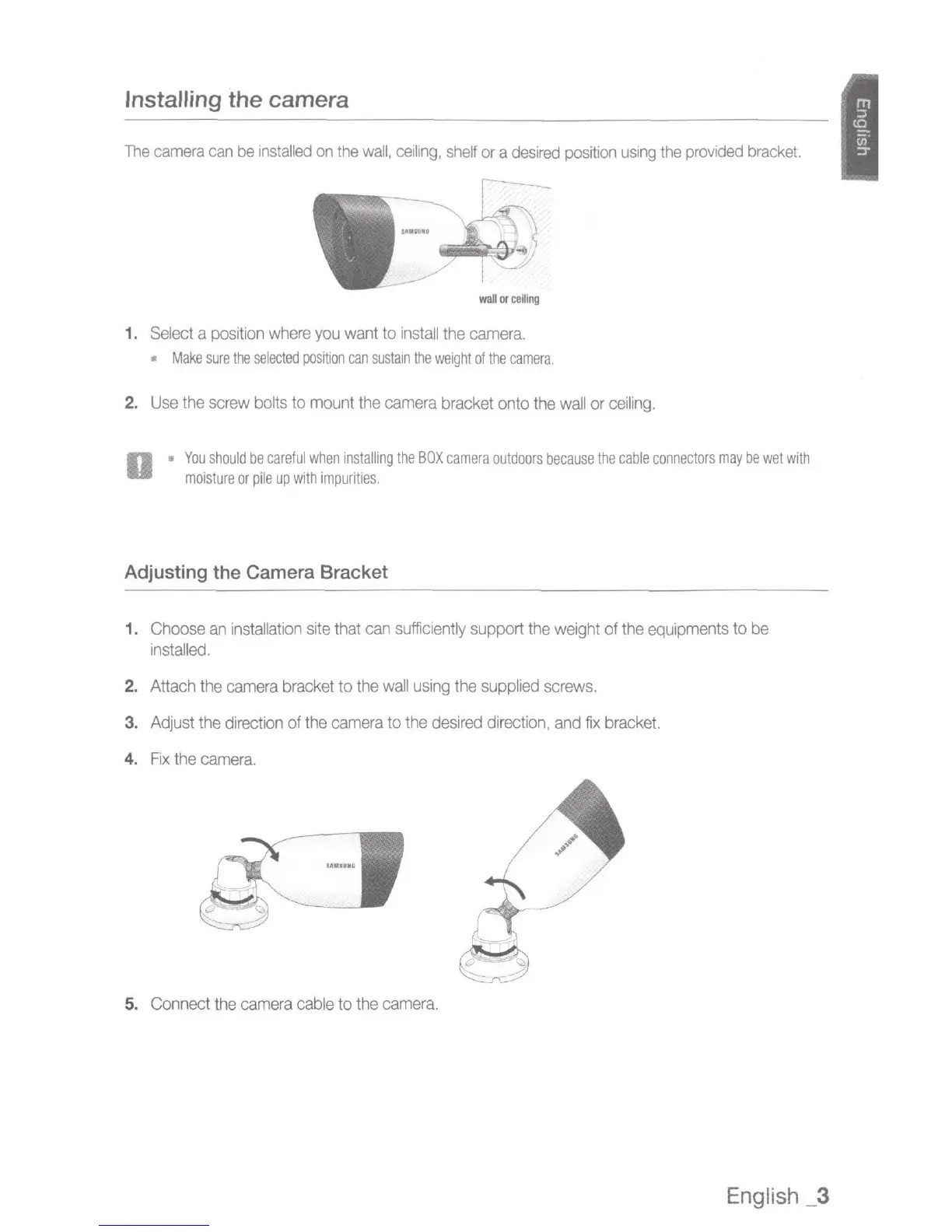
Installing the camera
The
camera
can
be
installed
on
the
wall,
ceiling,
shelf
or
a
desired
position
using
the
provided
bracket.
---
wal
l
or
ceiling
1.
Select
a
position
where
you
want
to
install
the
camera.
Make
sure
the
selected
position
can
sustain
the
weight
of
the
camera.
2.
Use
the
screw
bolts
to mount
the
camera
bracket onto
the
wall
or
ceiling.
o ·
You
should
be
careful
when
installing
the
BOX
camera
outdoors
because
the
cable
connectors
may
be
wet
with
moisture
or
pile
up
with
impurities.
Adjusting the Camera Bracket
1.
Choose
an
installation
site
that
can
sufficiently
support
the
weight of
the
equipments
to
be
installed.
2. Attach
the
camera
bracket to
the
wall
using
the
supplied
screws.
3.
Adjust
the
direction
of the
camera
to
the
desired
direction
,
and
fix
bracket.
4.
Fix
the
camera.
5. Connect
the
camera
cable
to
the
camera.
English
_3

Related product manuals