PRECAUTIONS
Ensure you read out the following
instructions before
installing the camera:
• Select
an area
(ceiling
or
wall)
that can withstand 5 times the camera weight
•
Stuck-in
or
peeled-off cables
can cause damage to the product
or
a fire.
•
For safety purposes, keep anyone
else
away from the installation site.
And put aside personal belongings
from the site, just in case.
INSTALLING THE CAMERA
The camera bracket can be
installed
on the
wall, ceiling, shelf
or
a desired position.
1. Choose an installation site that can sufficiently support the weight
of
the camera.
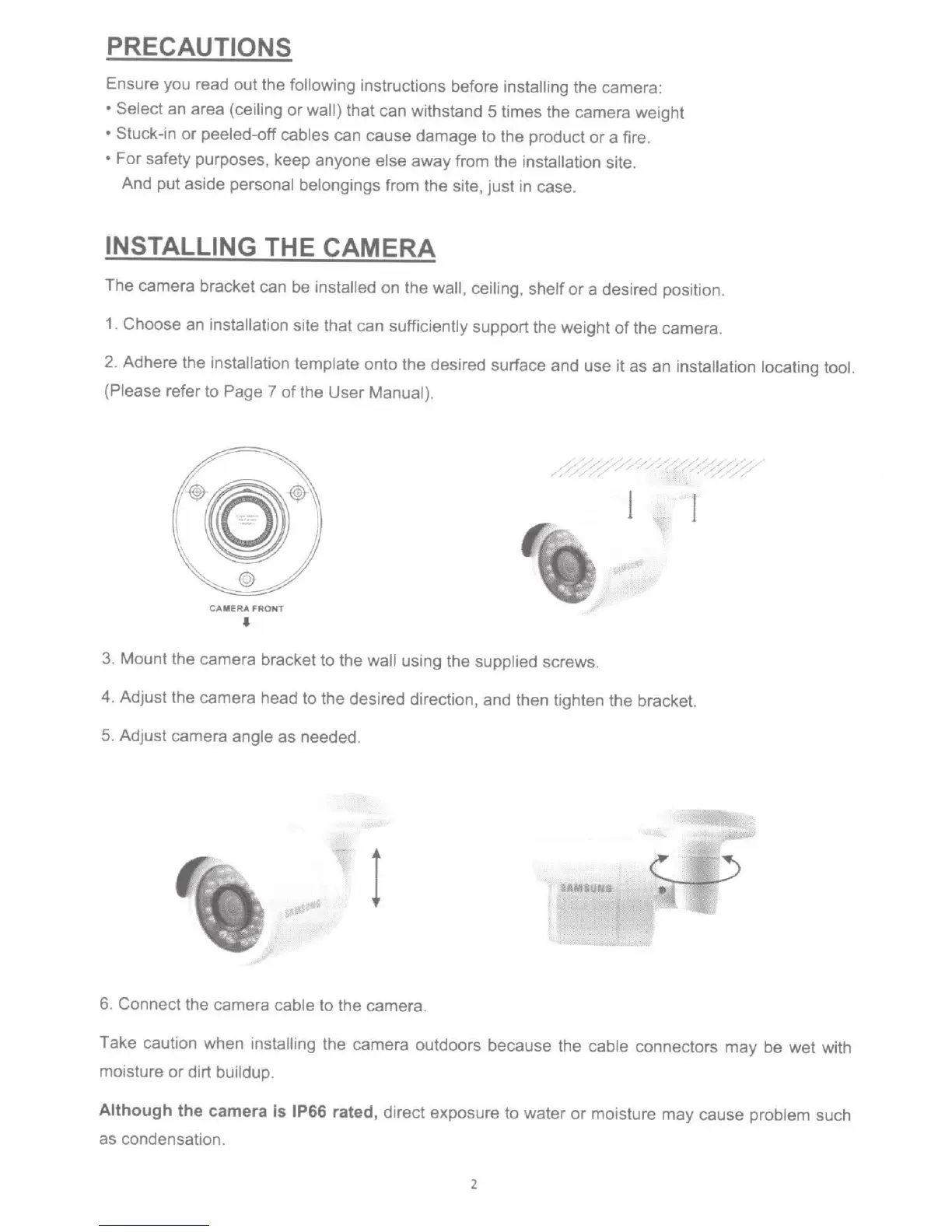
2. Adhere the installation
template
onto the desired surface and use it as an
installation locating tool.
(Please refer to Page 7 of the User Manual).
1
C
AMERA
FRONT
'
3. Mount the camera bracket to the
wall
using the
supplied screws.
4. Adjust the camera head to the desired direction, and then tighten the bracket.
5.
Adjust camera
angle
as
needed.
1
SAMIUNg
6 Connect the camera
cable
to the camera.
Take caution when
installing
the camera outdoors because the
cable
connectors may be wet with
moisture
or
dirt
buildup.
Although
the camera is
IP66 rated,
direct exposure to water
or
moisture may cause problem
such
as condensation.
2



 To Next Page