12_ installing your dryer
installing your dryer
INSTALLATION SIDE BY SIDE
For proper installation, we recommend that you hire a professional. To install:
1. Move your dryer to an appropriate location for installation. Consider
installing the dryer and washer side-by-side. Lay two of the carton
cushion-tops on the fl oor. Tip your dryer on its side so it will lay across
both cushion-tops.
2. Set your dryer back in an upright position.
3. To ensure that the dryer provides optimal drying performance, it must
be level. To minimize vibration, noise, and unwanted movement,the
fl oor must be a perfectly level, solid surface.
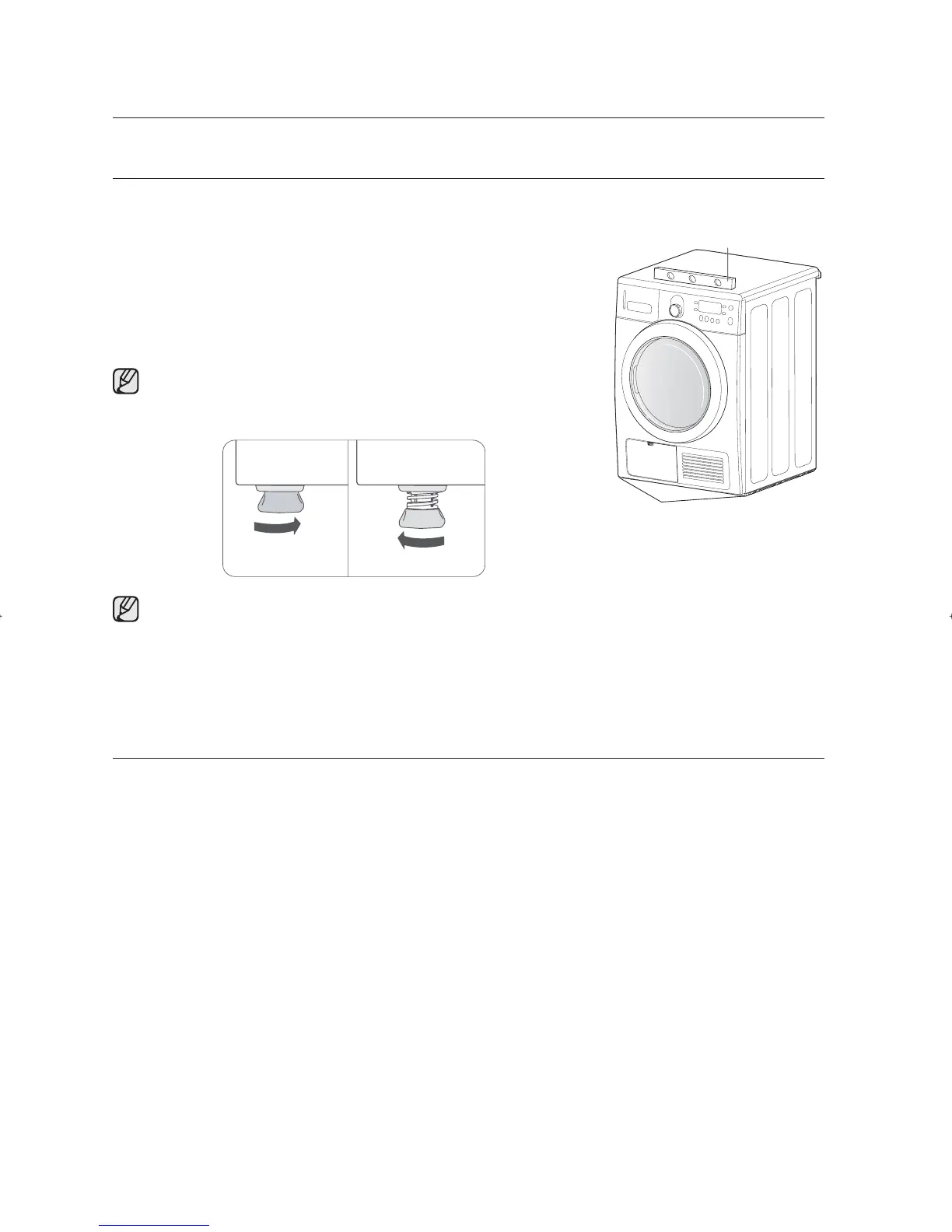
To set the dryer to the same height as the washer, fully retract the
levelling feet by turning them counterclockwise, then loosen the legs
by turning them clockwise
Adjust the levelling feet only as much as necessary to level the dryer.Extending the levelling feet more
than necessary can cause the dryer to vibrate.
4. Review Electrical Requirements section (See page 11).
BEFORE OPERATING OR TESTING.
5. With a level, check your dryer and make necessary adjustments to the levelling legs.
6. Plug in your dryer, and check operation by using the checklist below.
FINAL INSTALLATION CHECKLIST
Dryer is plugged into electrical outlet and is properly grounded.
Dryer is leveled and is sitting fi rmly on the fl oor.
Start your dryer to confi rm that it runs, heats, and shuts off.
Level
Levelling feet
Retract fully Then loosen
SDC18809X-02805K-02_EN.indd Sec3:12SDC18809X-02805K-02_EN.indd Sec3:12 2011-06-02 11:49:182011-06-02 11:49:18



 To Next Page