installing your dryer _17
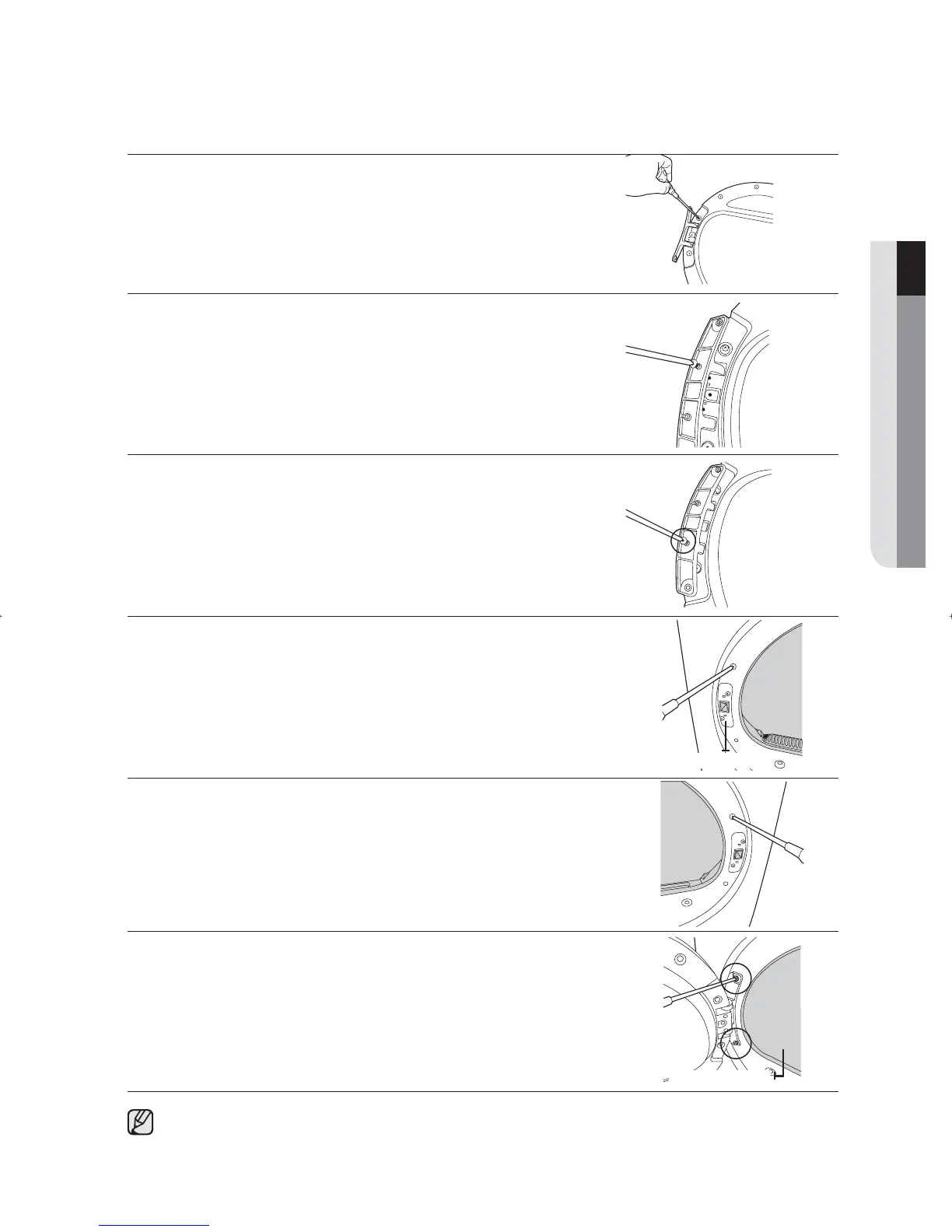
8. Fasten the 16 screws in the correct positions.
9. Note that two of the screws have a different length from the others.
(Use the longer screws for the door-lever.)
10. Move the position of the screw at the back of the door-hinge.
11. Fasten the screw in the bottom hole.
12. Remove the two screws holding the front-frame at the left.
13. Remove the two screws holding the holder-lever at the left.
14. Now, move to the right side of the product and fasten the two screws
holding the front-frame and the two screws holding the lever-holder.
15. Align the door with the fi xing holes.
16. Fasten the two screws holding the door-hinge.
You can restore the direction the door opens by following the procedures above, if necessary.
01 INSTALLING YOUR DRYER
Holer-Lever
Inside the drum
SDC18809X-02805K-02_EN.indd Sec3:17SDC18809X-02805K-02_EN.indd Sec3:17 2011-06-02 11:49:222011-06-02 11:49:22



 To Next Page