EasyManua.ls Logo

Samsung SDP-900DXA - User Manual

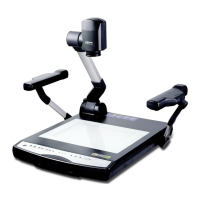
Samsung SDP-900DXA
46 pages
Print Icon
To Next Page IconTo Next Page
Loading...
SDP-900DXASDP-900DXA
HIGH RESOLUTION DIGITAL PRESENTER
USER'S MANUAL
HIGH RESOLUTION DIGITAL PRESENTER
USER'S MANUAL
ENGLISHENGLISH
Before attempting to operate this product, Please read the instructions carefully.
www.samsungpresenter.com
Before attempting to operate this product, Please read the instructions carefully.
www.samsungpresenter.com
English
French German Italian Spanish

Other manuals for Samsung SDP-900DXA

Question and Answer IconNeed help?

Do you have a question about the Samsung SDP-900DXA and is the answer not in the manual?

Summary

Special Features of the SDP-900 DXA

Optical and Digital Zoom Capabilities

Highlights 12X optical and 3X digital zoom for versatile magnification.

High-Resolution CCD and Connectivity

Details 850,000 pixels CCD, USB 2.0/1.1, RS-232C, and DVI port.

Safety and Compliance Information

Essential Safety Precautions

Provides crucial safety instructions for setup and operation of the digital presenter.

Included Accessories

Component Checklist

Lists all essential components to verify upon unpacking the digital presenter.

Product Identification

Front Panel Components

Identifies and illustrates the various parts located on the front side of the presenter.

Main Control Panel Functions

Power and Image Manipulation Buttons

Explains buttons for Power, Freeze, AWC, Zoom, TXT/IMG, and Rotate.

Focus, Source, and Illumination Controls

Details buttons for AF, INT/EXT, Lamp, and Iris functions.

Rear Terminals and Ports

Remote Controller Layout and Functions

Basic Operation Buttons

Explains controls for Power, INT/EXT, TXT/IMG, Lamp, Focus, Color, and Zoom.

Advanced Image Adjustment Buttons

Details buttons for Freeze, Brightness, Rotate, Wide/Tele, NTSC/PAL, and Presets.

Remote Controller Functionality Details

Core Control Functions

Explains functions of Power, INT/EXT, TXT/IMG, Lamp, Focus, and Color/AF buttons.

Image Management Functions

Details Rotate, Wide/Tele, Brightness, Exit, NTSC/PAL, Preset, Save/Recall, Divide, Shift.

Initial Setup Procedure

Raising Support and Positioning Lamp

Steps for raising the main support and positioning the lamp unit.

Connecting to Output Devices

Connecting to Monitors and Projectors

Guides connection to PC monitors, projectors, or DVI-supporting devices via VGA or DVI.

Connecting to Computers

USB Computer Connection

Connect to PC via USB and install software for image viewing and control.

Basic Presenter Operation

Displaying External Device Images

Steps to show images from external devices by connecting and powering on.

Selecting Video Input Sources

Choosing Source with INT;EXT Button

Select video sources (EXT1, EXT2, INT) using the INT/EXT button.

Projecting Objects onto the Presenter

Object Projection Setup

Guide to set up, connect, power on, and place an object on the document plate.

Positioning and Focusing on Objects

Place object on plate and adjust presenter head; use INT OUT for projection.

Image Focusing and Control

Manual and Auto Focus Adjustment

Focus the image using AF button or manual F/N focus controls.

Image Size and Brightness Adjustment

Image Color and Sharpness Tuning

Image Rotation and Memory Functions

Multi-Image Display Modes

Custom User Settings

Graphical User Interface (GUI) Operation

GUI Menu Structure and Image Adjustments

Overview of GUI menus for image adjustments like Focus, Zoom, Brightness, and Color.

GUI Image Adjustment Details

GUI Color and White Balance

GUI Digital Image Processing

GUI Image Save and Recall

GUI Miscellaneous Functions

GUI Drawing System Overview

Presenter Storage Procedure

Final Storage Steps

Troubleshooting Common Issues

No Image and Connectivity Problems

Resolves no image, PC/USB communication, and remote controller issues.

Focus and GUI Mouse Issues

Troubleshoots image focus, film display, and GUI mouse functionality.

Remote Controller Battery Replacement

Technical Specifications

Optical and Video System Specs

Details lens, zoom, focus, illumination, video output, and input terminals.

PC Connection and General Specs

Covers PC connection, software, operating conditions, power, dimensions, and weight.
Samsung SDP-900DXA Specifications

General IconGeneral
BrandSamsung
ModelSDP-900DXA
CategoryProjector
LanguageEnglish

Related product manuals