Get started
12
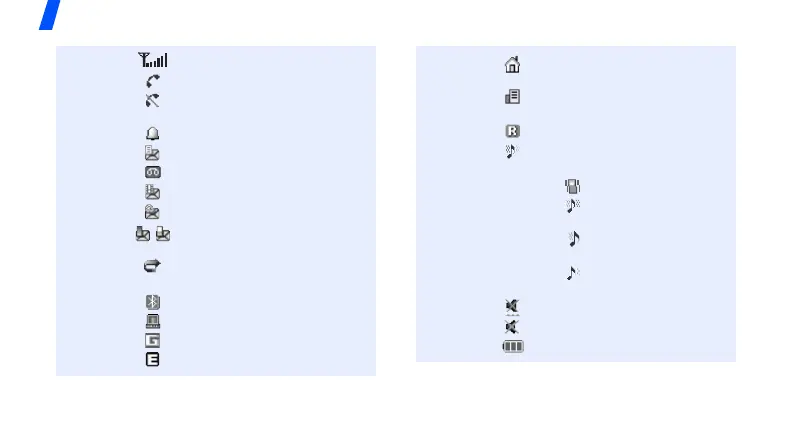
Icons
*
Received signal strength
Call in progress
Out of your service area; you
cannot make or receive calls
Alarm set
p. 93
New text message
New voicemail
New multimedia message
New e-mail
One of the message Inboxes
is full
Call diverting feature active
p. 117
Bluetooth active
p. 57
Synchronised with a PC
GPRS network
EDGE network
Home Zone, if registered for
the appropriate service
Office Zone, if registered for
the appropriate service
Roaming network
Ringer type
p. 115
• None: Melody
•: Vibration
• : Melody and
vibration
•: Vibration then
melody
•: Melody then
vibration
Silent mode (Vibration)
Silent mode (Mute)
Battery power level
* Depending on your country or service provider, the
icons shown on the display may vary.



 To Next Page