EasyManua.ls Logo

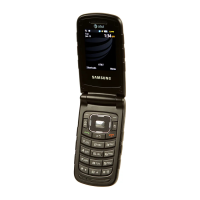
Samsung SGH-Z240 - User Manual

Samsung SGH-Z240
40 pages
Print Icon
To Next Page IconTo Next Page
Loading...
SGH-Z240
User’s Guide

Other manuals for Samsung SGH-Z240

Question and Answer IconNeed help?

Do you have a question about the Samsung SGH-Z240 and is the answer not in the manual?

Summary

Important Safety Precautions

Driving, Refuelling, and Aircraft Safety

Safety rules for driving, refuelling, and using phone in aircraft.

Operational Guidelines and Safety

Emergency Calls and Child Safety

Procedures for emergency calls and keeping phone away from children.

Getting Started

Phone Operation Basics

Powering On and Off

Steps to turn the phone on and off.

Phone Controls and Indicators

Phone Icons and Indicators

Phone Customization Options

Phone Locking and Call Management

Phone Lock and Password Protection

Activate phone lock and set a password for security.

Making Calls

Steps for making voice and video calls.

Call Management Features

Answering and Multi-Party Calls

How to answer calls and manage multi-party conversations.

Taking Photos

Instructions for capturing still images with the camera.

Camera and Media Operations

Music Playback and Playlist Creation

Web Browsing and Phonebook Management

Web Browser Navigation

Access and navigate the internet using the web browser.

Sending Messages

Sending Text and Multimedia Messages

Create and send text and multimedia messages.

Message Management

Sending Emails and Viewing Messages

Send emails and view received text, multimedia, and email messages.

Using Bluetooth Connectivity

Bluetooth Setup and Data Transfer

Turn on, pair devices, and send data via Bluetooth.

Menu Functions - Advanced Display and Phone Settings

Menu Functions - Security Settings

Call Settings and Phone Lock

Set call options and activate phone password protection.

Security: SIM Lock, PIN Lock, and Privacy

Secure phone with SIM lock, PIN lock, and privacy settings.

Menu Functions - Advanced Security and Network

Health and Safety Information

SAR Certification Information

Details on the phone meeting EU RF exposure limits and SAR measurement.

Safety Precautions and Battery Care

SAR Value and RF Exposure

Highest SAR value and explanation of RF exposure during operation.

Battery Usage Precautions

Precautions for charging, usage, and temperature effects on batteries.

Safety Information and Road Safety

Battery Safety and Disposal

Do not short-circuit battery. Dispose of used batteries correctly.

Road Safety and Operating Environment

Driving safety and rules for operating phone in different environments.

Device Usage Precautions

Vehicle, Posted Facilities, and Explosive Environments

Safety rules for vehicles, posted facilities, and potentially explosive areas.

Emergency Call Reliability

Never rely solely on wireless phone for essential communications like medical emergencies.

Operational and Maintenance Safety

Airbag, Aircraft, and Compliance Safety

Safety regarding airbags, aircraft use, and consequences of non-compliance.

Maintenance and Care Guidelines

Accessory and Service Guidelines

Samsung SGH-Z240 Specifications

General IconGeneral
BrandSamsung
ModelSGH-Z240
CategoryTelephone
LanguageEnglish

Related product manuals