Sendingphotosor videosviaemail
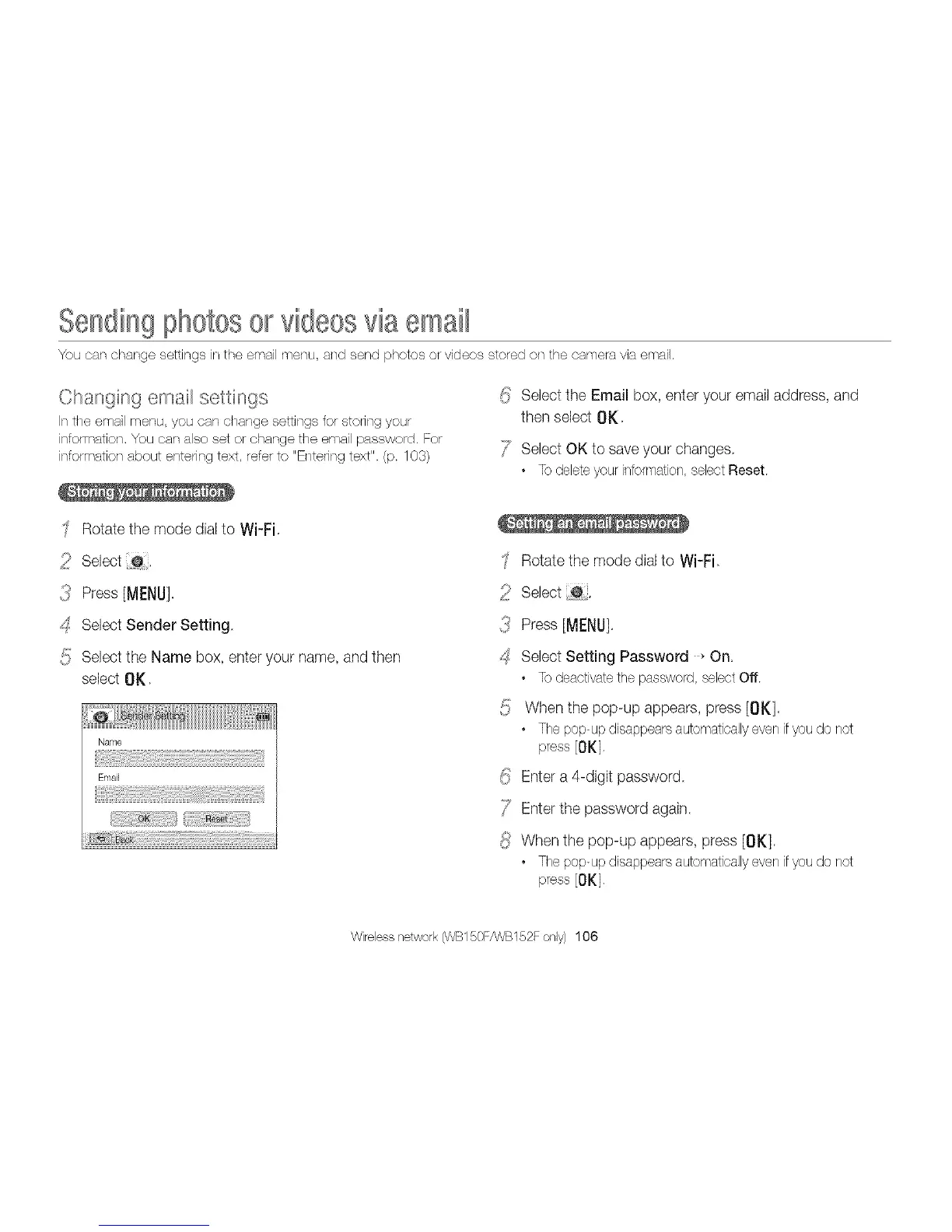
You car/change settings in the email menu, and send photos or videos stored on the camera via email,
Changing email settings
In the email menu you can change settings for storing your
information, You car/also set or change the email password. For
information about entering text, refer to "Entenng text". (p. 103)
Rotate the mode dial to Wi-Fi
_ii_ Select @,
{<_ Press [MI:NU]
_:S Select Sender Setting
5 Select the Name box, enter your name, and then
select OK,
_!_Select the Email box, enter your email address, and
then select 01(
/7 Select OK to saveyour changes.
• Todeleteyour intormation,selectReset.
Rotate the mode dial to Wi-Fi
_ii_ Select _0.
3 Press [MENU].
_:SSelect Setting Password _On.
• To deactivate the password, select Off.
{!} When the pop-up appears, press [OK],
• The pop-up disappears automatically even if you do not
press [OK].
_i_ Enter a 4-digit password.
/7 Enter the password again.
{i/ When the pop-up appears, press [OK].
• The pop-up disappears automatically even if you do not
press [OK],
Wirelessnetwork(WB150F/WB152Fonly) 106



 To Next Page