Beforecontactinga servicecenter
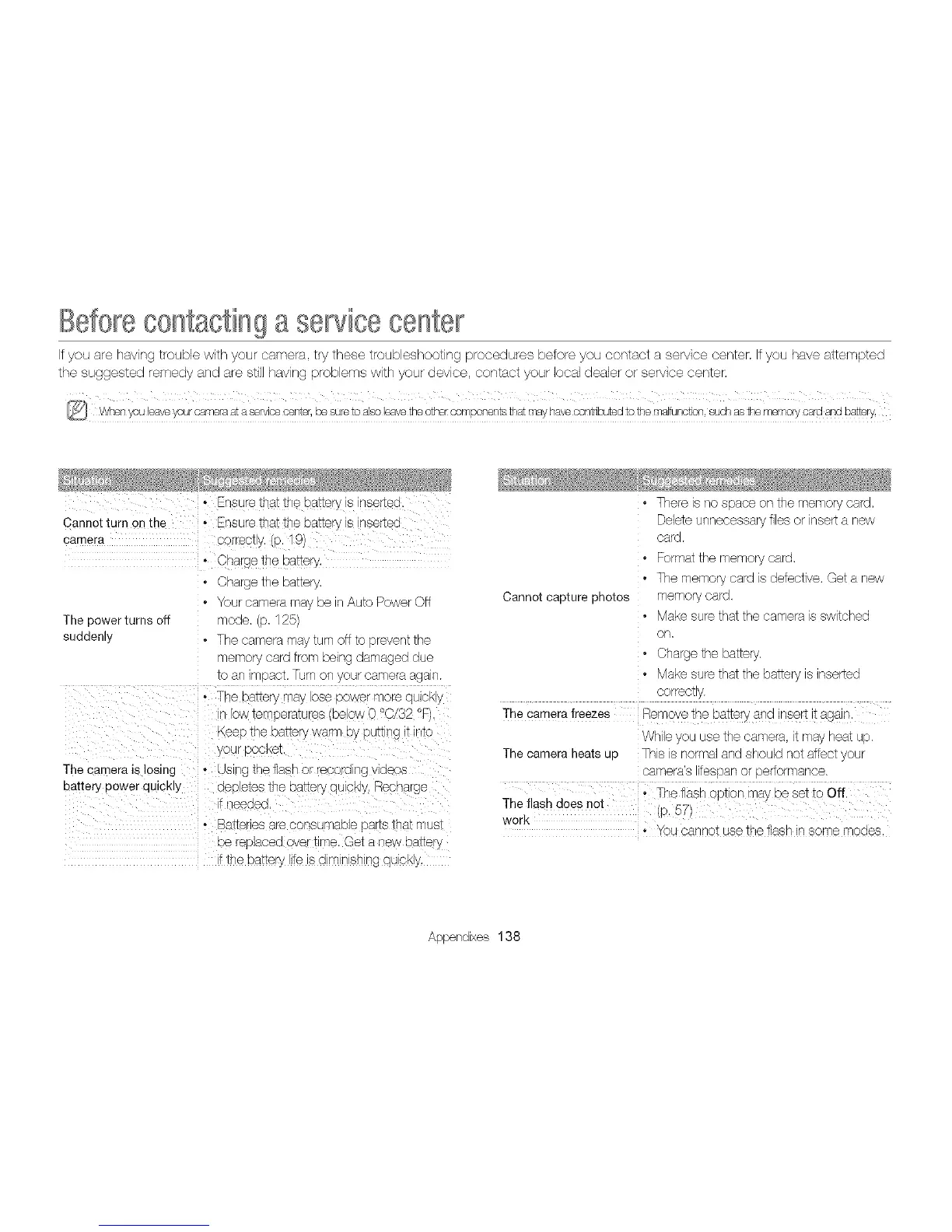
If you are having trouble with your camera try these troubleshooting procedures before you contact a service center. Ifyou have attempted
the suggested remedy and are still having problems with your device, contact your local dealer or sewice center,
• Ensure that the cannerys nsertec • There s no space on the memory card,
Cannot Iurn on the - Ensure tna_tne oa_terys nsertec Deleteunnecessary fl es or nsert a new
camera oorreoty, tP 19/ card.
- Charge tne ma_ery • Format the memory card,
• }barge tne oa_:ery • The memory card s detective. Get a new
• four camera ma De Auto Power Off Cannot capture photos memory card.
The cower turns off node D, 125 • Make sure that the camera s swtched
sudden • • The camera mav turn off :c sreven: tne on,
nero nardfrom being damaged due • Charge the battery.
to an ° }ac_,Turnon your camera agan • Make sure that the battery s inserted
° The basery may ose power more quickly correcty.
ow temeeratu es )elow 0 °O/32 °P The camerafreezes Remove the batteryand insert it aga n.
_,eeptne oa_erywarm DypuI_ng _ Jr-_to Wh le you use the camera, t may heat up.
your pocKeI. The camera heats up Ths s normal and should not affect your
The camera is losing • us ng the flash or recc "anr_ ]eos camera's itespan or pertormance.
battery power qUICKly aeeetes tne Da_erydUCKy.Recbarge
- needeci
• Batte es are consumao_e saris _na_mus_ • You cannot use the flash in some modes.
Deree_acedover _ he. Get a new battery
Ttne oa_ep, ife is dim nsitar_qu eKD
Appendixes 138



 To Next Page