22_ operating the cleaner
Charging
When the product is initially purchased, the battery is fully
discharged, and you must charge the vacuum cleaning
robot manually.
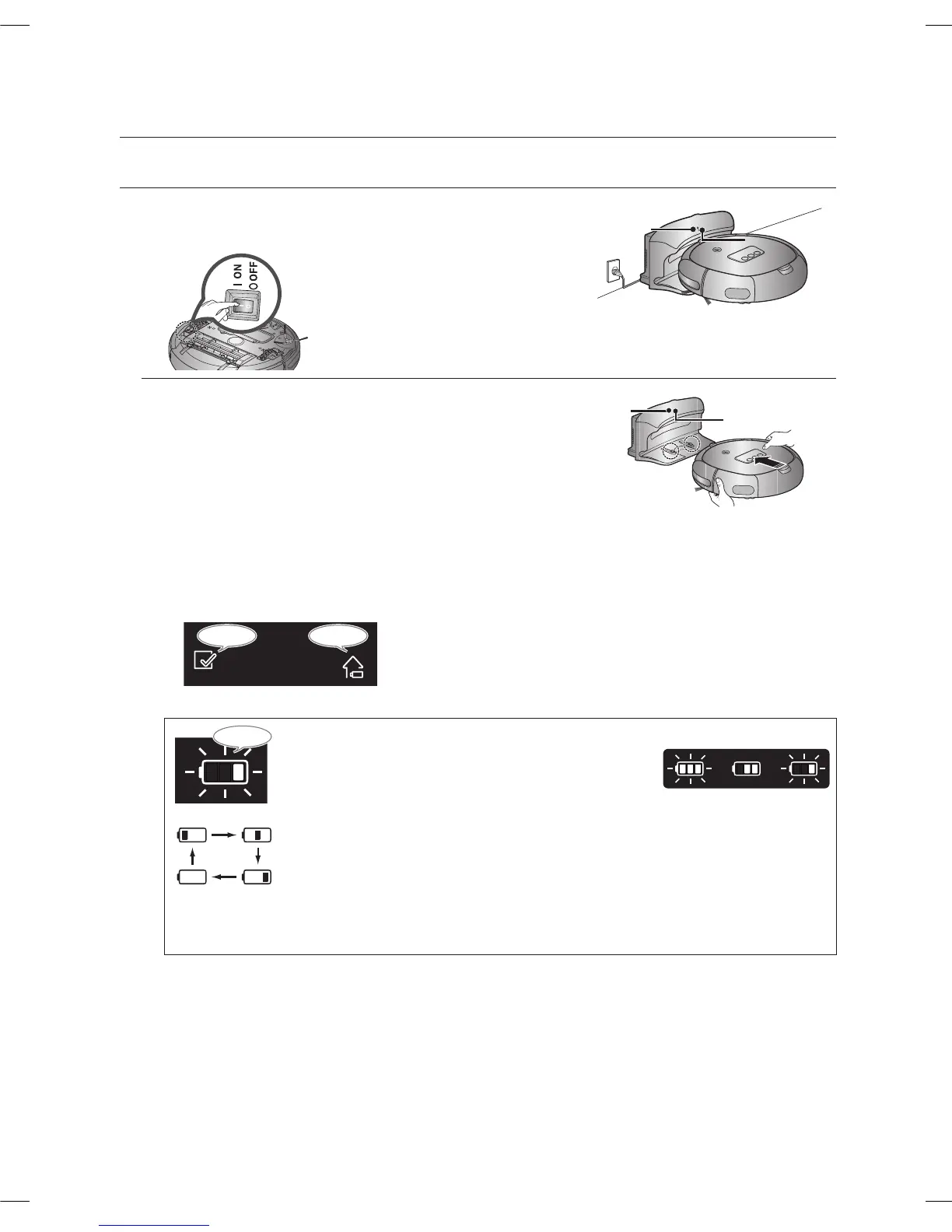
Turn on the Power Switch at the bottom of the product.
After aligning the charge pins of the main unit with the 1.
charge pin of the charger station, press the main unit
until you hear a Recharging power sound from the
charger.
The Charging Lamp turns green. -
Check the charge status of the vacuum cleaning 2.
robot.
When it is fully charged, all three bars of the battery level icon will Flash simultaneously. -
If the following appears in the display (as seen in the fi gure below) 10 seconds after connecting
■
the robot cleaner to the charging station, it indicates that the power switch is turned off. In this
case, please turn on the power switch at the bottom of the cleaner.
Flash
When the battery level display fl ashes while
■
cleaning, the Vacuum cleaning Robot stops
vacuuming and automatically charges itself at the
charger.
charging
If the battery level icon on the display moves to
■
the right as shown while the cleaner is operating,
the cleaner can no longer be operated by either
the remote control or the buttons on the main unit.
In this case, use the charger station to recharge
the battery. (This is when the battery is completely
discharged.)
operating the cleaner



 To Next Page