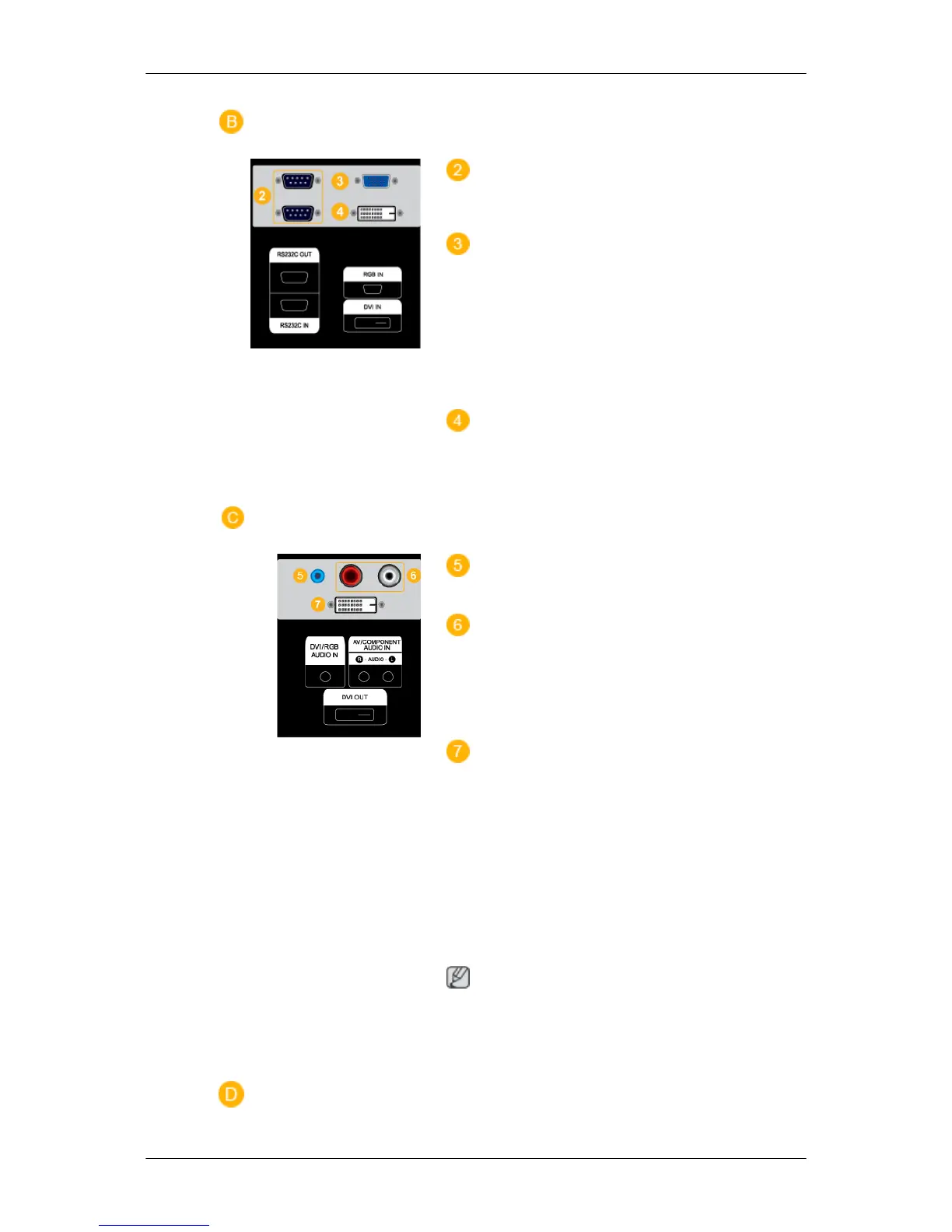
RS232C OUT/IN (RS232C Serial PORT)
MDC(Multiple Display Control) Program Port
RGB IN (PC Connection Terminal (In-
put))
• Use a D-Sub Cable (15 pin D-Sub) - PC
mode (Analog PC)
• Connect the RGB IN port on the monitor
to the BNC port on the PC using the RGB
to BNC cable.
DVI IN (PC Video Connection Terminal)
Use a DVI Cable (DVI-D to DVI-D) - DVI
mode (Digital PC)
DVI/RGB AUDIO IN (PC/DVI Audio Con-
nection Terminal (Input))
AV/COMPONENT AUDIO IN [R - AU-
DIO- L]
Connect the port of the DVD, VCR (DVD /
DTV Set-Top Box) to the [ R - AUDIO - L ]
port of the LCD Display.
DVI OUT
• Connect a monitor to another monitor
through a DVI cable.
• Connect the DVI OUT port on the monitor
to the HDMI IN port on the other monitor
using the DVI to HDMI cable.
• DVI, HDMI and network signals sent via
the DVI OUT port are displayed on the
second display which has the DVI IN port.
Note
Up to 6 Full HD or 10 HD monitors can be
connected (May differ depending on the
product).
Introduction













 To Next Page