Note
• Available Modes: PIP ON
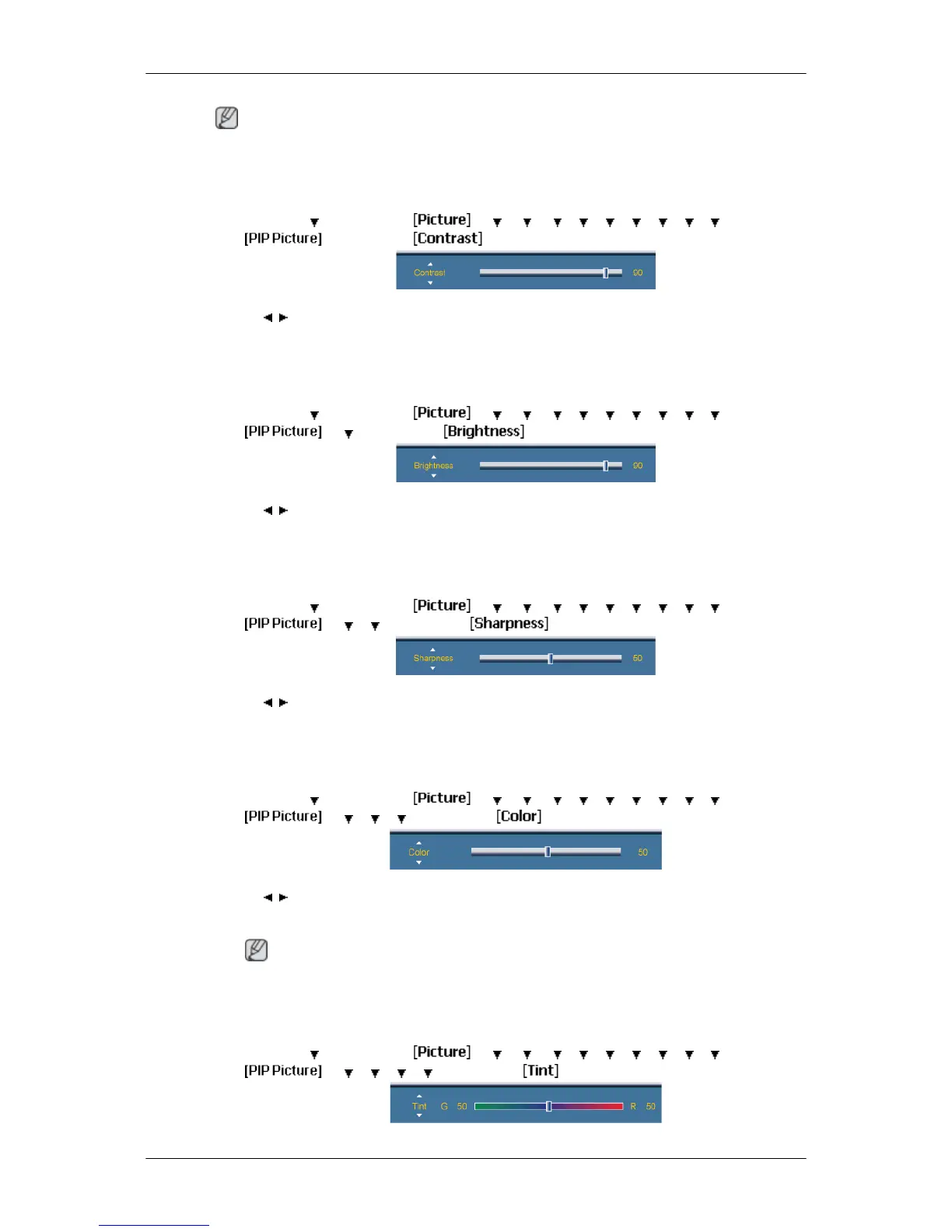
1. Contrast
MENU → → ENTER → → → → → → → → → → → ENTER →
→ ENTER→
→ , → ENTER
Adjusts the Contrast of the PIP window on the screen.
2. Brightness
MENU → → ENTER → → → → → → → → → → → ENTER →
→ → ENTER →
→ , → ENTER
Adjusts the Brightness of the PIP window on the screen.
3. Sharpness
MENU → → ENTER → → → → → → → → → → → ENTER →
→ → → ENTER →
→ , → ENTER
Adjusts the Sharpness of the PIP window on the screen.
4. Color
MENU →
→ ENTER → → → → → → → → → → → ENTER →
→ → → → ENTER →
→ , → ENTER
Adjusts the Color of the PIP window on the screen.
Note
Enabled only when the PIP input is selected in AV, HDMI or Component mode.
5. Tint
MENU → → ENTER → → → → → → → → → → → ENTER →
→ → → → → ENTER →
Adjusting the LCD Display




 To Next Page