EasyManua.ls Logo

Samsung SyncMaster 933HD Plus - Connecting a Camcorder

Samsung SyncMaster 933HD Plus
43 pages
Print Icon
To Next Page IconTo Next Page
To Previous Page IconTo Previous Page
Loading...
English - 9
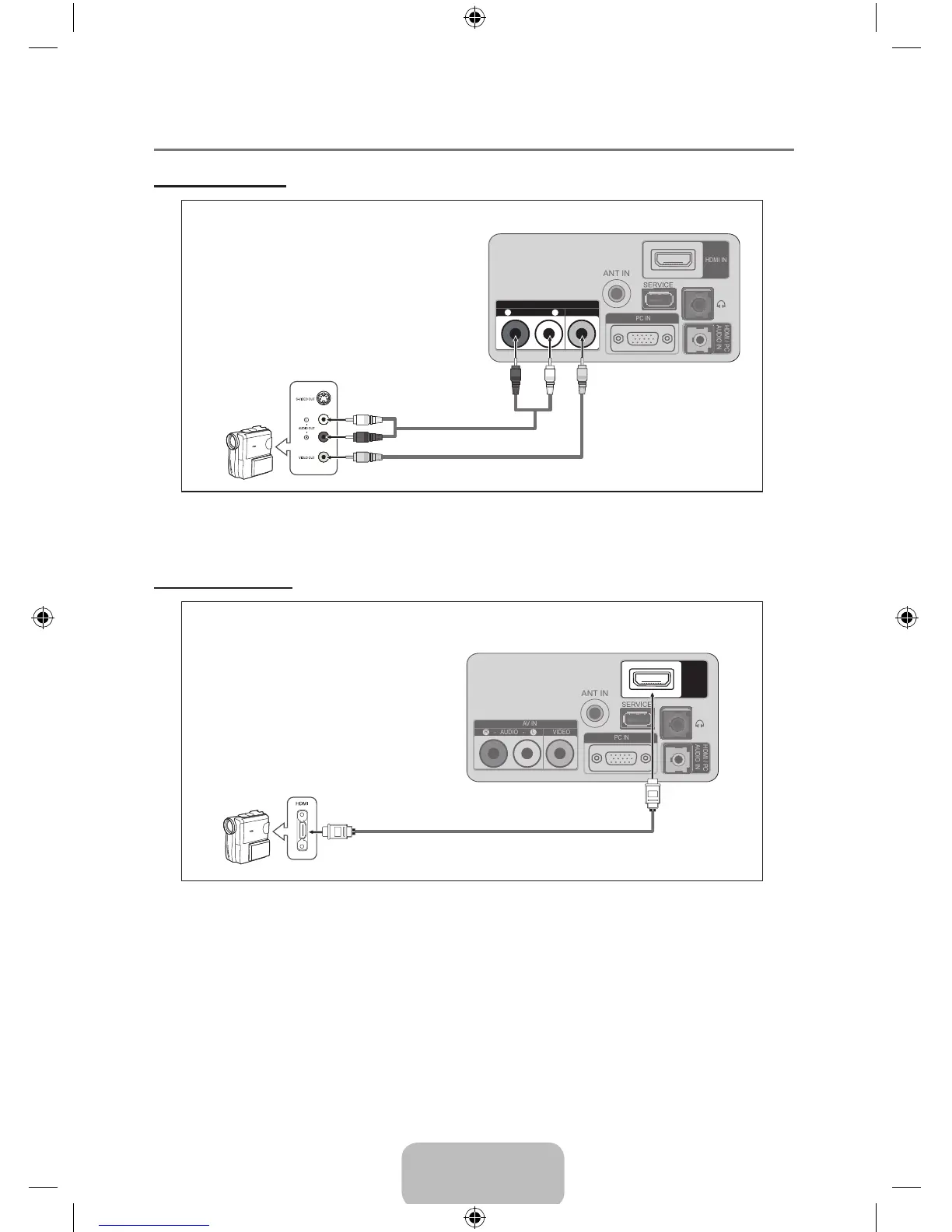
Connecting a Camcorder ¦
Using a Video Cable
ANT IN
HDMI IN
AV IN
- AUDIO -
VIDEO
R
L
PC IN
HDMI / PC
AUDIO IN
ANT IN
HDMI IN
AV IN
- AUDIO -
VIDEO
R
L
PC IN
HDMI / PC
AUDIO IN
Camcorder
TV Rear Panel
1
Video Cable (Not supplied)
2
Audio Cable
(Not supplied)
Each Camcorder has a different back panel conguration. N
When connecting a Camcorder, match the color of the connection terminal to the cable. N
Using an HDMI Cable
ANT IN
HDMI IN
AV IN
- AUDIO -
VIDEO
R
L
PC IN
HDMI / PC
AUDIO IN
ANT IN
HDMI IN
AV IN
- AUDIO -
VIDEO
R
L
PC IN
HDMI / PC
AUDIO IN
TV Rear Panel
HD Camcorder
1
HDMI Cable (Not supplied)
1. Connect an HDMI Cable between the HDMI IN jack on the TV and the HDMI OUT jack on the
camcorder.
BN59-00905F_eng.indd 9 2009-11-10 9:30:40

Table of Contents

Other manuals for Samsung SyncMaster 933HD Plus

Related product manuals