EasyManua.ls Logo

Samsung SyncMaster 933HD Plus - Installing and Disconnecting the Stand

Samsung SyncMaster 933HD Plus
43 pages
Print Icon
To Next Page IconTo Next Page
To Previous Page IconTo Previous Page
Loading...
English - 37
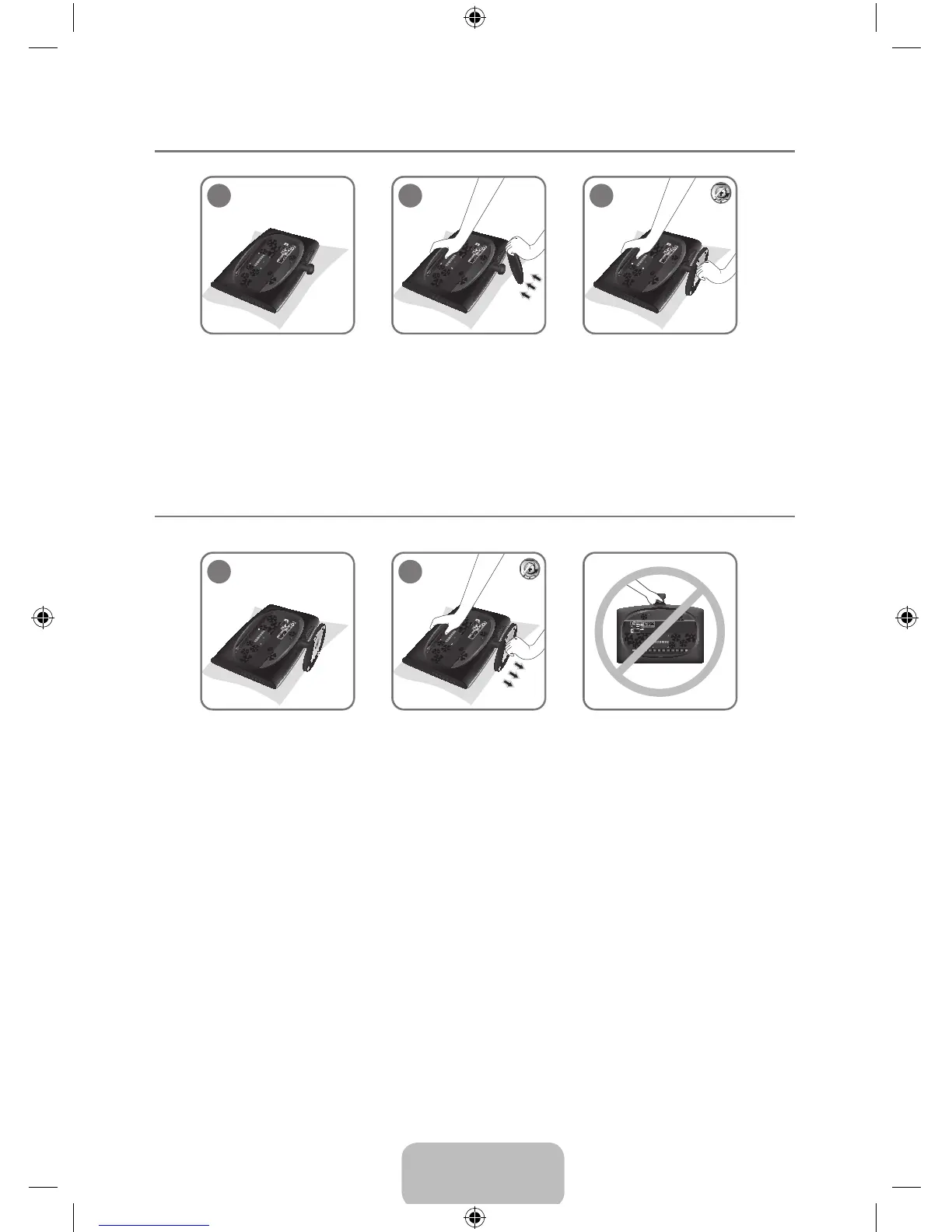
Installing the Stand ¦
1
2
3
1. Place the front of the TV onto a soft cloth or cushion on a table.
Align the TV bottom along the table edge. N
2. Insert the Stand Connector into the Stand in the direction shown by the gure.
3. Turn the connecting screw at the bottom of the stand fully so that it is completely xed.
Disconnecting the Stand ¦
1
2
1. Place the front of the TV onto a soft cloth or cushion on a table.
Align the TV bottom along the table edge. N
2. Turn the connecting screw at the bottom of the stand to separate it.
Do not lift the product holding only the stand. N
BN59-00905F_eng.indd 37 2009-11-10 9:30:48

Table of Contents

Other manuals for Samsung SyncMaster 933HD Plus

Related product manuals