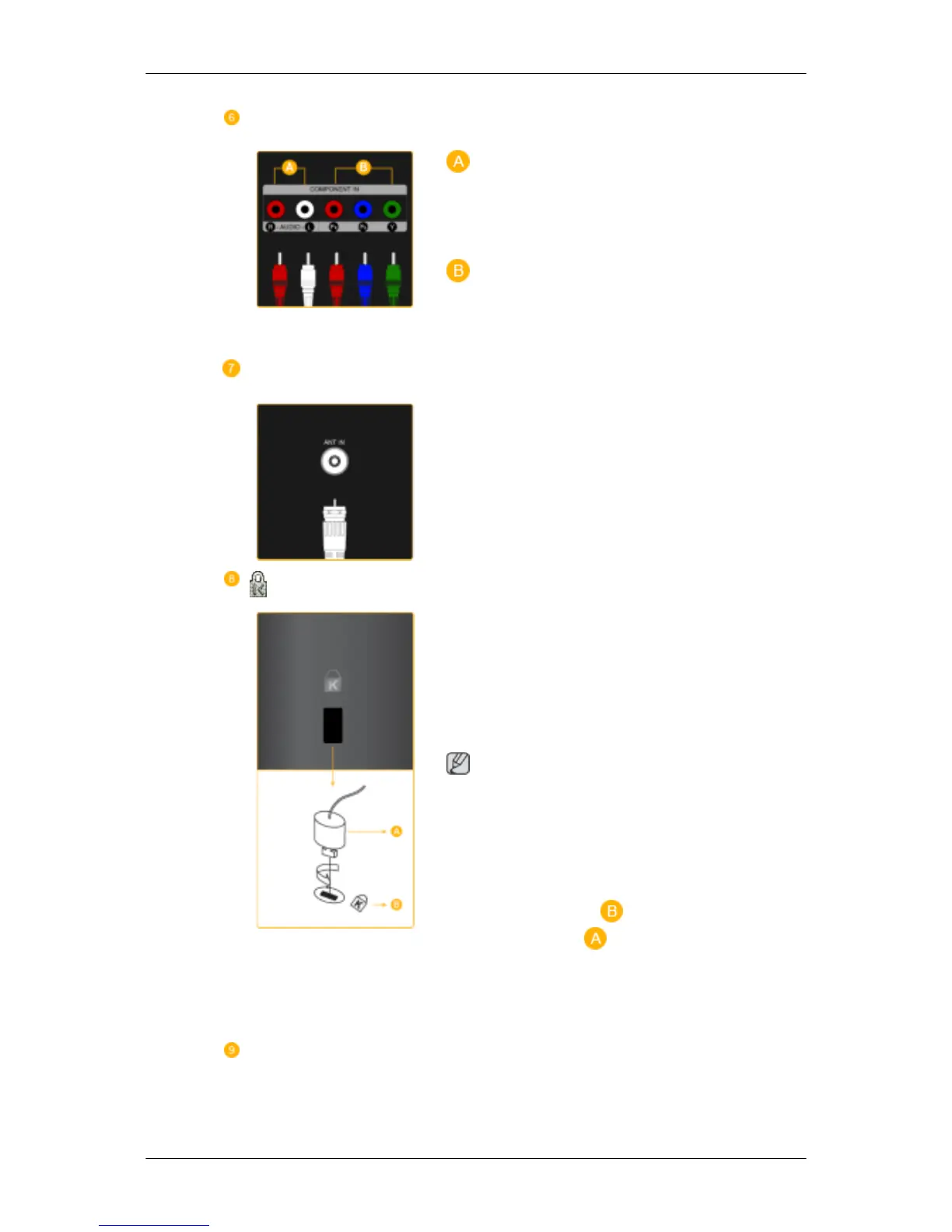
COMPONENT IN
R - AUDIO - L
Connect the port of the DVD, VCR (DVD / DTV
Set-Top Box) to the [ R - AUDIO - L] port of the
product.
P
R
, P
B
,Y
Connect the VIDEO OUT port of the DVD / DTV
Set-Top Box to the [ P
R
, P
B
,Y ] input ports using
a component video cable ( P
R
, P
B
,Y ).
ANT IN
Connect the CATV cable or TV antenna cable to
the "ANT IN" port on the rear side of the product.
Make sure to use a TV antenna cable (sold sepa-
rately) as the antenna cable.
Kensington Lock
The Kensington Lock is a device used to physi-
cally fix the system when using it in a public
place. The locking device has to be purchased
separately. The appearance and locking method
may differ from the illustration depending on the
manufacturer. Refer to the manual provided with
the Kensington Lock for proper use. The locking
device has to be purchased separately.
Note
The location of the Kensington Lock may be dif-
ferent depending on its model.
Using the Anti-Theft Kensington Lock
1. Insert the locking device into the Kensington
slot on the Monitor ( ) and turn it in the
locking direction ( ).
2. Connect the Kensington Lock cable.
3. Fix the Kensington Lock to a desk or a heavy
stationary object.
COMMON INTERFACE
Introduction










 To Next Page