Installing the Product 2-8
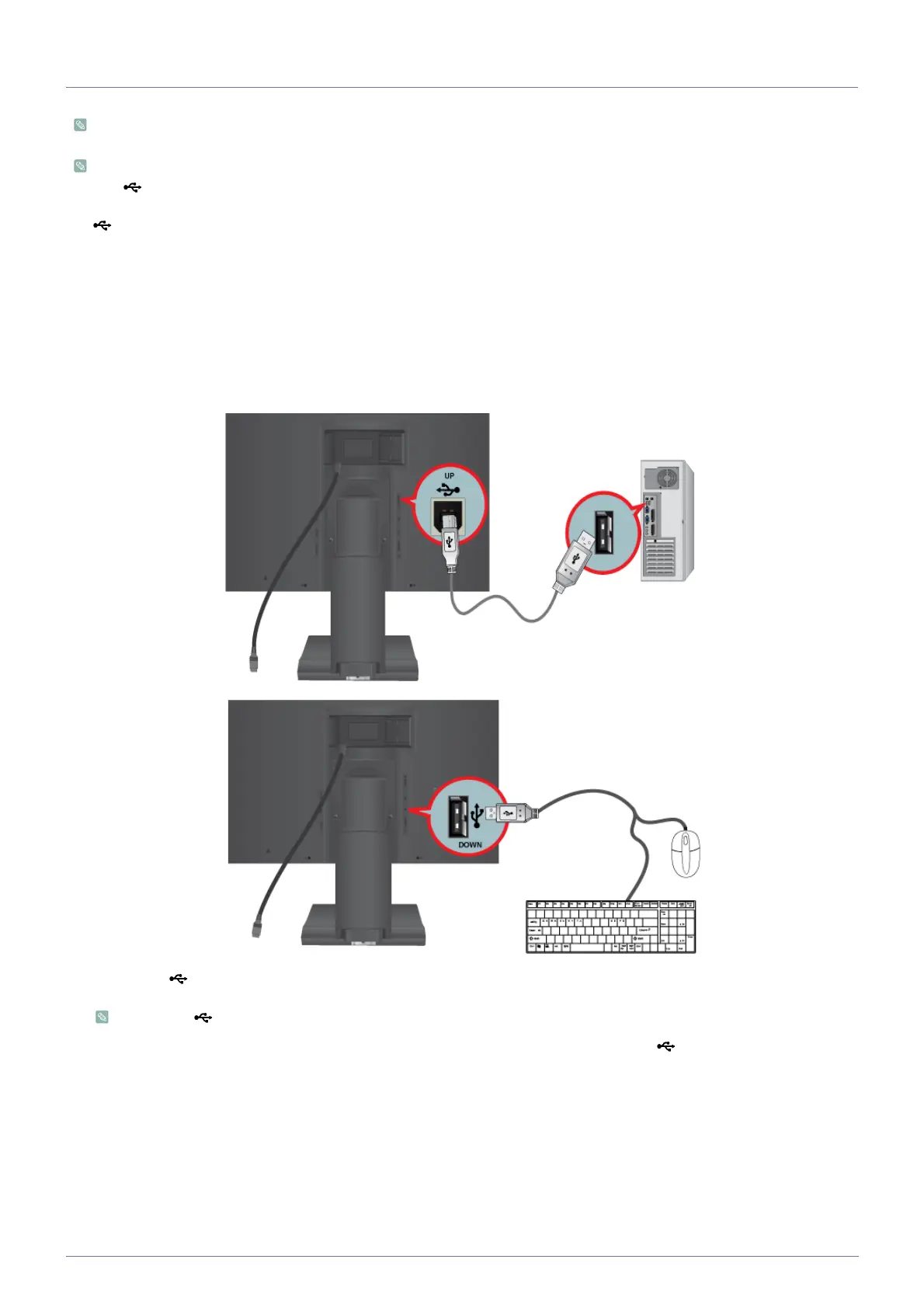
2-8 Connecting USB
Applicable to the stand models that have USB ports only.
You can use a USB device such as a mouse, keyboard, Memory Stick, or external hard disk drive by connecting them to
the DOWN port of the monitor without connecting them to the PC.
The USB port of the monitor supports High-Speed Certified USB 2.0.
1. Connect the UP port of the monitor and the USB port of the computer with the USB cable.
• To use DOWN port, you have to connect the UP (Upstream Cable) to the PC.
• Make sure to use the USB cable supplied with this monitor to connect the monitor's UP port and your computer's
High speed Full speed Low speed
Data Rate 480 Mbps 12 Mbps 1.5 Mbps
Power Consumption 2.5 W
(Max., each port)
2.5 W
(Max., each port)
2.5 W
(Max., each port)






 To Next Page