EasyManua.ls Logo

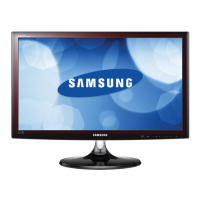
Samsung T32E310EW - User Manual

Samsung T32E310EW
94 pages
Print Icon
To Next Page IconTo Next Page
Loading...
LED TV
user manual
Thank you for purchasing this Samsung product.
To receive more complete service, please register
your product at
www.samsung.com/register
Model _____________ Serial No. _____________
T24E310EW
T24E310EX
T28E310EW
T28E310EX
T32E310EW
T32E310EX
TE310

Table of Contents

Questions and Answers

  • R
    redwardsAug 13, 2025
    Why did my Samsung LED TV turn on by itself?
    • D
      Darren RogersAug 13, 2025
      If your Samsung LED TV turned on by itself after being off for about 45 minutes, this is normal behavior. The TV uses the OTA (Over The Air) function to automatically update firmware downloaded while you were watching TV.
  • M
    Michael CoxAug 17, 2025
    How to fix intermittent loss of audio or video on Samsung T32E310EW?
    • A
      Amber LamAug 17, 2025
      Loss of audio or video on your Samsung LED TV can be caused by using cables that are too rigid or thick. Check the cable connections and reconnect them. Ensure the cables are flexible enough for long-term use. If mounting the TV to the wall, consider using cables with 90-degree connectors.
  • C
    carterlauraAug 20, 2025
    Why does my Samsung T32E310EW LED TV say “This file may not be playable properly”?
    • C
      Christopher CrawfordAug 21, 2025
      If you see the message “This file may not be playable properly” on your Samsung LED TV, it might be due to the high bit rate of the content. Usually, the content will still play, but you might experience some issues with its playability.
  • K
    Karen ChandlerAug 25, 2025
    What to do if my Samsung T32E310EW shows “Scrambled Signal” or “Weak or No Signal”?
    • E
      Evelyn EdwardsAug 26, 2025
      If you see “Scrambled Signal” or “Weak or No Signal” on your Samsung LED TV, and you're using a CAM CARD (CI/CI+), ensure it's properly inserted into the common interface slot. If the problem persists, try removing the CAM CARD and reinserting it into the slot.
  • S
    shannon76Aug 29, 2025
    How to fix recurrent picture/sound issues on Samsung T32E310EW LED TV?
    • S
      sarahterryAug 29, 2025
      If you are experiencing recurrent picture or sound issues on your Samsung LED TV, try checking and changing the signal or source to resolve the problem.
  • J
    Jordan MeadowsSep 1, 2025
    Why is the PIP menu not available on my Samsung T32E310EW LED TV?
    • J
      jessicawadeSep 2, 2025
      PIP functionality on Samsung LED TV is available when you are using a TV, AV, Component, HDMI2/ DVI, EXT., or HDMI1 source.
  • C
    Carlos GomezSep 5, 2025
    What to do if rubber cushion pads on my Samsung T32E310EW base stand react with furniture?
    • S
      stephen17Sep 5, 2025
      To prevent a reaction between the rubber cushion pads on the base stand and the top finish of some furniture, use felt pads on any surface of the Samsung LED TV that comes into direct contact with furniture.
  • K
    krystaldavilaSep 9, 2025
    Why do I see small particles on the edge of my Samsung T32E310EW LED TV frame?
    • M
      Mitchell TaylorSep 9, 2025
      This is part of the product’s design and is not a defect.

Summary

Getting Started

Safety Precautions

Guidelines for safe operation and handling of the product.

Installation Related

Instructions and warnings for installing the TV securely and safely.

Installing the Stand

Step-by-step guide for attaching the TV stand to the product.

Initial Setup

On-screen prompts to guide through basic TV configuration upon first use.

Connecting the Power Cord and the Aerial or Cable Connection

Instructions for connecting the TV to power and broadcast signal sources.

Connections

Connecting to AV Devices (Blu-ray Players, DVD Players, etc.)

Guide for connecting external audio-visual devices like Blu-ray players.

Connecting to a PC

Steps to connect a personal computer to the TV for display and audio.

Changing the Input Source

Procedure for selecting the active input source on the TV.

Basic Features

Changing the Preset Picture Mode

Options for selecting predefined picture settings based on viewing environment.

Adjusting Picture Settings

Detailed guide for fine-tuning picture quality parameters like brightness and contrast.

Changing the Picture Options

Accessing advanced picture settings for detailed screen adjustments.

Changing the Preset Sound Mode

Selecting predefined sound profiles for different types of content.

Adjusting Sound Settings

Guide to configuring sound effects and audio equalization for optimal listening.

Auto Tuning

Procedure for automatically scanning and storing available TV channels.

Preference Features

Setting the Time

Guide to setting the TV's clock, time zone, and auto/manual time configurations.

Self Diagnosis

Tools for diagnosing and troubleshooting TV picture and sound issues.

Software Update

Instructions for updating the TV's firmware to the latest version.

Advanced Features

Connecting a USB Device

Steps for connecting USB storage devices containing media files to the TV.

Playing the Photos; Videos; Music

Detailed guide for navigating and controlling media playback on the TV.

Other Information

Troubleshooting

Solutions for common issues related to picture quality, color, and screen display.

Sound Quality

Troubleshooting steps for issues with no sound or low volume.

No Picture, No Video

Solutions for problems where the TV screen is blank or shows no image.

Installing the Wall Mount

Instructions and precautions for mounting the TV on a wall.

Installing the TV on a wall

Visual guide demonstrating the process of mounting the TV on a wall.

Securing the TV to the Wall

Safety instructions and methods for securely attaching the TV to a wall.

To avoid the TV from falling

Specific steps and precautions to prevent the TV from tipping over.

Specifications

Technical specifications of the TV, including dimensions, resolution, and power.

Warranty Card

WARRANTY CONDITIONS

Terms and conditions governing the product's warranty period and coverage.

Contact SAMSUNG WORLDWIDE

Samsung T32E310EW Specifications

General IconGeneral
Screen Size32 inches
Resolution1366 x 768
Display TypeLED
Refresh Rate60 Hz
HDMI Ports2
USB Ports1
Smart TVNo
Aspect Ratio16:9

Related product manuals