operating the cleaner
Remote-control type (Optional)
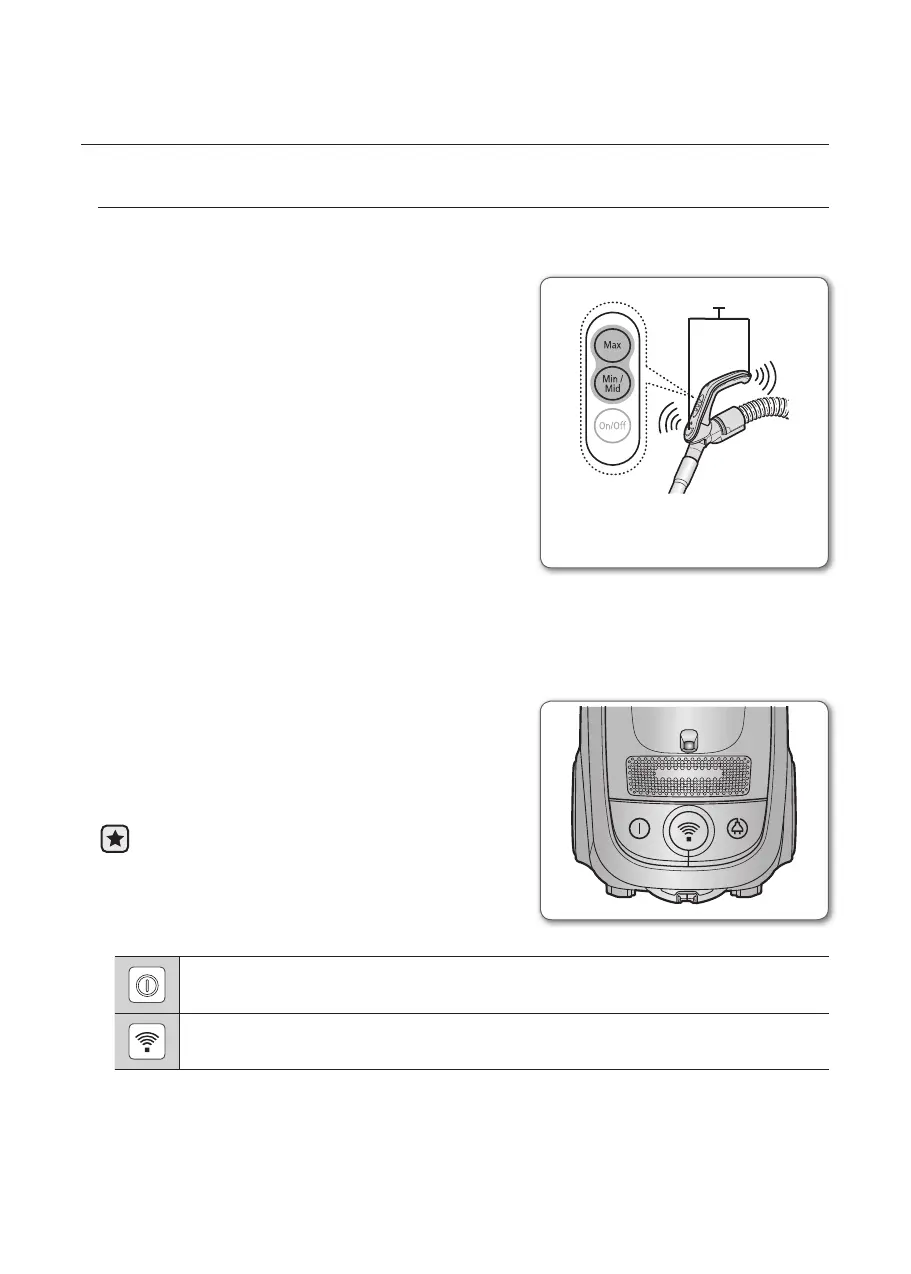
-HOSE
1. Vacuum cleaner ON/OFF
Press the ON/OFF button to operate the vacuum
cleaner.
Press again to stop the vacuum cleaner.
2. Vacuum cleaner MIN/MID
Press the MIN/MID button to operate the vacuum
at a low level (for curtain cleaning, etc.).
Press again to operate the vacuum in a MID
mode.
3. Using at MAX
Press the MAX button to operate the vacuum at
maximum intake.
-BODY
Press the power ON/OFF button repeatedly to
start and to stop the vacuum cleaner.
(OFF
→
ON
→
OFF)
If the remote handle control is not working,
the cleaner can be operated using the ON/OFF
button on the body of the machine.
The ON/OFF button operates the vacuum cleanner or stops it.
The INFRARED light indicates the part that receives the infra-red signal from the
handle control.
Handle Control
The cleaner is controlled by using
infrared signals.
sender






 To Next Page