EasyManua.ls Logo

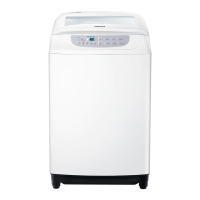
Samsung WA90H4200SW - User Manual

Samsung WA90H4200SW
22 pages
Print Icon
To Next Page IconTo Next Page
Loading...
Washing Machine
user manual
imagine the possibilities
Thank you for purchasing a Samsung product.
WA90H4400SS
WA90H4200SW
WA70H4200SW
WA90H4200SW_03414K_EN_140306.indd 1
This manual is made with 100% recycled paper.
DC68-03414K

Questions and Answers

  • G
    gavinramirezAug 8, 2025
    What to do if my Samsung WA90H4200SW Washer shows a Child Lock error?
    • E
      emilygloverAug 8, 2025
      If your Samsung Washer displays 'CL' or 'dE' and drains with an alarm, it indicates the Child Lock is activated to prevent accidents. After draining, turn the power off and then on. Ensure the door is closed, then turn the power off and on again. Also, verify if the Start/Pause button is pressed.
  • D
    David PetersenAug 18, 2025
    Why is no water being supplied to my Samsung WA90H4200SW?
    • N
      Nicolas DouglasAug 18, 2025
      Ensure the water tap is open and that water is not cut off. Check the water supply hose and its connection for clogs. Also, make sure the water tap isn't frozen. If the water supply isn't finished within 1 hour, or if there's no water level change after 5 minutes (10 minutes for some models), a buzzer will sound, and '4E' will be displayed.
  • J
    James MartinAug 29, 2025
    What to do if the water does not drain from my Samsung Washer?
    • H
      Heidi ThomasAug 29, 2025
      To resolve water drainage issues with your Samsung Washer, check if the drain hose is positioned correctly (for models without a pump, it should be down). Ensure the drain hose isn't frozen or clogged. If the water doesn't drain within 30 minutes, a buzzer will sound, and the display will show '5E'.

Summary

Safety Instructions

General Safety Precautions

Key precautions to prevent danger and damage during appliance use.

Child Safety and Usage Restrictions

Guidelines regarding children's access and use by persons with reduced capabilities.

Electrical & Positioning Safety

Instructions for safe electrical connection and appliance placement.

Operational Safety Warnings

Handling Power Cords and Wet Parts

Warnings about handling power cords, touching wet parts, and operating the machine.

Appliance Environment Precautions

Precautions regarding the appliance's surroundings and materials used.

Additional Safety Precautions

Installation Environment Safety

Advice on avoiding moisture, direct sunlight, and heaters.

Usage and Cleaning Safety Guidelines

Warnings about unplugging, cleaning procedures, and cleaning agents.

Setting Up Your Washer

Description of Parts

Identifies and explains the main components of the washing machine.

Automatic Washing Process

Automatic Sensing Function Explained

Explanation of how the machine senses laundry and adjusts settings.

Control Panel Overview

Digital Graphic Display Function

Explains the display for remaining time and error codes.

Child Lock Functionality

Installation and Maintenance

Connecting the Water Supply Hose

Step-by-step guide to connect the water supply hose to the tap and machine.

Drain Hose and Filter Maintenance

Connecting the Drain Hose

Instructions for connecting the drain hose for pump-drained and general washers.

Troubleshooting Common Problems

Machine Wont Work or Water Issues

Checks for power, water supply, and drain hose problems.

Washing Machine Operation Issues

Power Cut or Machine Not Working

Checks for power, lid, pause button, and water supply issues.

Washing Machine Performance Issues

No Water Extraction

Checks for start/pause, faucet, and filter issues when no water is extracted.

Noises and Vibrations During Spinning

Solutions for loud noises and vibrations, including leveling and load balance.

Product Specifications

Samsung WA90H4200SW Specifications

General IconGeneral
BrandSamsung
ModelWA90H4200SW
CategoryWasher
LanguageEnglish

Related product manuals