washing a load of laundry _25
02WASHINGALOADOFLAUNDRY
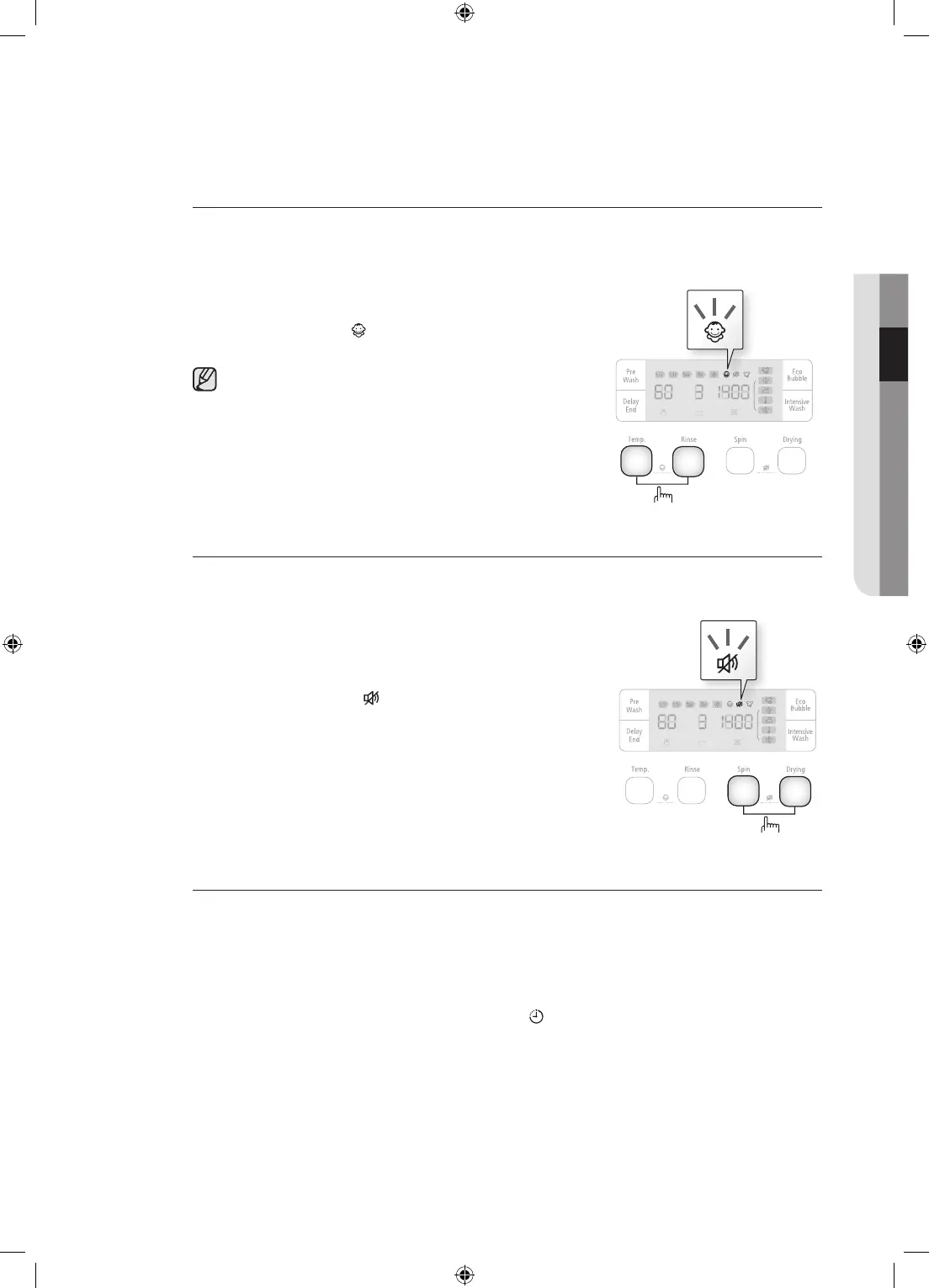
Childlock
TheChildLockfunctionallowsyoutolockthebuttonssothatthewashcycleyou’vechosen
can’t be changed.
Activating/Deactivating
IfyouwanttoactivateordeactivatetheChildLockfunction,
press the Temp. and Rinse buttons at the same time for
3seconds.“Child Lock ” will be lit when this feature is
activated.
WhentheChildLockfunctionisactivated,onlythe
Powerbuttonworks.TheChildLockfunctionremains
on even after the power is turned on and off or after the
disconnecting and reconnecting the power cord.
Soundoff
TheSoundOfffunctioncanbeselectedduringallcourses.Whenthisfunctionisselected,sound
is turned off for all courses. Even if the power is turned on and off repeatedly, the setting is
retained.
Activating/Deactivating
IfyouwanttoactivateordeactivatetheSoundOfffunction,
press the Spin and Optionbuttonsatthesametimefor3
seconds. The “Sound Off ” will be lit when this feature is
activated.
Delayend
You can set the washing machine to finish your wash automatically at a later time, choosing a
delayofbetween3to19hours(in1hourincrements).Thehourdisplayedindicatesthetimeat
which the wash will be finished.
1. Manuallyorautomaticallysetyourwashingmachineaccordingtothetypeoflaundryyouare
washing.
2. Press the Delay End button repeatedly until the delay time is set.
3. Press the Start/Pause button. The “Delay End ” indicator will be lit, and the clock will
begin counting down until it reaches the set time.
4. TocancelaDelayEndfunction,pressthePower button and then turn the washing machine
on again.
3SEC.
3SEC.
WD0804W8-02927U_EN(XEU)_removePF.indd 25 2011-7-9 11:58:56


 To Next Page