EasyManua.ls Logo

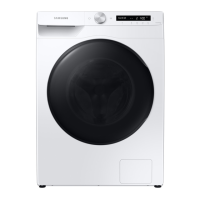
Samsung WD10T Series - User Manual

Samsung WD10T Series
144 pages
Print Icon
To Next Page IconTo Next Page
Loading...
Washing Machine
User manual
WD1*T****** / WD9*T****** / WD8*T******
U-PJT_COMBO-MD_SimpleUX_DC68-04269L-00_EN.indd 1 2021/6/30 9:06:57

Questions and Answers

  • B
    brent22Jul 30, 2025
    What to do if my Samsung WD10T does not start?
    • R
      Robin PerezJul 30, 2025
      If your Samsung Washer doesn't start, there are several things to check: * Ensure the washing machine is properly plugged in. * Verify that the door is completely closed. * Confirm that the water taps are open. * Press and hold the start button to initiate the cycle. * Check that Child Lock is not activated. * Inspect the fuse or reset the circuit breaker. * Ensure proper power supply. Also, if the 'AddWash door is open' message appears, close the AddWash door properly and try again.
  • C
    Catherine RobinsonAug 9, 2025
    Why is there no water coming into my Samsung Washer?
    • J
      Jeffrey TaylorAug 9, 2025
      If your Samsung Washer isn't getting enough water or no water at all, try these steps: * Fully open the water tap. * Make sure the door is properly closed. * Check that the water supply hose isn't frozen, kinked, or clogged. * Ensure there's sufficient water pressure. * Verify the cold and hot water taps are correctly connected. * Clean the mesh filter, as it may be clogged.
  • U
    umartinAug 18, 2025
    How to prevent detergent from remaining in the drawer of my Samsung Washer?
    • J
      Joe HillAug 18, 2025
      If detergent remains in the detergent drawer of your Samsung Washer after a cycle, consider the following: * Ensure the washing machine has sufficient water pressure. * Make sure you're adding the detergent to the center of the drawer. * Verify the rinse cap is correctly inserted. * If using granular detergent, ensure the detergent selector is in the upper position. * Remove the rinse cap and clean the detergent drawer.

Summary

Safety Information

What You Need to Know About the Safety Instructions

Understand essential safety guidelines for operating the washing machine safely and efficiently.

Important Safety Precautions

Follow basic precautions to reduce the risk of fire, electric shock, or injury when using the appliance.

Critical Installation Warnings

Adhere to critical warnings for safe and proper installation of the washing machine.

Installation Cautions

Observe cautions to ensure the washing machine is positioned correctly and safely.

Critical Usage Warnings

Follow critical warnings to prevent hazards during the operation of the washing machine.

Usage Cautions

Adhere to cautions for safe and proper use of the washing machine during operation.

Installation

Installation Requirements

Meet electrical, water supply, and drain requirements for proper installation.

Step-by-Step Installation

Follow detailed steps for selecting a location and removing shipping bolts.

STEP 3 Adjust the Levelling Feet

Level the washing machine by adjusting the feet to ensure stability and reduce vibration.

STEP 4 Connect the Water Hose

Connect the water inlet hose correctly to the tap and washing machine.

STEP 5 Position the Drain Hose

Position the drain hose correctly for effective water drainage.

STEP 6 Power On

Connect the power cord and turn on the washing machine for the first time.

Before You Start

Laundry Guidelines

Follow guidelines for sorting laundry, checking pockets, and using laundry nets.

Operations

Operating a Cycle

Learn how to select, customize, and start a washing cycle on the machine.

Cycle Overview

Explore different wash cycles, their descriptions, and maximum load capacities.

SmartThings

Set up and use the SmartThings app for smart washing machine control.

Maintenance

Troubleshooting

Checkpoints

Review common issues and suggested solutions for washing machine problems.

Information Codes

Understand error codes displayed on the screen to diagnose and resolve issues.

Specifications

Samsung WD10T Series Specifications

General IconGeneral
BrandSamsung
ModelWD10T Series
CategoryWasher
LanguageEnglish

Related product manuals