EasyManua.ls Logo

Samsung YP-Q3AB - User Manual

Samsung YP-Q3AB
55 pages
Print Icon
To Next Page IconTo Next Page
Loading...
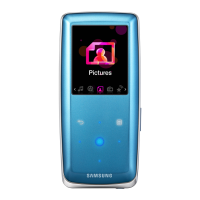
YP-Q3
Thank you for purchasing this Samsung
product. To receive a more complete
service, please register your product at
www.samsung.com/register
MP3 Player
user manual
imagine the possibilities

Questions and Answers

  • C
    charleswareAug 16, 2025
    What to do if my Samsung MP3 Player will not turn on?
    • R
      Rita EricksonAug 16, 2025
      If your Samsung MP3 Player will not turn on, try recharging the battery and then attempt to power it on again. If this doesn't work, reset the player by pressing the reset button.
  • J
    jlopezAug 18, 2025
    Why my Samsung YP-Q3AB MP3 Player will not connect to PC?
    • A
      Ashley WilliamsAug 19, 2025
      If your Samsung MP3 Player isn't connecting to your PC, try running Windows Update on your PC. Select key updates and service packs to update everything. Reboot the PC and reconnect the player after the update is complete.
  • C
    Charles SmithAug 22, 2025
    Why battery running time on Samsung YP-Q3AB is different?
    • A
      Amanda HoodAug 22, 2025
      The battery running time of your Samsung MP3 Player may differ depending on the current sound mode or display settings. Also, the battery running time may decrease if the player is left in a location with a high or low temperature.
  • H
    Heidi BoydAug 26, 2025
    How to fix slow file transfer on Samsung YP-Q3AB?
    • J
      Judy PriceAug 26, 2025
      To resolve slow file transfers on your Samsung MP3 Player, first format the player by going to Settings, then System, and finally Format. Also, closing any programs you are not actively using can help, as running multiple programs simultaneously can reduce the file transfer rate.
  • J
    Jared WilsonAug 28, 2025
    Why Samsung YP-Q3AB will not play any files?
    • C
      carloswatsonAug 28, 2025
      If your Samsung MP3 Player is not playing files, first verify that there are playable files stored on the player. Also, your player cannot play files larger than 2 GB, so check the size of the files. Make sure that the files are not damaged and that the battery is charged.
  • S
    Steve CruzAug 30, 2025
    How to fix Samsung YP-Q3AB MP3 Player when I cannot download files?
    • J
      Johnny BeckerAug 31, 2025
      If you cannot download files to your Samsung MP3 Player, ensure the USB cable is correctly connected, and try reconnecting it. Also, verify that you have Windows Media Player 11 or higher installed on your PC. Check if the memory is full. If problems persist, reset the player by pressing the reset button.
  • A
    Alexandra ReedSep 3, 2025
    What to do if buttons do not work on Samsung YP-Q3AB MP3 Player?
    • F
      Frank BergSep 3, 2025
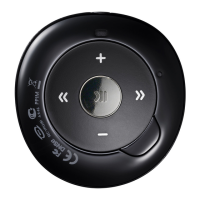
      If the buttons on your Samsung MP3 Player are not working, first check if the buttons are locked. Ensure that the buttons correspond to the functions you are trying to use. If the problem continues, reset the player by pressing the reset button.
  • A
    Abigail MoralesSep 6, 2025
    Why does my Samsung MP3 Player turn off automatically?
    • C
      Caroline CareySep 6, 2025
      If your Samsung MP3 Player turns off automatically, it may be because the player is designed to turn off if it is not used for 5 minutes after playback is paused.
  • D
    Dr. Joseph TorresSep 9, 2025
    What to do if Samsung MP3 Player does not play a video file?
    • S
      Sydney BerrySep 9, 2025
      If your Samsung MP3 Player does not play a video file and shows an error message, try re-transferring the video file using Kies.
  • M
    Michael TownsendSep 12, 2025
    Why Samsung MP3 Player screen does not display anything?
    • A
      Ann LewisSep 12, 2025
      The screen of your Samsung MP3 Player might not be visible if it is under direct sunlight.

Samsung YP-Q3AB Specifications

General IconGeneral
BrandSamsung
ModelYP-Q3AB
CategoryMP3 Player
LanguageEnglish

Related product manuals