30
GB
Deleting les from the Program List
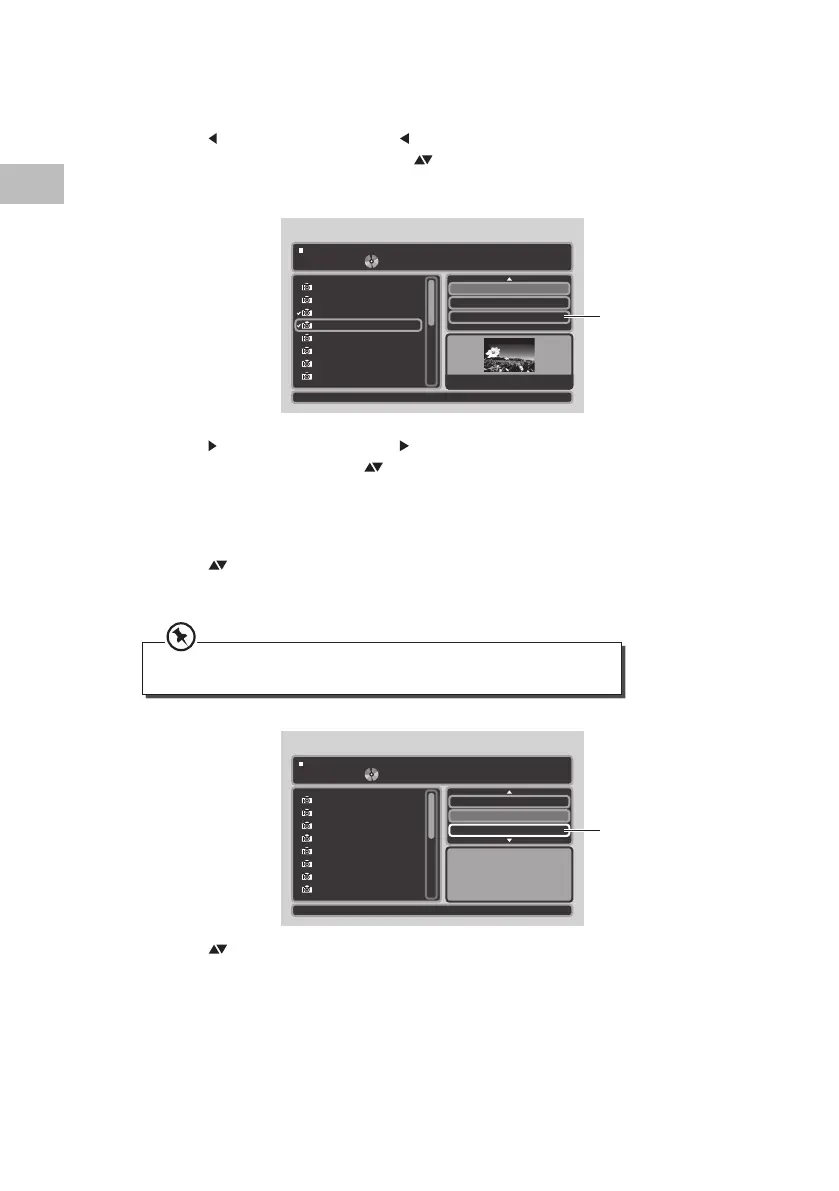
1. Repeat steps 1, 2 and 3 as described in “Adding les to the Programme List” section.
2. Press the
button on the unit or the /VOL– button on the remote control to enter the
left screen in Program view. Press the buttons on the unit or the remote control to
select a le you want to delete, and then press the OK button on the unit or press the
ENTER button on the remote control to select the le.
3. Press the
button on the unit or the /VOL+ button on the remote control to enter
the right screen, then press the buttons on the unit or the remote control to select
Clear program to delete the ticked les in Program view.
To Return to Browser List
1. Press the buttons on the unit or the remote control to select the Browser view,
then press the OK button on the unit or press the ENTER button on the remote control
to change from “Browser view” to “Program view”.
2. Press the
buttons on the unit or the remote control to select Edit mode, then press
the OK button on the unit or press the ENTER button on the remote control to leave
Edit mode.
• The “Browser view” will display all the tracks available on the disc.
• The “Program view” will display all the selected track after programming.
4 / 17
W: 1024 H: 768
Edit mode
Browser view
Clear program
011101_12
011101_13
011101_01
011101_22
011101_26
011101_31
011101_33
011101_34
011101_22
Clear Program
Browser view
1 / 17
Edit mode
Browser view
011101_12
011101_13
011101_01
011101_22
011101_26
011101_31
011101_33
011101_34
Mode : Normal
Browser view
S95PD11E_IB_7L_RC_130606_Michelle.indb 30 6/6/13 4:08 PM


 To Next Page