12
GB
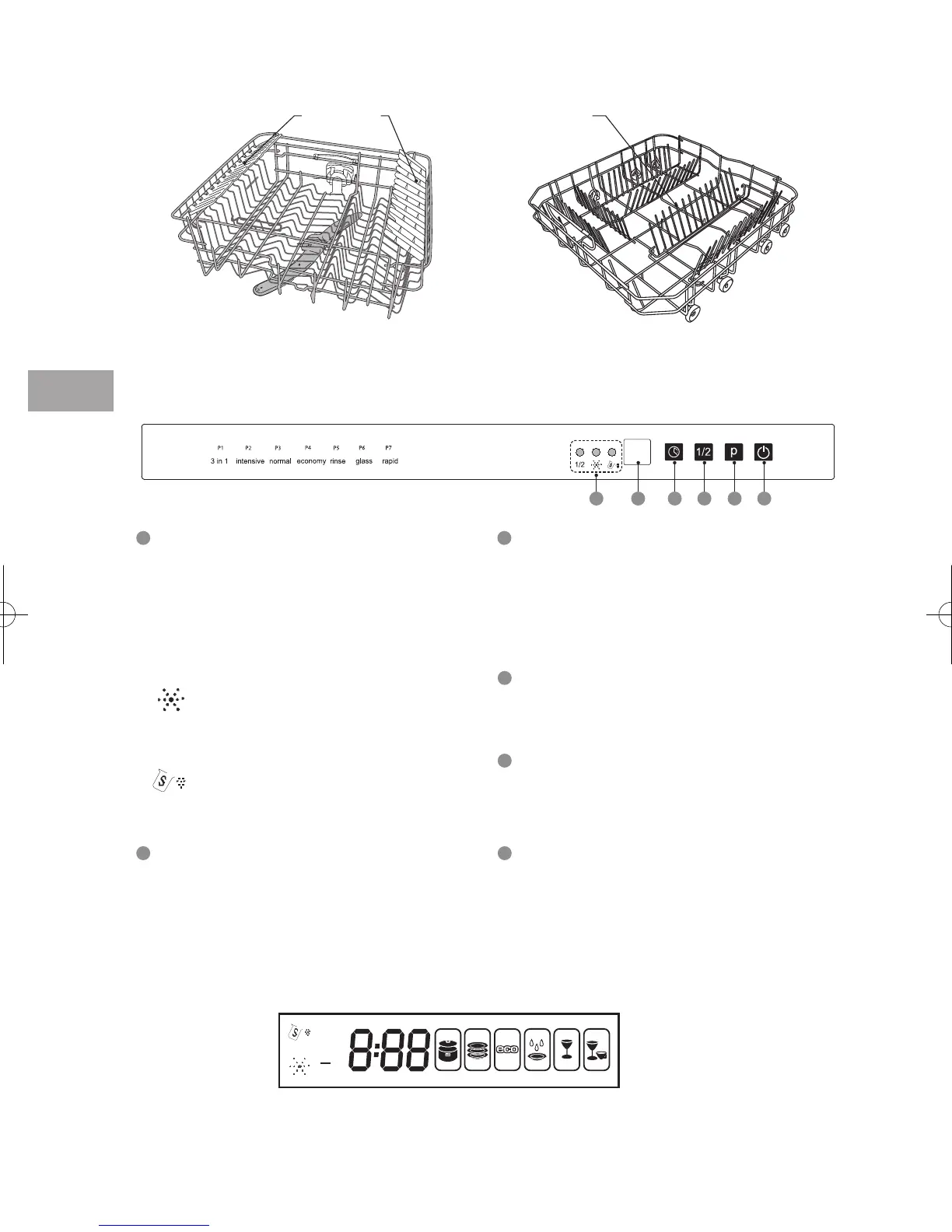
The Upper Basket
The Control Panel
The Exterior Display Window
The Lower Basket
Cup Racks
Spikes
1
1
2
2
3 4 5 6
Half Load Indicator Light
• Illuminates when the half load
washing cycle is selected.
• Only the upper spray arms will be in
function.
• Load the soiled dishes in the upper
basket.
Rinse Aid Refill Warning Light
• Illuminates when the rinse aid
dispenser needs refilling.
Salt Refill Warning Light
• Illuminates when the salt reservoir
needs refilling.
Display Window
• Display delay start time and fault codes.
• Displays programme selected, programme time, delay start time and fault codes etc.
3
Delay Start Button
• To preset the wash timer and delay the
starting time by up to 24 hours.
• Each press of this button
increases the delay start time by 1 hour
intervals.
4
Half Load Washing Button
• Press this button to select the half load
washing cycle.
5
Programme Button
• Press this button to select the washing
programme.
6
On/Off Button
• To turn the dishwasher on and off.
• The led light illuminates when the
dishwasher is on.
1
2
3 in 1
SDW60W_X10N_IB_5L_111021_ELabel.indb 12 11年10月21日 下午6:54


 To Next Page
 Loading...