8
ON
OFF
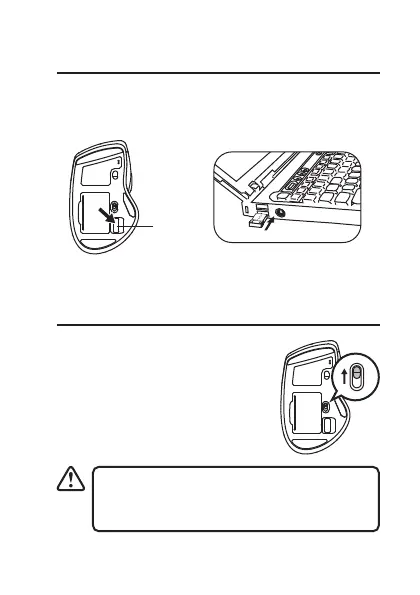
Connecting the Nano Dongle
Remove the Nano Dongle from the mouse and then
plug the Nano Dongle directly into your computer’s
USB port.
To save energy, switch the ON/OFF button
to the o position to turn o the mouse and
disconnect the mouse and the Nano Dongle.
Activating the Wireless Mouse
Switch the ON/OFF button to
power on the mouse and then the
mouse will automatically connect
to the Nano Dongle plugged into
your computer.
Dongle
ON
OFF
ON
OFF


 To Next Page